What Are the Best Surge Protector and Uninterruptible Power Supply Buying Guides to Protect Expensive Gaming Hardware
Introduction: Guarding Your Investment Against the Unseen Threat
When assembling or purchasing a high-end gaming PC, console collection, and streaming setup, most gamers obsess over graphics cards, refresh rates, CPU cooling loops, and ultra-fast NVMe storage. Yet, all that thousands-of-dollars hardware relies entirely on a single, invisible utility: the electrical wall outlet.
Across major technology and residential hubs like Texas, New York, California, Washington, and San Francisco, power grids face constant stress. From summer heatwaves causing rolling brownouts in Texas to winter storms hammering power lines in New York and Washington, unstable electricity, micro-surges, and sudden blackouts are a constant threat. Plugging a high-end gaming rig straight into a standard wall outlet is a gamble that can result in fried motherboards, corrupted operating systems, and ruined components in a fraction of a second.
At thegamerbuzz.com, we champion hardware longevity. This comprehensive buying guide separates basic power strips from high-end surge protectors and Uninterruptible Power Supplies (UPS), ensuring your battle station stays safe no matter what the electrical grid does.
Part 1: Surge Protector vs. UPS – What is the Difference?
A common and dangerous mistake is assuming a basic $5 multi-outlet power strip offers protection against electrical hazards.
+---------------------------+-----------------------------------+-----------------------------------+
| Feature                   | Standard Surge Protector          | Uninterruptible Power Supply (UPS)|
+---------------------------+-----------------------------------+-----------------------------------+
| Primary Function          | Diverts excess voltage spikes     | Provides battery backup & clean power|
| Protection Against Surges | Yes (rated in Joules)             | Yes (built-in surge suppression)  |
| Behavior During Blackout  | Power cuts off immediately        | Keeps PC running for 5–15 minutes |
| Ideal Component Use       | Monitors, consoles, audio gear    | Gaming PC, sensitive data drives  |
+---------------------------+-----------------------------------+-----------------------------------+
1. What a Surge Protector Does
A surge protector uses internal components called Metal Oxide Varistors (MOVs) to detect sudden voltage spikes (such as those caused by lightning strikes or local grid switches). When a spike occurs, the surge protector absorbs or diverts the excess voltage safely down into the home’s grounding wire, keeping your equipment safe.
2. What a UPS Does
A UPS (Uninterruptible Power Supply) contains everything a surge protector does, plus a heavy-duty internal battery bank and an inverter. The moment your home suffers a brownout or total blackout, the UPS instantly switches to battery power (in milliseconds), giving you enough time to safely close your games, save your progress, and shut down your PC properly.
Part 2: Essential Surge Protector Buying Guide
If you are buying a surge protector for peripheral devices (like monitors, speaker systems, console charging docks, and routers), you need to look beyond the number of plug slots.
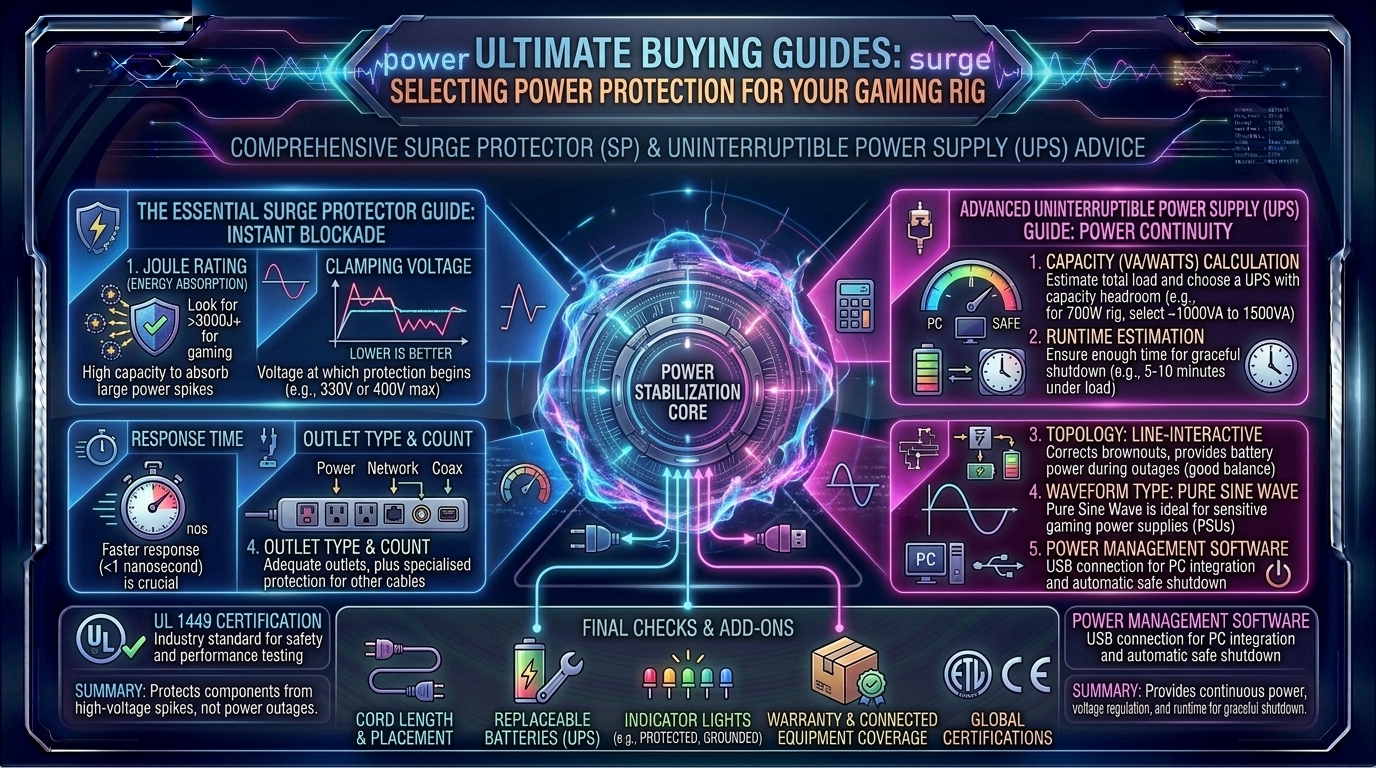
1. The Joule Rating Rule
The Joule rating measures how much electrical energy a surge protector can absorb before its internal components wear out and fail.
- Under 1,000 Joules: Inadequate for gaming hardware. Good only for low-power lamps or phone chargers.
- 1,000 to 2,000 Joules: Decent baseline protection for single consoles or secondary monitors.
- 2,000 to 4,000+ Joules: The gold standard for gaming setups. High Joule ratings mean the strip can absorb multiple minor surges or a massive spike without catastrophic failure.
2. Clamping Voltage and Response Time
Look for a low clamping voltage (ideally 330V to 400V)—this is the threshold that triggers the protector into action. Additionally, look for a response time of under 1 nanosecond so the diversion happens faster than the electrical spike can reach your power supply unit (PSU).
Part 3: Uninterruptible Power Supply (UPS) Buying Guide for Gaming PCs
A high-end gaming PC with a power-hungry graphics card cannot simply drop power instantly without risking data corruption or PSU failure. Choosing the right UPS requires understanding electrical load capacities.
+--------------------+-----------------------------------+-----------------------------------+
| PC Tier / System   | Power Draw (Watts)                | Recommended UPS Capacity          |
+--------------------+-----------------------------------+-----------------------------------+
| Mid-Range Setup    | 350W – 500W                       | 1,000 VA to 1,200 VA              |
| High-End Gaming PC | 550W – 750W                       | 1,500 VA            |
| Extreme Rig / SLI  | 750W+                             | 2,000 VA+ (Pure Sine Wave)        |
+--------------------+-----------------------------------+-----------------------------------+
1. VA (Volt-Amperes) vs. Watts
Manufacturers rate UPS units in VA, but your PC components draw real Watts. As a rule of thumb, multiply the VA rating by roughly 0.6 to 0.7 to estimate the actual wattage capacity. A 1500VA UPS typically supports a real-world load of around 900 watts, making it ideal for a high-end gaming desktop and a 4K monitor.
2. Simulated Sine Wave vs. Pure Sine Wave Output
- Simulated (Approximated) Sine Wave: Cheaper UPS models output a stepped, blocky electrical wave when running on battery power. While fine for basic office PCs, modern power supplies featuring Active PFC (Power Factor Correction)—standard in high-end gaming rigs—can hum, overheat, or reject simulated sine waves entirely, causing the PC to shut down anyway.
- Pure Sine Wave: Outputs a smooth, clean electrical wave identical to wall power. This is mandatory for high-end gaming PCs and expensive hardware.
Part 4: Regional Grid Realities Across the US
Different states present unique electrical challenges for gaming hardware:
- Texas (Austin, Dallas, Houston): Extreme summer heat waves cause massive grid strain, frequently resulting in rolling brownouts and unstable voltage drops that stress power supply units.
- New York & San Francisco: Older urban infrastructure, underground wiring, and dense power grids mean frequent micro-surges caused by city construction and transformer switching.
- Washington (Seattle area): Winter windstorms routinely knock out suburban power lines, making battery backup essential to protect open creative projects and long gaming sessions.
Frequently Asked Questions (FAQ)
1. Do I need both a surge protector and a UPS?
A quality UPS already has built-in surge protection for its battery-backed outlets. You do not need to plug a UPS into a separate surge protector (doing so can actually interfere with performance). However, you can use standard surge protectors for auxiliary gear like desk lamps or phone chargers.
2. How long will a UPS keep my gaming PC running during a blackout?
A typical 1500VA UPS will keep a high-end gaming PC and monitor running for roughly 5 to 10 minutes. This is not meant to let you keep playing through a storm; it is a safety window to save your game and shut down your operating system safely.
3. What is Active PFC, and why does it require a Pure Sine Wave UPS?
Active Power Factor Correction is a technology built into modern computer power supplies to maximize electrical efficiency. When a power outage occurs, low-end simulated sine wave UPS units output harsh electrical blocks that confuse Active PFC circuits, causing the PC to crash instantly. Pure Sine Wave units prevent this.
4. How often do surge protectors need to be replaced?
Surge protectors degrade over time as they absorb minor electrical fluctuations and spikes. Most high-end units last 3 to 5 years. If your surge protector’s indicator light (usually labeled “Protected” or “Grounded”) goes dark, the internal MOVs are spent and you must replace the unit.
5. Can I plug a space heater or gaming refrigerator into my gaming surge protector?
Never plug high-draw heating appliances (space heaters, hair dryers, microwaves) into a computer surge protector or UPS. They draw massive amounts of current that will instantly overload the circuit breaker and trip the strip.
6. Will a UPS improve my game’s frame rate or performance?
No. A UPS and surge protector do not alter the electrical current to make your PC run faster; they act strictly as safety insurance policies to protect your hardware from destruction.
7. What does “Clamping Voltage” mean?
Clamping voltage is the exact voltage level that triggers the surge protector to redirect excess electricity away from your equipment. Lower clamping voltages (like 330V) offer faster, more sensitive protection than higher voltages.
8. Why is my UPS making a loud beeping noise?
A continuous or intermittent beeping sound means the UPS has detected a blackout, low battery state, or an electrical overload. Check the digital LCD display on your UPS to diagnose whether utility power has dropped or if you have plugged in too many devices.
9. Can I replace the internal battery of a UPS when it dies?
Yes! Premium UPS brands (like APC or CyberPower) feature user-replaceable battery cartridges. After 3 to 5 years, when the internal lead-acid battery stops holding a charge, you can buy a replacement battery block rather than purchasing an entirely new unit.
10. Where can I find more hardware safety and setup advice?
For continuous hardware benchmarks, protective gear reviews, and setup optimization, keep your browser locked right here to thegamerbuzz.com!
Conclusion
Your gaming hardware represents a significant financial and emotional investment. Exposing a high-end PC, multi-monitor display array, and console setup to the whims of an unpredictable electrical grid is a risk that simply isn’t worth taking. By investing in a high-joule surge protector for your peripherals and a pure sine wave UPS for your gaming rig, you insulate your battle station against storms, blackouts, and silent voltage spikes.
At thegamerbuzz.com, we want your gear to last for years to come. Protect your hardware, secure your workflow, and game with total peace of mind!
Leave a Reply