What Are the Best Crosshair Settings and Color Combinations for High Visibility in Competitive Shooter Matches
Welcome to The Gamer Buzz, your premier competitive tactical hub. Whether you are climbing the ranked ladders from the vibrant gaming setups of San Francisco, New York, and Seattle or tuning your hardware performance across Texas and California, optimizing your visual interface is just as important as your physical aim.
In high-stakes tactical first-person and third-person shooters (such as Valorant, Counter-Strike 2, Apex Legends, and Overwatch 2), fractions of a second decide gunfights. If you lose track of your crosshair for even a millisecond amid visual utility, smoke grenades, map shadows, and bright character abilities, your accuracy plummets.
In this exhaustive, master-level guide, we break down the definitive crosshair settings, color theory principles, and contrast configurations required to maximize visual clarity and lock down your competitive aim.
1. The Core Psychology of Crosshair Visibility
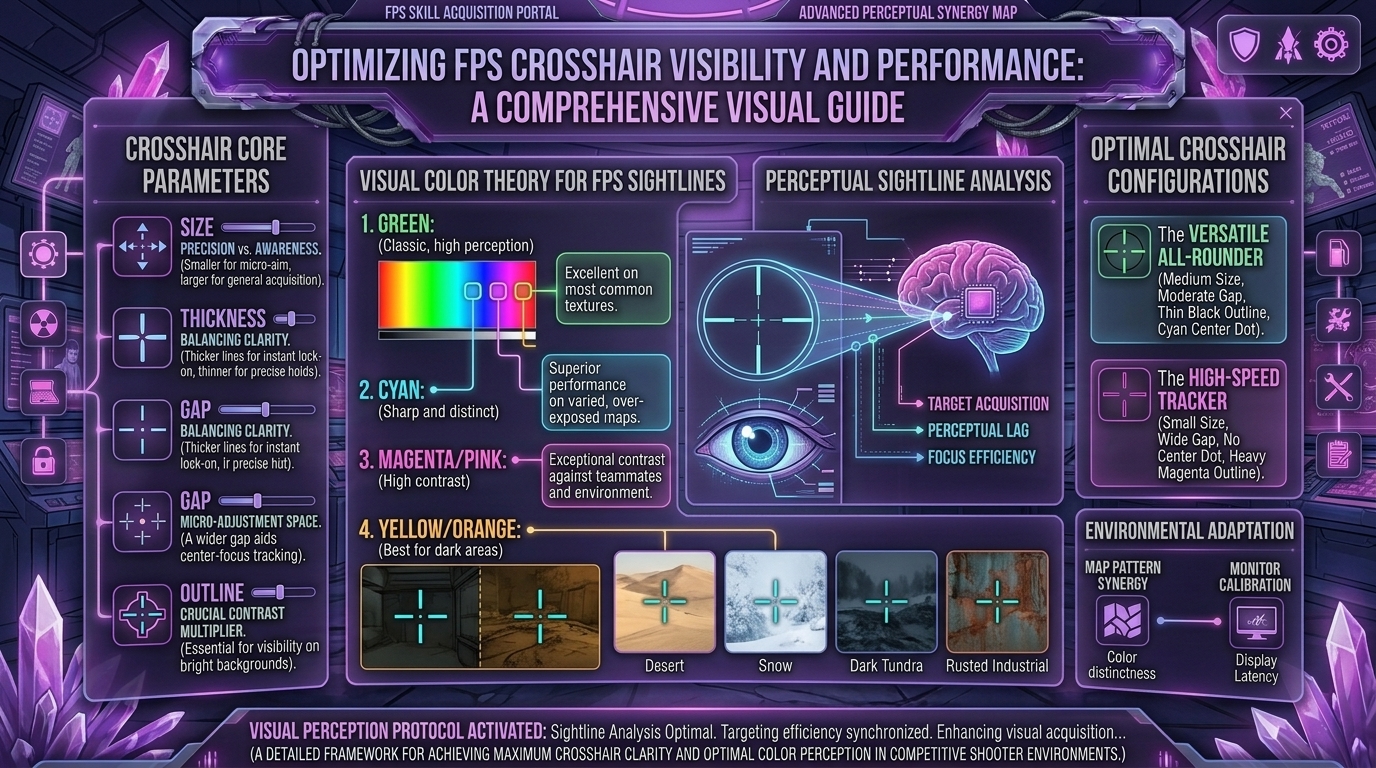
Your crosshair is the visual bridge between your hand-eye coordination and the game world. When selecting your settings, your primary goal is high visual contrast against dynamic backgrounds.
Most tactical shooter maps feature mixed color palettes: concrete grays, earthy browns, dark interior shadows, and brightly lit outdoor plazas. A poor crosshair color blends seamlessly into these textures, causing “reticle loss” during tracking movements.
The 3 Pillars of an Optimal Crosshair:
- Uninterrupted Center Space: Leaving an inner center gap prevents your reticle from completely obscuring an enemy’s head at long ranges.
- Dynamic Adaptation (Outlines): Utilizing subtle black outlines ensures your crosshair pops whether you aim against a dark wall or a blinding flash of light.
- Zero Visual Noise: Turning off dynamic movement and firing error spreads keeps your aiming reference point static, predictable, and disciplined.
2. Choosing the Best Crosshair Colors: The Pro Tier List
Color science plays a massive role in human reaction times. Certain wavelengths trigger faster cognitive registration in the visual cortex.
| Crosshair Color | Visibility Rating | Map Compatibility | Best Use Case |
| Cyan / Light Blue | S-Tier (Elite) | Exceptional on 95% of maps | Universally favored by pros; stands out against grays and earth tones. |
| Bright Neon Green | S-Tier (Elite) | Highly reliable everywhere | Natural human eye sensitivity makes green pop instantly in peripheral vision. |
| Hot Pink / Magenta | A-Tier (Great) | Excellent on green/nature maps | Perfect if you frequently lose your crosshair in neutral environments. |
| Pure White | B-Tier (Good) | Balanced, but can blend on snow maps | Clean and minimalist, best paired with a thin black outline. |
| Yellow / Orange | C-Tier (Situational) | Poor on desert/sunlit maps | Can wash out entirely under bright lighting or sandy environmental textures. |
3. Recommended Numerical Settings for Precision and Tracking
While personal preference dictates shape, mathematical consistency governs performance. Use these structural dimensions as your baseline:
- Center Dot: Off (or set to 1-pixel tiny dot if you prefer tap-firing). Large dots block micro-adjustments at long distances.
- Inner Line Length: 4 to 6 units. Keeps the reticle compact enough not to obstruct targets.
- Inner Line Thickness: 1 to 2 units. Thicker lines can obscure heads during precise spray transfers.
- Outer Lines: Disabled (0). Outer lines add unnecessary visual clutter that distracts from tracking movement.
- Outlines: Enabled (Opacity 1, Thickness 1). This creates a high-contrast border around your core color, ensuring visibility against white walls and skyboxes.
4. Crosshair Styles: Cross vs. Dot vs. T-Shaped
Different weapons and playstyles benefit from different structural geometries:
[The Classic Cross] ➔ Best for general tracking and spray pacing
[The T-Shape]       ➔ Best for absolute headshot and tap-firing precision
[The Minimal Dot]   ➔ Best for high-tier riflers with elite micro-adjustments
- The Classic Cross: Features four equal lines meeting in the center with a small gap. Offers great visual feedback for movement and weapon recoil pacing.
- The T-Shaped Crosshair: Removes the top vertical line entirely. This opens up clear vertical space directly above your enemy’s head, making it nearly impossible to lose sight of the target during vertical tracking or elevation changes.
- The Minimalist Dot: Strips away all lines, leaving a single focal point. Highly rewarding for confident players, though it can occasionally vanish during chaotic, high-recoil screen shakes.
5. Tailoring Crosshairs for Different Monitor Resolutions
Your physical display setup changes how lines render on screen:
- Native 16:9 Widescreen: Standard crosshair settings appear balanced. Stick to default line thicknesses (1).
- Stretched 4:3 Resolutions: If you run a stretched aspect ratio (popular in legacy tactical shooters to make character models appear wider), your horizontal pixels are stretched. You may need to slightly adjust your crosshair thickness or length parameters so the reticle does not look warped or distorted during fast camera pans.
10 Frequently Asked Questions (FAQ)
1. What is the absolute best crosshair color for competitive shooters?
Cyan and bright neon green are widely considered the best overall choices because they rarely match the natural background textures of modern map designs.
2. Should I use a center dot on my crosshair?
It depends on your weapon preference. Center dots are fantastic for single-tap precision weapons (like guardian or sniper variants), but can obstruct vision when spraying rifles at long range.
3. Why do professional players frequently change their crosshairs?
Some pros change crosshairs to psychologically reset a cold streak, combat visual fatigue, or adapt to newly released maps with unfamiliar color grading.
4. Are black outlines necessary?
Yes, outlines act as a visual safety net. If your bright cyan crosshair passes over a bright skybox or white wall, the black outline keeps the center point legible.
5. Should I turn movement error on or off?
Always turn movement and firing error off. You want your crosshair to remain completely static so your brain develops consistent spatial muscle memory without visual distractions.
6. Can a bad crosshair actually ruin my aim?
Indirectly, yes. If your crosshair blends into the map or is too large to see enemy heads at a distance, you will miss shots due to visibility loss rather than bad mechanics.
7. How do I import custom crosshair codes?
Most modern competitive shooters feature an in-game profile settings menu where you can copy and paste community or professional share codes instantly.
8. Is a smaller crosshair always better?
Generally yes, because it prevents target obscuration, but making it too small can cause you to lose track of it during chaotic, high-speed multi-enemy engagements.
9. How do graphics settings affect crosshair visibility?
Lowering post-processing, removing motion blur, and turning off ambient occlusion can drastically sharpen your game’s visual clarity, making any crosshair color stand out much better.
10. Where can I find more pro settings and crosshair codes?
Bookmark The Gamer Buzz and check back regularly for our comprehensive database of professional configuration breakdowns, gear guides, and tactical tips!
Conclusion
Your crosshair is the ultimate tool for translating visual intent into accurate gameplay execution. By swapping to a high-contrast color like cyan or green, enabling subtle black outlines, and keeping your layout clean and static, you will instantly improve your target acquisition speed. Pick your preferred style, lock in your settings, and start landing those clean opening frags in your next match!
Leave a Reply