How to Master Vertical Sound Design Cues to Tell Whether Enemies Are Above or Below You in Multistory Buildings
Whether holding a choke point in VALORANT, navigating multi-tier structures in Apex Legends, pushing a stairwell in Call of Duty: Warzone, or tracking footsteps in Rainbow Six Siege, vertical audio cues are among the most difficult sensory inputs to decipher in competitive gaming. Human ears are naturally better at detecting horizontal sound origins (left vs. right) than vertical height differences (above vs. below).
When game engines attempt to model 3D spatial audio through stereo headphones, subtle acoustic cues—such as pitch shifts, material surface acoustics, and binaural HRTF filtering—are all that separate an enemy dropping down on your head from one sneaking up from the basement.
Misinterpreting vertical audio leads to misplaced crosshair placement, wasted utility, and instant elimination. Mastering these acoustic details provides a massive spatial advantage in fast-paced multistory combat.
At The Gamer Buzz, we analyze esports audio engineering, sound card setups, and spatial awareness techniques. This comprehensive guide breaks down the physical and acoustic science behind 3D audio, how modern game engines render verticality, optimal hardware/software settings, and step-by-step listening strategies to immediately pinpoint enemies across multi-level structures.
Whether competing in regional tournaments in Texas, esports arenas across California and San Francisco, gaming lounges in Washington, or climbing ranked ladders from New York, honing your vertical sound processing will transform your tactical awareness.
1. The Science of Vertical Audio: How Human Ears and Game Engines Process Height
Understanding why vertical sound is tricky helps you consciously train your brain to pick up subtle spatial clues.
How Humans Hear Verticality in the Real World
Horizontal positioning relies on Interaural Time Difference (ITD) and Interaural Level Difference (ILD)—the tiny delays and volume variations between sound arriving at your left versus right ear. Vertical positioning, however, relies primarily on spectral filtering caused by the outer ear (pinna). As sound waves reflect off the folds of your pinna, certain frequencies are subtly boosted or cut depending on the angle of entry, allowing your brain to calculate elevation.
How Game Engines Simulate Vertical Sound
Stereo headphones cannot physically recreate pinna reflections without digital assistance. Modern game engines use three primary methods to communicate height:
- Head-Related Transfer Function (HRTF): Algorithms that simulate how human ears alter sound waves coming from above, below, or behind you over a 3D sphere.
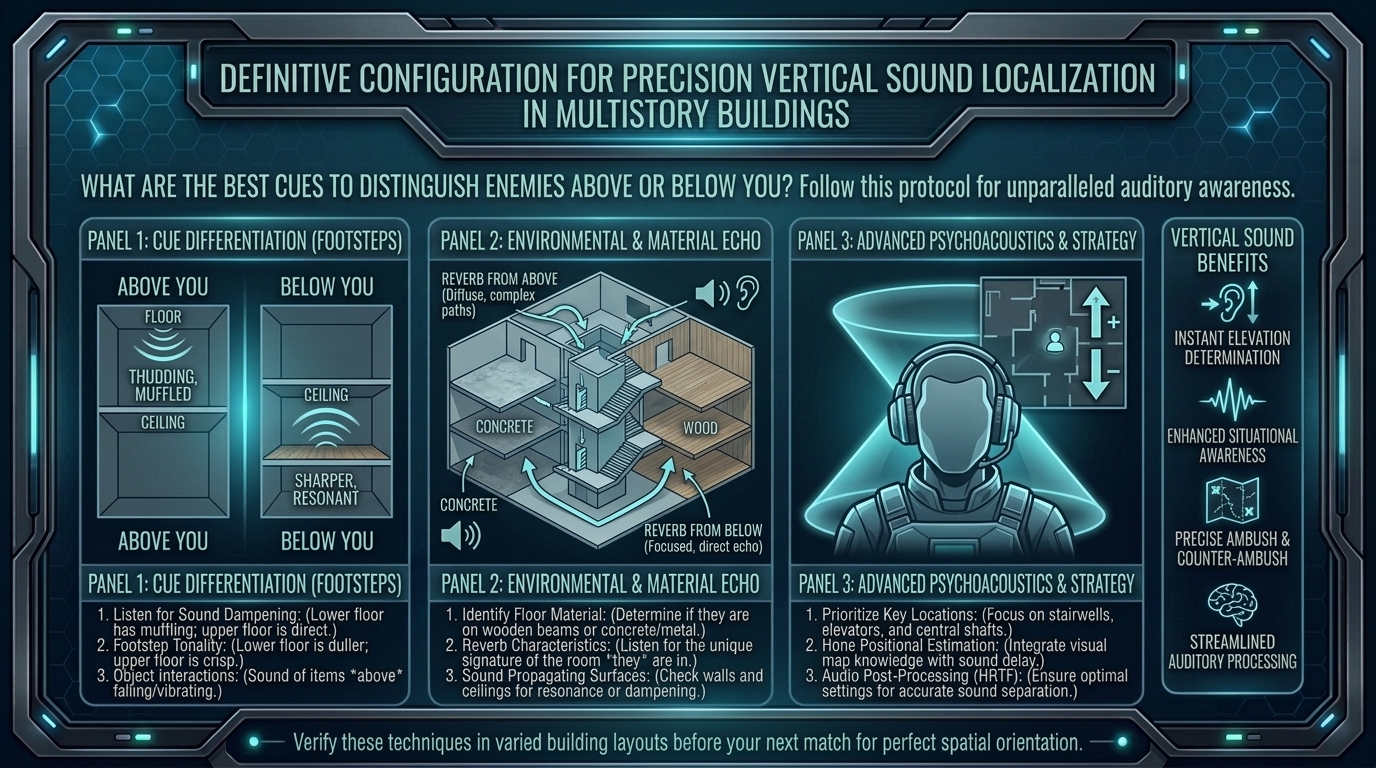
- Material Surface Dynamics: Assigning distinct surface sound profiles to different floors—such as hollow wooden floorboards on upper levels versus heavy concrete or metal grating on lower levels.
- Occlusion and Environmental Filtering: Muffling, dampening, or changing the reverberation of sounds passing through ceilings, floors, or closed doors.
| Acoustic Cue / Element | Enemy Above You | Enemy Below You | Visual / Strategic Impact |
| Pitch & Frequency | Sharper, higher-frequency clatter; clear footstep impact | Muffled low-end thud; heavy bass boom with rolled-off highs | High: High frequencies indicate an un-occluded or overhead origin. |
| Surface Acoustics | Thin wood, creaking ceiling joists, metal roof rattling | Dense concrete, carpeted dampening, hollow sub-floor thuds | Critical: Differentiates identical floor layouts by material sound. |
| Environmental Reverb | Shorter reverb tail; dry, direct acoustic impact | Long echo tail; boomy resonance filtering upward through stairwells | Moderate: Helps identify open staircases vs. sealed floors. |
| Occlusion Filter Profile | Higher clarity if floor boards are thin; direct ceiling transmission | Heavy low-pass filtering (sounds like audio through a thick wall) | Essential: Tells you if an enemy is behind structural cover. |
2. Audio Hardware & Software Configuration for Maximum Vertical Clarity
Before practicing in-game listening, optimize your sound pipeline to prevent dynamic range compression or artificial virtual surround sound clutter.
Recommended Audio Setup
- Use High-Quality Stereo Headphones: Open-back studio headphones (or precise closed-back IEMs) offer a cleaner soundstage than cheap “7.1 Virtual Surround” gaming headsets.
- Disable Virtual 7.1 Surround Software: Turn off third-party virtual 7.1 software (Dolby Atmos for Headphones, DTS Headphone:X, or proprietary headset software) unless the specific game explicitly recommends it alongside its native HRTF setting. Layering multiple 3D spatial engines introduces phase cancellation, turning vertical cues into muddy noise.
- Enable In-Game HRTF / 3D Audio: Ensure options like “HRTF” (CS2, VALORANT) or “3D Audio” (Apex Legends, Warzone) are explicitly toggled ON in your game’s audio settings menu.
- Equalizer (EQ) Tuning: Use a flat/neutral EQ profile or apply a subtle boost to upper-mid frequencies (1 kHz – 4 kHz) to emphasize footstep snap while slightly taming heavy explosion bass (60 Hz – 250 Hz) that masks subtle overhead movement.
3. Step-by-Step Listening and Angle-Tipping Strategy
When audio cues sound ambiguous, sitting still won’t help. Use this dynamic angling technique to instantly resolve vertical confusion.
1.Center Your Crosshair and Identify Horizontal Audio Pan:Locks onto basic horizontal plane line.
When you hear a sound in a multistory building, rotate your camera horizontally until the sound centers evenly between your left and right ear channels.
2.Tilt Your Camera Angle 30 to 40 Degrees (The Pitch-Tilt Method):Forces HRTF to shift spatial panning relative to elevation.
Quickly tilt your crosshair up toward the ceiling or down toward the floor while continuing to listen. Because HRTF algorithms calculate spatial panning relative to your virtual ear orientation, tilting your head alters the left/right balance:
- If you look DOWN and the sound shifts BEHIND/ABOVE your ear channels, the enemy is ABOVE you.
- If you look DOWN and the sound shifts FORWARD/BELOW, the enemy is BELOW you.
3.Cross-Reference Floor Surface Audio Profiles:Verifies underlying surface materials.
Listen for surface material cues. If the building features wood on upper floors and concrete in the basement, match the acoustic texture (e.g., hollow wood clicks vs. dull concrete thuds) to your map knowledge.
4.Listen for Action-Specific Vertical Cues:Exposes vertical movement intensity.
Listen for telltale vertical actions: landing thuds after dropping off ledges, ladder climbing clatters, or rope zipline zips. A landing impact sound always indicates an enemy dropping down from a higher elevation.
4. Game-Specific Vertical Audio Quirks and Map Awareness
Different game engines handle verticality through custom audio tricks:
- VALORANT: Features native HRTF built specifically for stereo headphones. Turning HRTF ON adds spatial height filters. Map design uses distinct floor textures (e.g., metal grates on A Tower in Haven) to clarify overhead positions.
- Apex Legends: Features high verticality with ziplines and jump jets. Listen for the distinct whoosh of air displacement when an enemy falls past your level. The game uses a pitch-shifting filter: sounds above your head have a slightly higher frequency profile than footsteps below your feet.
- Call of Duty: Warzone: Multistory structures in urban zones rely heavily on occlusion masking. Footsteps directly above you sound sharp and close, while footsteps below sound muffled by heavy concrete sub-flooring.
- Rainbow Six Siege: Utilizes an advanced sound propagation engine. Sound in Siege does not travel through solid walls or floors; it travels through the shortest open path (hatches, doorways, drone holes). An enemy directly above a broken hatch will sound like they are right at the top of the opening.
10 Frequently Asked Questions (FAQ)
1. Why do footsteps directly above me sound identical to footsteps directly below me?
Stereo headphones only have left and right speakers. Without proper HRTF spatial processing or intentional camera movement (tilting up/down), your brain lacks the spectral data needed to differentiate 180-degree vertical opposites.
2. Should I turn on Windows Sonic or Dolby Atmos for competitive gaming?
In most competitive games with built-in 3D audio (like VALORANT or CS2), disable Windows Sonic and Dolby Atmos. Using multiple spatial audio engines creates phase issues that blur fine detail. Only use spatial software if the game explicitly lacks native HRTF.
3. Does increasing volume help me hear vertical footsteps better?
No. Cranking your master volume to dangerous levels distorts your headset drivers and damages your hearing. Instead, use an EQ to boost footstep frequencies (1 kHz – 4 kHz) while dampening low-end explosion noise.
4. What is the “Pitch-Tilt Method” for audio positioning?
It is a technique where you quickly angle your camera up or down while listening to a continuous audio cue. Changing your virtual ear angle forces the HRTF engine to alter the sound’s left/right balance, immediately revealing whether the source is above or below.
5. Why do footsteps sound completely different on different floors of the same building?
Game developers assign different material textures (such as wooden floorboards on top floors vs. concrete in basements) so players can identify vertical position using surface sounds alone.
6. Do open-back headphones provide better vertical positioning than closed-back headphones?
Yes. Open-back headphones offer a wider, more natural soundstage and clearer instrument separation, making subtle HRTF frequency shifts easier for your brain to process.
7. How does Rainbow Six Siege handle vertical sound differently than other FPS games?
Siege uses sound propagation: audio travels through physical openings (open doors, windows, blown-out floor hatches) rather than passing directly through solid walls. A sound above you might actually come from a doorway to your left if that is the nearest open acoustic path.
8. Can audio compression (Night Mode / Loudness Equalization) help with vertical audio?
Audio compression levels the difference between quiet sounds (footsteps) and loud sounds (explosions). While this makes distant footsteps easier to spot, extreme compression can distort distance perception, making an enemy two floors above sound like they are right next to you.
9. Why can’t I hear enemies dropping down from ledges above me?
Many modern games apply dampening filters or reduce landing sound effects to prevent audio clutter during chaos. Look for subtle cues like air displacement, armor rustle, or quick directional footstep changes upon landing.
10. How long does it take to train your brain to read HRTF vertical cues?
With active practice—using the pitch-tilt method and learning map floor materials—most players notice a clear improvement in vertical spatial awareness within 1 to 2 weeks of continuous play.
Conclusion
Mastering vertical sound cues in multistory buildings requires a mix of proper hardware setup, game engine awareness, and active listening techniques. By disabling conflicting virtual surround software, enabling native in-game HRTF, leveraging surface acoustic differences, and using camera pitch-tilting to test ambiguous cues, you can pinpoint enemy elevations instantly.
For more esports audio guides, hardware optimization tips, and competitive tactical analysis across Texas, California, San Francisco, Washington, and New York, stay tuned to The Gamer Buzz.
Leave a Reply