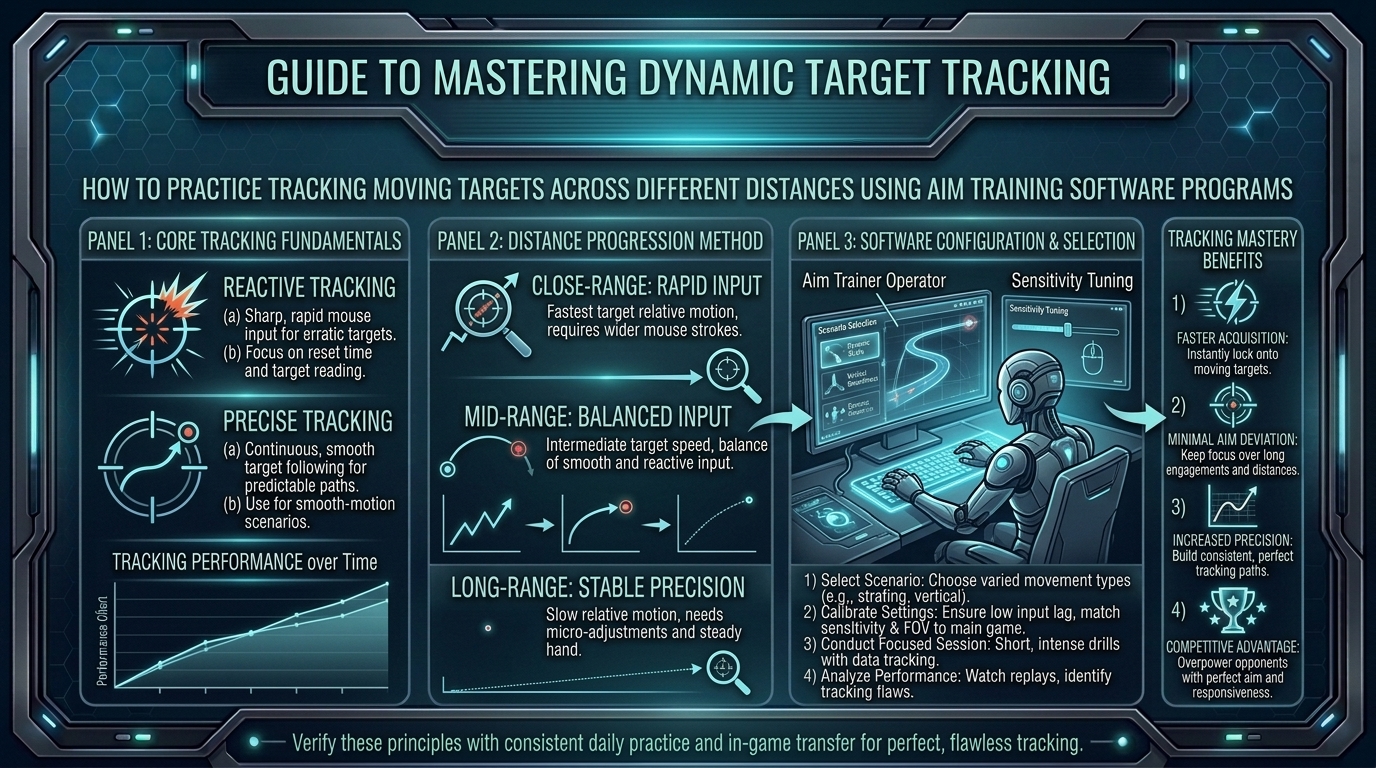
How to Practice Tracking Moving Targets Across Different Distances Using Specialized Aim Training Software Programs
Whether you are tracking a strafing opponent in Apex Legends, smooth-tracking headshots in VALORANT, matching movement speeds in Call of Duty: Warzone, or tracking high-speed targets in Overwatch 2, smooth target tracking is the foundation of mechanical aim dominance. Unlike click-timing (flicking), which requires a single precise tap, tracking demands continuous micro-adjustments, visual reaction processing, and muscular control across varying target speeds, accelerations, and angular distances.
Many competitive players struggle with tracking because they train incorrectly. They either rely solely on in-game deathmatches—where target encounters are unpredictable—or use aim trainer scenarios that don’t match real-world combat physics.
At The Gamer Buzz, we analyze esports mechanical training, peripheral optimization, and physical aiming techniques. This comprehensive guide breaks down how to use specialized aim training software like KovaaK’s and Aimlabs to isolate target tracking across short, medium, and long distances.
Whether competing in regional esports circuits across Texas, grinding competitive queues in California and San Francisco, practicing in Washington, or climbing ranked ladders from New York, structured aim training accelerates your mechanical progression.
1. The Biomechanics and Physics of Target Tracking
Understanding how your eyes, brain, and arm muscles process motion helps you train more effectively.
Smooth Pursuit vs. Reactive Micro-Flicks
- Smooth Pursuit Eye Movements (SPEM): The human visual system naturally tracks moving objects smoothly only when your eyes can predict the target’s trajectory. When a target changes direction unpredictably, your vision momentarily loses track, causing your aim to lag behind.
- Reactive Micro-Flicks: When a target changes direction or distance, you must make a micro-correction to snap back onto the center mass before resuming smooth tracking. Superior aim comes from minimizing the time delay between target direction changes and your arm’s micro-correction.
- Target Size and Angular Velocity: As a target moves further away, its angular velocity decreases, requiring slower, ultra-precise wrist or finger movements. As a target gets closer, its angular velocity increases rapidly, requiring wide, high-speed forearm swipes.
| Distance Category | Primary Muscle Groups Used | Mouse Movement Type | Key Aim Trainer Scenario Types |
| Short Distance (Close-Range) | Full Forearm, Elbow, & Shoulder | Wide, fast horizontal & vertical swipes | Close Fast Strafe, Smoothness Trainers, Reactive Tracking |
| Medium Distance (Mid-Range) | Wrist & Forearm Micro-Adjustments | Smooth continuous tracking with light pressure | Thin Gauntlet, Centering, Plaza Ground Tracking |
| Long Distance (Long-Range) | Fingertips & Fine Wrist Joints | Ultra-slow, micro-meter tracking adjustments | Precise Long Strafe, Air Smoothness, Tiny Targets |
2. Setting Up Aimlabs and KovaaK’s for Accurate In-Game Transfer
Before launching training scenarios, match your aim trainer settings to your main competitive game to build accurate muscle memory.
Crucial Sensitivity and Display Syncing
- Sensitivity Match: Use exact sensitivity match profiles in KovaaK’s or Aimlabs (e.g., select the VALORANT, Apex Legends, or Overwatch preset). Do not change your DPI or in-game multiplier when switching between aim software and your main game.
- Field of View (FOV) Sync: Match your in-game FOV type (e.g., Clamped Horizontal 103 for Overwatch/VALORANT or VFOV for Apex Legends). Incorrect FOV alters perceived target speed and ruins your spatial perception.
- Disable Mouse Acceleration: Ensure Windows “Enhance Pointer Precision” is turned Off and Raw Input is Enabled in both your OS and aim software settings.
3. Distance-Specific Tracking Routines and Scenarios
To build complete mechanical tracking ability, isolate your practice across three core distance zones.
1.Close-Range Tracking (High Angular Velocity):Develops rapid forearm swiping and high-speed reactivity.
Train close-quarters strafing where targets move quickly across your FOV.
- Recommended Scenarios: Close Fast Strafe (KovaaK’s), Circle Strafe, Close Reactive (Aimlabs).
- Technique Focus: Keep your arm light on the mousepad. Avoid gripping the mouse too tightly, which creates friction and causes jittery tracking during fast directional changes.
2.Mid-Range Tracking (Moderate Angular Velocity):Builds smooth tracking control and centering.
Focus on targets maintaining moderate speed at mid-distance, requiring balanced wrist and forearm coordination.
- Recommended Scenarios: Centering II (KovaaK’s), Smoothness Trainer, SphereTrack (Aimlabs).
- Technique Focus: Maintain a steady crosshair glide directly over the center of the target model. Practice matching your hand speed to the target’s visual speed without overshooting.
3.Long-Range Tracking (Low Angular Velocity, Tiny Targets):Develops precise fingertip micro-adjustments.
Train against small targets moving slowly at long distance, isolating fine wrist and fingertip joint movement.
- Recommended Scenarios: Thin Gauntlet (KovaaK’s), Long Strafe, MicroTrack (Aimlabs).
- Technique Focus: Relax your hand and use subtle fingertip pressure adjustments to make micro-corrections without jerking the crosshair off-target.
4.Vertical & Multi-Directional Bounce Tracking:Combines dynamic movement with verticality.
Integrate verticality and jump arcs to prepare for multi-tier combat environments.
- Recommended Scenarios: Bounce 360, Popcorn Tracking, Vertical Smoothness.
- Technique Focus: Track targets through natural gravity arcs (parabolic curves) without snapping prematurely to where you think the target will land.
4. How to Fix Common Tracking Mistakes: Tension & Prediction
Most players hit a plateau in tracking performance due to two habits: over-tension and predictive aim.
1. Eliminating Hand and Arm Tension
Tensing your hand muscles creates instantaneous micro-stutters during camera motion. When your muscles are tense, your hand makes jerky, step-like movements rather than a smooth glide. Practice conscious relaxation: keep your grip light (about a 3 or 4 out of 10 in pressure) so your wrist and forearm glide smoothly across the mousepad.
2. Reactive Aim vs. Predictive Guessing
Predictive aiming happens when you guess where an enemy will strafe next and snap ahead of them. If the enemy changes direction, your crosshair flies into empty space. Train reactively: train your eyes to read the target’s torso movement, wait for the actual visual change in direction, and smooth-correct back onto target.
10 Frequently Asked Questions (FAQ)
1. Which aim trainer is better for tracking: KovaaK’s or Aimlabs?
Both programs are excellent. KovaaK’s is famous for its massive community scenario library and advanced smoothness routines, while Aimlabs offers automated analytics, weakness identification, and official game-mode training suites.
2. How long should I practice tracking in an aim trainer every day?
A dedicated routine of 20 to 30 minutes per day before your main gaming session is optimal. Avoid over-training past 60 minutes, as mental and muscular fatigue leads to poor aiming habits.
3. Should I use high sensitivity or low sensitivity for target tracking?
Moderate to low sensitivities (e.g., 25 cm to 45 cm per 360°) provide the best balance between smooth tracking control and close-range swiping ability. Slightly higher sensitivity makes fine micro-tracking easier, while lower sensitivity improves raw smoothness.
4. What is “Smoothness Training,” and why is it important?
Smoothness training uses scenarios with thin, un-predictable targets moving at constant speeds. It forces you to eliminate micro-stutters, hand jitters, and over-flicking, resulting in a buttery-smooth crosshair glide.
5. Why does my aim jitter when I try to track moving targets?
Jittery tracking is usually caused by excessive hand tension, pressing down too hard on your mousepad, or using a mousepad/mouse-skate combination with high static friction. Relax your grip and focus on fluid motion.
6. Should I focus on target headshots or center mass when practicing tracking?
In general tracking scenarios, focus on staying dead-center on the target model. Once your smooth tracking baseline is established, move to precision scenarios featuring smaller head-sized targets.
7. How does mousepad choice affect tracking performance?
Smooth, hybrid, or glass mousepads with low static friction allow for effortless micro-adjustments, making them popular for tracking-heavy games like Apex Legends and Overwatch.
8. Will aim training in software actually transfer to my main competitive game?
Yes! Aim trainers isolate raw motor control, eye-hand coordination, and smoothness. Once these mechanical fundamentals become second nature, you can focus entirely on game sense, positioning, and utility usage in-game.
9. How do I track targets that spam A-D strafes rapidly?
Do not try to flick back and forth with every fast strafe. Instead, lower your hand tension, keep your crosshair centered along the enemy’s core movement axis, and make short, controlled micro-adjustments.
10. Can high-refresh-rate monitors improve my tracking ability?
Absolutely. Upgrading from 60Hz to 144Hz, 240Hz, or 360Hz significantly reduces motion blur and display latency, allowing your eyes to process visual target movement faster and smoother.
Conclusion
Mastering target tracking across short, medium, and long distances is a transformational mechanical skill for competitive gamers. By matching your in-game sensitivity and FOV settings inside specialized software like KovaaK’s or Aimlabs, breaking down practice into distance-specific routines, eliminating grip tension, and training reactively rather than predictively, you will see immediate improvements in your tracking accuracy and crosshair stability.
For more esports mechanical guides, peripheral optimizations, and performance breakdowns across Texas, California, San Francisco, Washington, and New York, stay tuned to The Gamer Buzz.
Leave a Reply