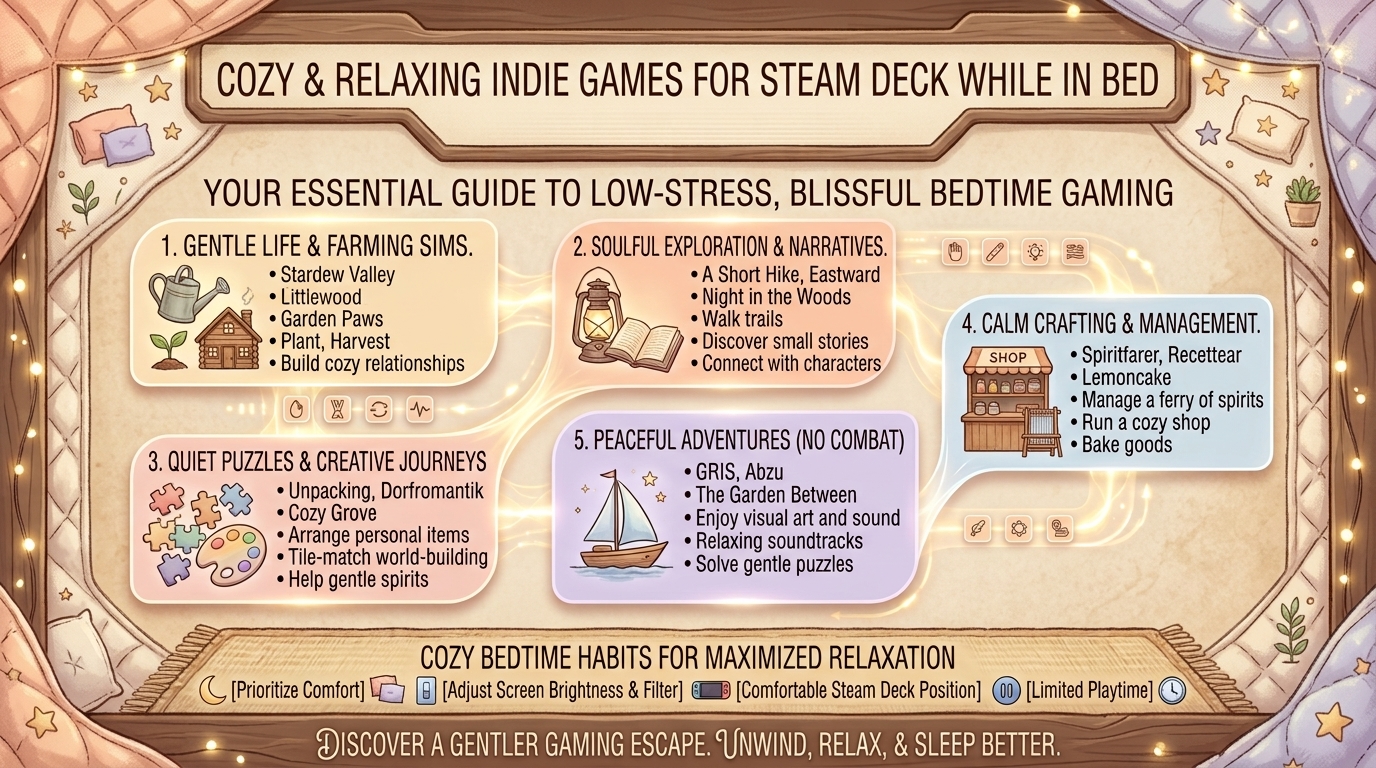
What Are the Best Cozy Relaxing Indie Video Games to Play on Steam Deck While Lying in Bed?
After a high-stress day of competitive gaming, grinding ranked ladders, or managing work responsibilities, nothing beats sinking into bed, turning down the lights, and picking up your Steam Deck for a quiet, low-stakes gaming session. The handheld form factor of Valve’s Steam Deck makes it the ultimate device for comfortable, bedside relaxation.
However, not every game is suited for cozy late-night sessions. Rapid twitch mechanics, stressful death penalties, tiny illegible text, and battery-hogging graphics can quickly ruin a relaxing evening. The ideal bed-gaming experience calls for rich indie titles with soothing soundtracks, low-stress gameplay loops, full controller compatibility, long battery performance, and easily readable UI elements.
At The Gamer Buzz, we review indie gems, handheld hardware optimizations, and gaming lifestyle gear. This comprehensive guide covers the best cozy indie games for your Steam Deck, key graphics and power tweaks for maximum battery life, ergonomics for playing in bed, and essential tips for relaxing handheld gameplay.
Whether unwinding in tech hubs across San Francisco, California, and Washington, resting up in Texas, or relaxing in a New York apartment, these cozy indie games deliver the ultimate late-night Steam Deck experience.
1. What Makes a Game Truly “Cozy” on the Steam Deck?
Not all cozy games play comfortably in bed. A genuinely great late-night handheld game satisfies several physical, visual, and design criteria:
Key Criteria for Bedside Steam Deck Gaming
- Low Cognitive Strain: Gameplay that encourages exploration, puzzle-solving, farming, or atmospheric storytelling without punishing fast-reaction fail states.
- Unobtrusive Sound Design: Soothing ambient scores and gentle sound effects that sound great through speakers or headphones without sudden loud spikes.
- Text Legibility & UI Scaling: Clear text rendering on a 7-inch display (1280×800 resolution) so you don’t have to strain your eyes in dim lighting.
- Battery & Thermal Efficiency: Games running between 3W to 8W TDP (Thermal Design Power) keep the Deck cool, quiet, and capable of lasting 4 to 7 hours on a single charge.
- Instant Pause & Sleep Mode Support: Games that suspend seamlessly when pressing the Steam Deck power button, allowing you to drift off to sleep without worrying about losing save progress.
| Game Category | Ideal Gameplay Traits | Examples | Target TDP / Battery Life |
| Farming & Life Sims | Gentle daily routines, relationships, craft-building | Stardew Valley, Coral Island | 3W – 5W (5–7 Hours) |
| Tactile Puzzle & Sort | Organization, low time-pressure, rewarding loops | Unpacking, A Little to the Left | 4W – 6W (4–6 Hours) |
| Narrative Exploration | Rich atmosphere, passive pacing, strong art style | Dredge, A Short Hike, Gris | 5W – 7W (4–5 Hours) |
| Deckbuilders & Strategy | Turn-based decisions, zero reaction speed demands | Balatro, Slay the Spire | 3W – 5W (5–7 Hours) |
2. Top Cozy Indie Video Games Verified for Steam Deck Bedside Play
Here are some of the absolute best indie titles to play on your Steam Deck while curled up in bed, organized by genre and gameplay vibe:
1.Category 1: Life Sims & Gentle Farming Adventures:Farming, life management, and long-term relaxing progression.
- Stardew Valley: The undisputed king of cozy gaming. Runs at minimal power (3W TDP), offering endless hours of farming, fishing, and community building with native controller support and up to 7 hours of battery life on OLED models.
- Coral Island: A vibrant, tropical twist on the farming sim genre with ocean cleanup mechanics, diverse characters, and excellent visual scaling for handheld play.
- Dave the Diver: Combines ocean exploration with sushi restaurant management. The rhythmic gameplay loop and humorous animations make it ideal for winding down.
2.Category 2: Tactile Puzzles & Satisfying Organization:Tactile organization, passive puzzle-solving, and chill mechanics.
- Unpacking: A zen puzzle game about the familiar experience of pulling possessions out of boxes and fitting them into a new room. Rich sound design and zero timer pressure make it exceptionally peaceful.
- A Little to the Left: A charming organization puzzle game where you sort, stack, and align everyday household objects while dealing with a mischievous cat.
- Dorfromantik: A peaceful building strategy and puzzle game where you create expanding village landscapes by placing hexagonal tiles.
3.Category 3: Atmospheric Exploration & Narrative Journeys:Rich atmospheric journeys and rich narrative exploration.
- A Short Hike: A cozy adventure game about hiking up a serene mountain park. It features fluid movement, gliding, fishing, and can be completed at your own relaxing pace.
- Dredge (Passive Mode): A single-player fishing adventure with a sinister undercurrent. Turning on “Passive Mode” removes aggressive sea monsters, transforming it into a relaxing coastal fishing voyage.
- Gris: A breathtaking narrative platformer with water-color visual art and a stirring score, offering an effortless emotional journey free of danger or frustrating deaths.
4.Category 4: Chill Turn-Based Strategy & Rogue-Lite Deckbuilders:Turn-based mechanics with zero physical reaction stress.
- Balatro: A poker-inspired roguelike deckbuilder that is dangerously addictive yet completely turn-based. You can play entirely at your own pace with one-handed touchscreen or controller inputs.
- Slay the Spire: The classic deckbuilder that runs efficiently on Steam Deck power. Perfect for lying down, contemplating tactical synergies, and sleeping whenever you choose.
3. Steam Deck Performance Tweaks for Bedside Gaming
Optimizing your Steam Deck settings ensures quiet fan operation, cool thermals, and extended battery life for night gaming.
1. Optimize TDP (Thermal Design Power) and Frame Rate
Open the Steam Deck Performance Overlay (using the ... Quick Access Button) and configure these settings for cozy indie titles:
- Set Frame Rate Limit to 40 FPS or 60 FPS: Lowering the frame rate cap dramatically reduces GPU load and fan noise.
- Enable Manual TDP Limit: Lower the TDP slider to 4W – 7W for standard 2D indie titles. This prevents the internal fans from spinning up, keeping your device silent in a dark bedroom.
- Lower Refresh Rate (LCD Models): Set the screen refresh rate to 40Hz to save additional battery power without sacrificing visual fluidity.
2. Adjust Display Brightness and Night Mode
- Enable Night Mode: Turn on the built-in Night Mode tint (Filter Blue Light) in the Display menu to prevent eye strain and preserve natural melatonin production before sleep.
- Lower Screen Brightness: Lower your brightness to 15%–25% for comfortable viewing in pitch-black rooms.
4. Bedside Ergonomics: Playing Comfortably Without Arm Fatigue
Holding a 1.4 lb (669g) device above your chest while lying flat on your back can cause elbow stiffness, wrist strain, and hand numbness. Use these physical adjustments for comfortable bedside gaming:
- Avoid the “Lying Flat on Back” Trap: Never hold the Steam Deck directly over your face while lying completely flat on your back. If your grip slips, the device can fall, and holding your arms elevated restricts forearm blood circulation.
- Use a Pregnancy Pillow or Body Pillow: Prop yourself up at a 30-to-45-degree angle using a wedge or body pillow. Rest your elbows and forearms comfortably on side pillows to support the weight of the device.
- Consider Glasses or Docking Accessories: If playing sideways in bed, use a flexible tablet arm mount anchored to your headboard combined with a lightweight wireless controller (such as an 8BitDo or Xbox controller) to relieve all hand weight.
- Use Angled Charging Cables: Standard USB-C charging cables bend sharply against blankets when playing while plugged in. Use a 90-degree right-angle USB-C adapter to protect your charging port and cable from strain.
10 Frequently Asked Questions (FAQ)
1. How long does the Steam Deck battery last while playing light indie games in bed?
On light indie titles (such as Stardew Valley or Balatro) with TDP capped at 4W–5W, the standard Steam Deck LCD lasts about 4 to 5 hours, while the Steam Deck OLED can achieve 7 to 9 hours of continuous playback.
2. Will playing games on the Steam Deck in bed ruin my sleep quality?
It can if blue light and high screen brightness are unmanaged. Keep screen brightness low, turn on the Steam Deck’s native Night Mode (blue light filter), and avoid stressful, high-intensity competitive games right before sleeping.
3. What does “Steam Deck Verified” mean for cozy indie games?
“Steam Deck Verified” means Valve has tested the game to confirm full controller support, proper default resolution display, legible text scaling, and seamless proton compatibility without requiring manual desktop tweaks.
4. Can I play non-Steam cozy games (like GOG, Epic Games, or Itch.io titles) on Steam Deck?
Yes! By installing third-party launchers such as Heroic Games Launcher or NonSteamLaunchers in Desktop Mode, you can easily access cozy games from your Epic Games, GOG, or Itch.io libraries.
5. What are the best accessories for playing Steam Deck comfortably in bed?
Essential bedside accessories include a 10ft soft nylon braid USB-C cable, a 90-degree right-angle USB-C adapter, a memory foam wedge pillow, and comfortable wireless earbuds (like AirPods or Galaxy Buds) for low-profile audio listening.
6. Are touch-screen-only games comfortable to play on the Steam Deck?
While the Steam Deck has a multi-touch screen, playing touch-only games for long periods in bed can lead to wrist fatigue. Remapping touch controls to the physical trackpads or thumbsticks using Steam Input provides a more comfortable experience.
7. How do I prevent fan noise from bothering my partner while gaming in bed?
Set a low TDP limit (4W–6W) and cap the frame rate to 40 FPS in the Quick Access menu. This keeps GPU power consumption low enough that the fan remains nearly silent.
8. Does the Steam Deck OLED screen offer significant benefits for late-night bed gaming?
Yes. The OLED screen delivers true pitch-black levels, wider dimming ranges, vibrant color saturation at lower brightness levels, lower overall power consumption, and noticeably quieter internal fan acoustics.
9. Can I stream cozy games from my gaming PC to my Steam Deck in bed?
Yes! Using Valve’s built-in Remote Play or third-party streaming tools like Moonlight / Sunshine, you can stream games running on your desktop PC directly to your Steam Deck. This offloads all processing to your PC, keeping your handheld cool and maximizing battery life.
10. How do I stop my hands from going numb while holding the Steam Deck in bed?
Numbness is caused by elbow hyper-flexion compressing the ulnar nerve. Keep your elbows supported on pillows at wider angles (greater than 90 degrees) rather than bending them tightly against your chest.
Conclusion
The Steam Deck is the premier handheld device for late-night cozy gaming. By choosing gentle, low-stress indie titles like Stardew Valley, Unpacking, A Short Hike, and Balatro, capping your TDP performance settings for whisper-quiet fan operation, and using supportive pillow ergonomics, you can create the ultimate relaxing bedside gaming ritual.
For more handheld performance breakdowns, hardware guides, and indie reviews across Texas, California, San Francisco, Washington, and New York, stay tuned to The Gamer Buzz.
Leave a Reply