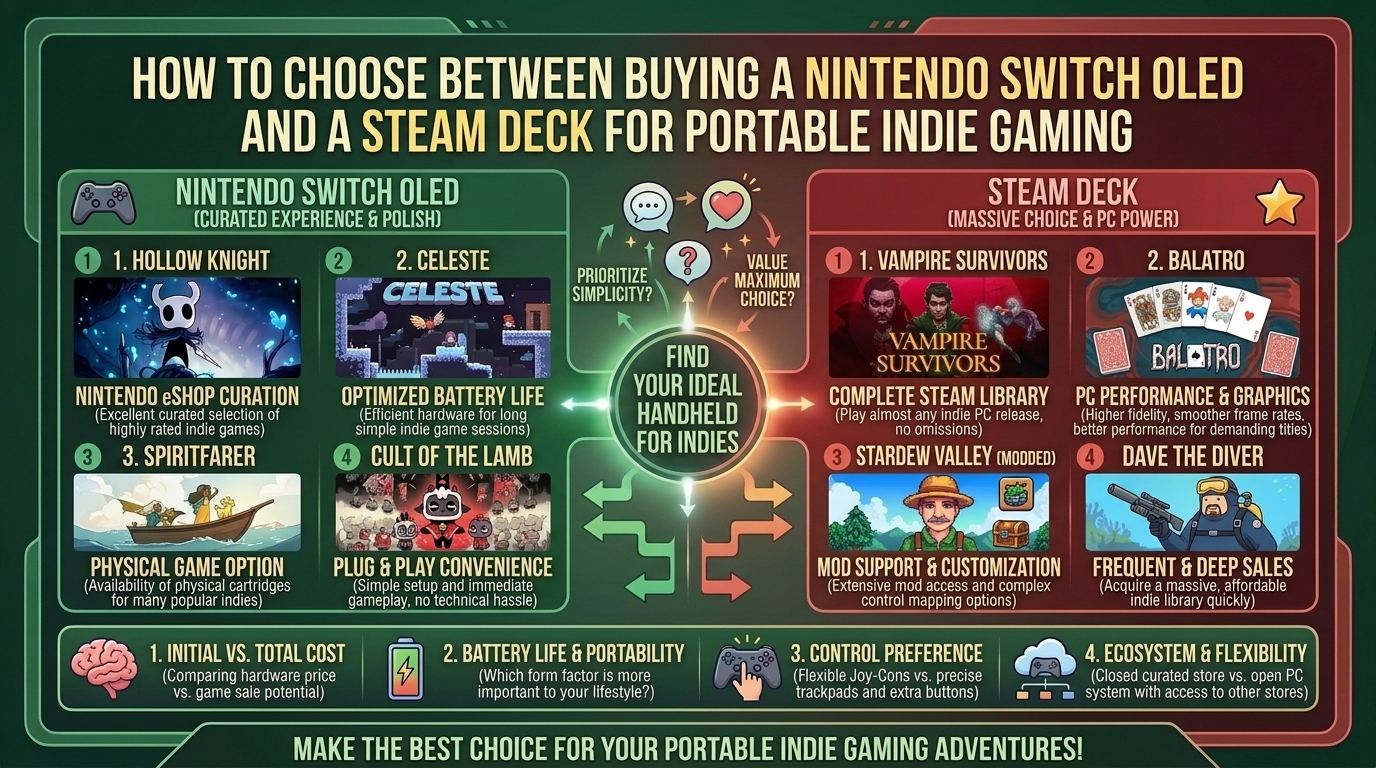
How to Choose Between Buying a Nintendo Switch OLED and a Steam Deck for Portable Indie Gaming
Indie games have revolutionized modern gaming. Stripped of AAA bloat and hyper-realistic graphics demands, indie titles prioritize innovative gameplay loops, distinctive art styles, and deep mechanical replayability. Because indie titles generally carry lighter hardware requirements than massive 3D open-world releases, they represent the absolute sweet spot for portable gaming devices.
However, selecting the ultimate handheld for independent games usually comes down to two titan platforms: the Nintendo Switch OLED Model and Valve’s Steam Deck (including the Steam Deck OLED).
While both handhelds can run fan favorites like Hades, Hollow Knight, Balatro, Celeste, and Dead Cells, they cater to radically different player needs. Nintendo offers an ultra-portable, plug-and-play console ecosystem with unmatched battery efficiency, physical cartridge collecting, and native couch co-op. Steam Deck acts as an open portable Linux PC, giving you access to Steam’s massive library, deep store sales, early-access titles, custom mods, and higher performance output.
At The Gamer Buzz, we test handheld hardware, battery discharge rates, display color accuracy, and game store pricing structures. This comprehensive buying guide breaks down hardware specs, display quality, software ecosystems, game pricing, and portability factors so you can make the perfect purchase decision for your indie gaming setup.
Whether you’re commuting through New York, gaming during travel across Texas and California, or relaxing at home in San Francisco and Washington, this breakdown provides everything you need to choose your ideal portable indie machine.
1. Comparing the Handheld Titans: Specs & Ecosystems
Choosing between the Nintendo Switch OLED and Steam Deck requires comparing their physical dimensions, OS flexibility, display panels, and underlying hardware.
+--------------------------------------------------------------------------+
|                       HANDHELD HARDWARE ARCHITECTURE                     |
+------------------------------------+-------------------------------------+
| NINTENDO SWITCH OLED               | Dedicated Console Ecosystem         |
| Custom Nvidia Tegra + Horizon OS   | Plug & play simplicity, low weight  |
+------------------------------------+-------------------------------------+
| VALVE STEAM DECK (LCD / OLED)      | Open Portable PC Platform           |
| Custom AMD APU + SteamOS (Linux)   | Modding, massive library, high FPS  |
+------------------------------------+-------------------------------------+
Core Hardware & Architectural Comparison
| Feature | Nintendo Switch OLED | Steam Deck (LCD) | Steam Deck OLED |
| Target Retail Price | ~$349.99 | ~$399.99 (Base/Refurb) | ~$549.99–$649.99+ |
| Display Panel | 7.0-inch OLED (720p, 60 Hz) | 7.0-inch IPS LCD (800p, 60 Hz) | 7.4-inch HDR OLED (800p, 90 Hz) |
| Processor (APU) | Custom NVIDIA Tegra X1 | Custom AMD Zen 2 / RDNA 2 | Custom AMD Zen 2 / RDNA 2 (6nm die shrink) |
| System Memory (RAM) | 4 GB LPDDR4 | 16 GB LPDDR5 | 16 GB LPDDR5 (Faster 6400 MT/s) |
| Internal Storage | 64 GB eMMC (MicroSD expandable) | 64GB eMMC to 512GB NVMe SSD | 512 GB or 1 TB NVMe SSD |
| Weight | ~420g / 0.93 lbs (with Joy-Cons) | ~669g / 1.47 lbs | ~640g / 1.41 lbs |
| Operating System | Horizon OS (Closed Nintendo Console) | SteamOS 3 (Arch Linux) | SteamOS 3 (Arch Linux) |
| Battery Life (Indie) | 4.5 to 9 Hours | 2 to 7 Hours | 3 to 12 Hours (Highly scalable) |
2. Platform Strengths: Where Each Device Excels
Why Choose the Nintendo Switch OLED for Indie Gaming?
1.1. True Portability & Lightweight Form Factor:Superior ergonomics for travel and effortless everyday carry.
Weighing under 1 pound (420 grams), the Switch OLED is considerably thinner and lighter than the Steam Deck. It fits easily into small sling bags, backpack sleeves, and travel cases without adding bulk during long flights or daily transit.
2.2. Plug-and-Play Console Simplicity:Zero system configuration or technical tinkering required.
The Switch is a dedicated gaming console. There are no graphics drivers to update, Proton compatibility layers to troubleshoot, or frame-rate TDP caps to tweak. Games are optimized specifically for the hardware out of the box.
3.3. Physical Cartridges & Detachable Joy-Cons:Physical media ownership, resale value, and native local co-op.
Switch owners can buy physical cartridges, allowing you to trade, lend, or resell indie games like Hollow Knight or Celeste. Detachable Joy-Cons also mean instant 2-player local co-op on tabletop mode without carrying extra controllers.
Why Choose the Steam Deck for Indie Gaming?
1.1. Massive Library & Frequent Deep Discounts:Access to tens of thousands of PC indie titles and Steam Sales.
Steam hosts the largest digital gaming library in history. Seasonal Steam Sales (Summer, Winter, Autumn) offer aggressive discounts on indie games—often 50% to 80% cheaper than their eShop counterparts.
2.2. Early Access Titles & Fan-Made Mods:Play games in early access years before they hit consoles.
Viral indie hits (such as Hades II, Lethal Company, or early Palworld) launch in Steam Early Access months or years before reaching consoles. Furthermore, Steam Deck allows custom mods, unofficial translated patches, and custom control schemes via Steam Input.
3.3. Superior Performance & Frame Rates:Raw hardware power capable of uncapped 60 to 90 FPS performance.
Equipped with 16GB of LPDDR5 RAM and an AMD APU, the Steam Deck easily runs complex 2D or semi-3D indie games (Risk of Rain 2, No Man’s Sky, Cult of the Lamb) at locked 60 FPS or 90 FPS (on OLED models) where the Switch might dip below 30 FPS.
3. Decision Matrix: Which Handheld Should You Buy?
To streamline your choice, evaluate which of these gamer profiles best matches your lifestyle:
- Buy the Nintendo Switch OLED if:
- You prioritize low device weight, maximum battery life, and compact travel sizing.
- You want a hassle-free, console-style experience with zero menu or graphics setting adjustments.
- You love collecting physical boxed game cartridges.
- You play a lot of local tabletop multi-player games with friends or family.
- You also want access to iconic Nintendo exclusive franchises (Zelda, Mario, Metroid).
- Buy the Steam Deck if:
- You already possess a backlog of games on Steam.
- You want access to Steam Early Access titles, PC mods, and emulation.
- You want games to run at high frame rates (60–90 FPS) with crisp anti-aliasing.
- You prefer buying games at steep Steam Sale discount prices.
- You don’t mind a larger, heavier handheld body in exchange for raw computing power.
10 Frequently Asked Questions (FAQ)
1. Does the Nintendo Switch OLED run indie games as smoothly as the Steam Deck?
For basic 2D pixel-art games (Balatro, Celeste, Sea of Stars), both run at a smooth 60 FPS. However, for visually intensive or physics-heavy indie games (Cult of the Lamb, Risk of Rain 2, Dead Cells under heavy load), the Steam Deck provides much higher, more stable frame rates.
2. Are indie games cheaper on Steam or the Nintendo eShop?
Indie games are generally significantly cheaper on Steam. While Nintendo eShop runs sales, Steam features frequent, massive discount events, bundle deals (like Humble Bundles), and lower base regional prices.
3. Can I play Steam Deck games offline during travel?
Yes. SteamOS features an offline mode that lets you play installed single-player indie games anywhere without an active Wi-Fi connection.
4. Is the Steam Deck too heavy for long handheld gaming sessions?
At roughly 1.4 pounds (640g–669g), the Steam Deck is noticeably heavier than the Switch OLED (0.93 lbs / 420g). While its ergonomic grips distribute weight well, some users experience wrist fatigue during long un-supported sessions compared to the lighter Switch.
5. Can the Nintendo Switch OLED be docked to a TV like the Steam Deck?
Yes! The Switch OLED comes bundled with a TV Dock out of the box. The Steam Deck can also connect to TVs or monitors, but requires buying a separate USB-C dock or hub.
6. What is the battery life difference when playing lightweight 2D indie games?
lightweight 2D games draw low power. The Nintendo Switch OLED achieves roughly 6 to 9 hours of battery life. The Steam Deck OLED can hit 6 to 12 hours when lowering its processor wattage (TDP), while the standard LCD Steam Deck gets around 4 to 7 hours.
7. Does the Steam Deck require PC knowledge to use?
Not necessarily for basic gaming. SteamOS boots directly into a user-friendly console-like interface designed for controller navigation. However, installing custom mods, non-Steam launchers, or emulators requires entering Desktop Mode (Linux).
8. Can I use external controllers on both devices?
Yes! Both handhelds support Bluetooth controllers, including PlayStation DualSense, Xbox Wireless Controllers, and third-party gamepad alternatives.
9. Which screen is better for colors: Switch OLED or Steam Deck OLED?
Both OLED panels offer infinite contrast ratios and deep black levels. However, the Steam Deck OLED panel adds HDR (High Dynamic Range) support and a faster 90Hz refresh rate, whereas the Switch OLED features a standard 60Hz SDR panel.
10. Can I expand the storage space on both handhelds?
Yes. Both devices feature a MicroSD card slot for fast storage expansion. Additionally, tech-savvy users can upgrade the internal M.2 NVMe SSD inside the Steam Deck, whereas the Switch OLED’s internal memory cannot be swapped.
Conclusion
Both the Nintendo Switch OLED and Steam Deck are magnificent choices for portable indie gaming, but they serve different philosophies. If you prioritize sleek portability, plug-and-play simplicity, physical game collecting, and out-of-the-box local co-op, the Nintendo Switch OLED is your ideal companion. If you want raw power, high frame rates, deep digital sales, early access builds, and open PC customization, the Steam Deck reigns supreme.
For more handheld hardware tests, game optimization guides, and indie reviews across Texas, California, San Francisco, Washington, and New York, stay tuned to The Gamer Buzz.
Leave a Reply