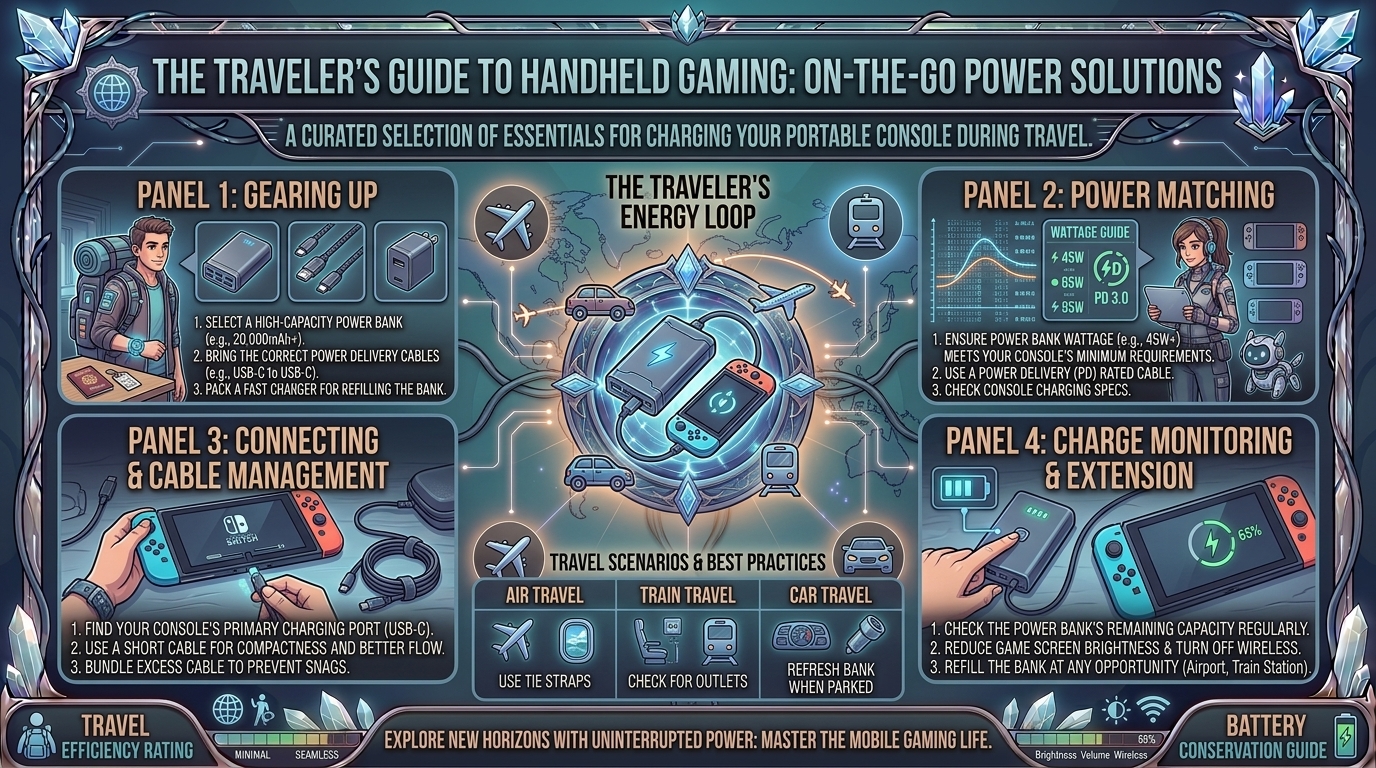
Modern handheld gaming consoles—from the Valve Steam Deck, Lenovo Legion Go, and ASUS ROG Ally series to the Nintendo Switch—have revolutionized on-the-go gaming. However, playing graphically demanding AAA titles on modern mobile chips consumes substantial battery power. High-performance handhelds can drain their internal batteries in as little as 90 to 120 minutes during intensive gameplay sessions.
To extend your mobile gaming marathons on long flights, road trips, or commutes, an external portable power bank is essential. However, simply plugging your console into a standard smartphone power bank will not suffice. Matching the correct wattage, voltage profiles, power delivery standards, and cable ratings is critical to prevent battery drain while playing or risking hardware damage.
This guide covers everything you need to know about selecting, configuring, and safely using high-output external power banks for handheld gaming consoles while traveling.
1. Understanding Power Requirements Across Major Handhelds
Not all handheld consoles draw the same amount of power. Using a power bank that outputs fewer watts than your console consumes under load results in discharge-while-plugged-in, where the battery continues to drain despite being connected to external power.
[ Power Bank Output (e.g., 65W PD) ] ──> [ E-Marker USB-C Cable (100W Rated) ] ──> [ Handheld Console (Steam Deck / ROG Ally / Switch) ]
                                                                                               │
                                                                                               ▼
                                                                                    [ Full-Speed Play & Charge ]
Power Specifications by Device
| Handheld Console Model | Internal Battery Capacity | Native Charger Wattage | Minimum Recommended Power Bank Wattage |
| Valve Steam Deck (LCD) | 40 Wh | 45W USB-C PD | 45W USB-C PD |
| Valve Steam Deck (OLED) | 50 Wh | 45W USB-C PD | 45W USB-C PD |
| ASUS ROG Ally / Ally X | 40 Wh / 80 Wh | 65W / 100W+ GaN | 65W USB-C PD 3.0 (for 30W Turbo Mode) |
| Lenovo Legion Go | 49.2 Wh | 65W USB-C PD | 65W to 100W USB-C PD |
| Nintendo Switch / Switch OLED | 16 Wh / 20 Wh | 39W USB-C PD | 18W to 45W USB-C PD |
2. Key Specs to Look For in a Gaming Power Bank
A. USB Power Delivery (USB-PD 3.0 / 3.1)
Avoid standard USB-A power banks capped at 12W–18W. Modern PC handhelds require USB-C Power Delivery (USB-PD) to negotiate higher voltage tiers (such as 15V/3A or 20V/3.25A). Without a supported PD protocol, the console will fall back to legacy slow charging.
B. Watt-Hour (Wh) Capacity vs. Airline TSA Regulations
When traveling by air, federal transportation security regulations (TSA and FAA) limit portable lithium-ion batteries in carry-on baggage:
- Under 100 Wh (Approx. 27,000 mAh at 3.7V): Approved for carry-on bags without prior airline authorization.
- 100 Wh to 160 Wh: Requires explicit airline approval prior to boarding.
- Over 160 Wh: Strictly prohibited on commercial passenger aircraft.
Pro Tip: Aim for a 20,000 mAh to 25,600 mAh (74 Wh to 94 Wh) power bank. This provides 1.5 to 2 full recharges for a Steam Deck or ROG Ally while remaining fully compliant with TSA carry-on limits.
C. Cable Selection (E-Marker Chips Matter)
A high-output power bank is only as fast as the cable connecting it. Standard thin USB-C cables are capped at 60W (3A). To pull 65W to 100W+, you must use a 100W/5A USB-C to USB-C cable containing an electronically marked (E-Marker) chip.
3. Step-by-Step Instructions: Safe On-the-Go Setup
1.Check Power Bank State of Charge and Cable Rating:
Ensure your external battery pack is fully charged. Verify that your USB-C cable is explicitly rated for 100W / 5A Power Delivery to prevent auto-throttling.
2.Connect Cable to High-Wattage Dedicated Port:
Plug your cable into the power bank’s primary USB-C port marked C1 or PD Out (45W/65W/100W). Multi-port power banks often reduce per-port output when multiple devices are plugged in.
3.Power On and Verify Charging Status:
Connect the cable to your handheld’s USB-C charging port. Check the operating system overlay (SteamOS, Windows Armoury Crate, or Switch battery icon) to confirm the device displays an active charging icon.
4.Manage Airflow and Thermal Position:
Place the power bank on a flat surface or seatback pocket alongside the handheld. Never cover the console’s rear intake vents or top exhaust fan with the battery bank or mounting straps.
4. Best Practices for Traveling and Extending Battery Life
- Plug In Early (The 80% Rule): Connect your power bank when your console is at 80% rather than waiting until it drops to 5%. Charging a nearly empty battery while rendering a AAA game generates excessive internal heat, triggering thermal throttling and battery wear.
- Cap Your Frame Rates: Dropping in-game targets from 60 FPS to 40 FPS or 30 FPS cuts overall System-on-Chip (SoC) power consumption by up to 30–40%, significantly extending your power bank’s runtime.
- Keep Accessories in Carry-On: Never pack lithium-ion power banks in checked baggage. Low temperatures and pressure changes in cargo holds create safety risks, and airline rules require all external power banks to stay in carry-on luggage.
- Use Pass-Through Charging Wisely: Some premium power banks support pass-through charging (charging the power bank while it powers your console). Use this in airport lounges to charge both units from a single wall outlet.
Frequently Asked Questions (FAQ)
1. Will using a 100W or 140W power bank damage a console that only needs 45W?
No. Modern USB Power Delivery devices operate on a handshake protocol. The handheld console only draws the specific voltage and amperage it requests from the power bank.
2. Can I charge my handheld using a standard USB-A to USB-C cable?
USB-A ports are capped at legacy power standards (typically 12W–18W). While this may slowly charge a Nintendo Switch in sleep mode, it cannot provide enough power to run a Steam Deck, ROG Ally, or Legion Go while playing.
3. Why does my ROG Ally drop out of 30W Turbo Mode when connected to a 65W power bank?
Some 65W power banks do not support the exact 20V/3.25A power profile required by ASUS. Using a 100W PD 3.0 power bank guarantees sufficient headroom for 30W Turbo Mode.
4. How many extra hours of playtime can I expect from a 20,000 mAh power bank?
A 20,000 mAh (74 Wh) power bank yields roughly 55–60 Wh of usable energy after accounting for heat and conversion losses. This adds approximately 2 to 4 extra hours of AAA gaming on a Steam Deck or ROG Ally.
5. Can I fly with a 30,000 mAh power bank in my carry-on bag?
A 30,000 mAh battery rated at 3.7V equals 111 Wh, which exceeds the standard 100 Wh TSA limit. You must check with your airline prior to travel, as security officers may confiscate it at airport checkpoints.
6. Is it safe to play games on a handheld console while it is charging from a battery pack?
Yes, provided your handheld and power bank have adequate ventilation. Avoid placing both items inside enclosed cases, pockets, or under blankets while gaming to prevent heat buildup.
7. What does “Bypass Charging” mean for power bank gaming?
Bypass Charging routes power from the USB-C port directly to the motherboard without passing through the internal battery. This eliminates battery charging heat during intense sessions and preserves battery health.
8. Why does my power bank get warm during use?
Converting energy across different voltages through DC-to-DC circuitry generates heat as a natural byproduct. Warmth is normal, but if the unit becomes hot to the touch, disconnect it immediately.
9. What cable specs do I need for 100W power banks?
Look for a USB-C to USB-C cable explicitly labeled with 100W / 5A charging speeds and an integrated E-Marker chipset.
10. Where can I find more tech walkthroughs and hardware guides?
Find comprehensive device setups, hardware reviews, and mobile gaming tips on TheGamerBuzz.
Conclusion
Using an external portable power bank is the single best way to eliminate range anxiety when traveling with a handheld gaming console. By choosing a power bank with at least 45W–65W USB-PD output, keeping the total capacity under 100 Wh for flight compliance, and pairing it with a 100W E-Marker USB-C cable, you can enjoy uninterrupted gaming wherever your travels take you. Keep your gear cool, optimize your in-game settings, and explore more hardware walkthroughs on TheGamerBuzz!
Leave a Reply