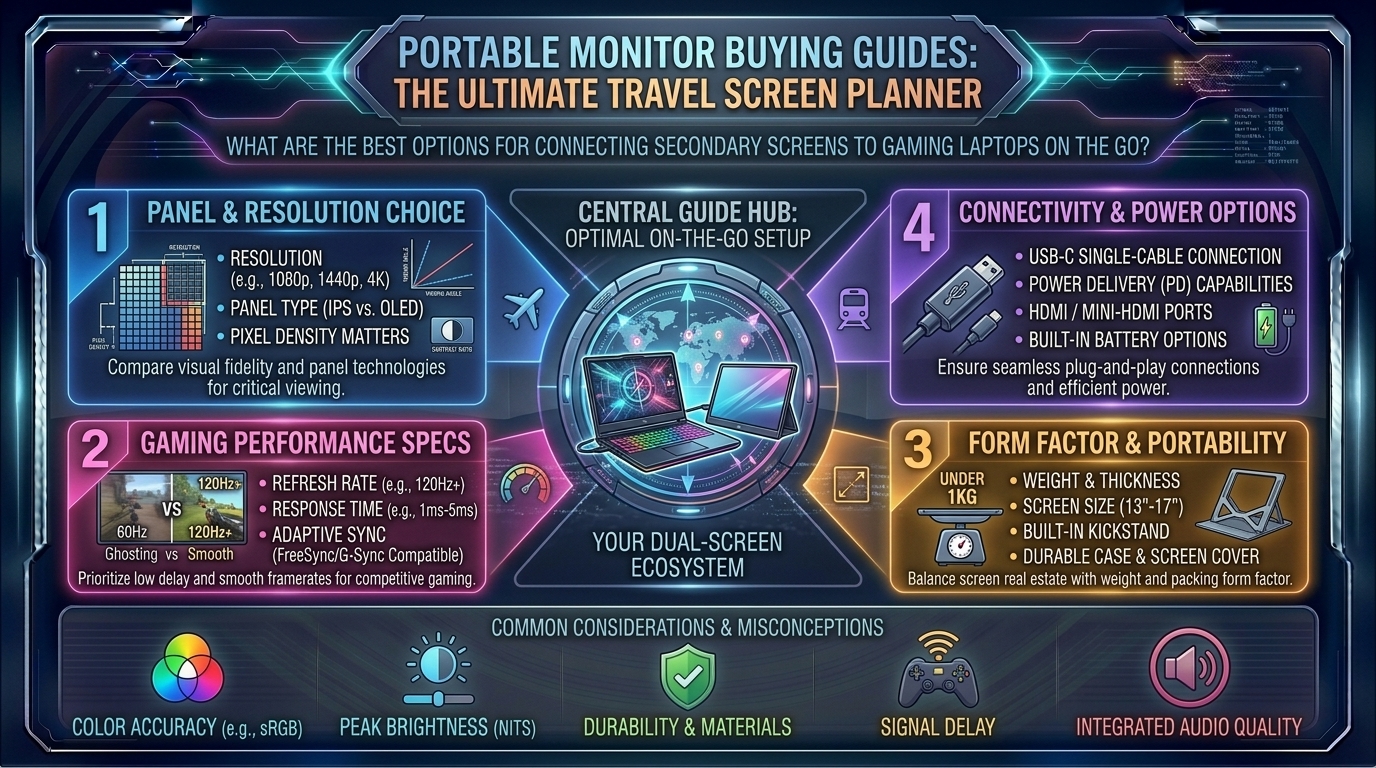
What Are the Best Portable Monitor Buying Guides for Connecting Secondary Screens to Gaming Laptops on the Go
Introduction: Unleashing Dual-Screen Freedom for Mobile Gaming Rigs
For the modern mobile gamer, digital creator, and power user navigating fast-paced hubs like New York, San Francisco, Seattle, Austin, and Los Angeles, the gaming laptop is a marvel of compact engineering. Packing discrete GPUs and multi-core processors into a chassis that fits into a backpack is incredible. Yet, anyone who has ever tried to play an immersive RPG, stream a competitive match, or manage a complex coding environment on a single 15-inch laptop screen knows the physical limitation: screen real estate is a scarce commodity.
Enter the portable monitor. No longer restricted to blurry, washed-out corporate data screens, today’s portable gaming displays feature ultra-fast refresh rates (144Hz to 300Hz), stunning 2K/QHD resolutions, and vibrant IPS or OLED panels. Whether you are setting up a temporary battle station in a coffee shop, a hotel room, or a collaborative workspace, adding a secondary screen changes everything.
At thegamerbuzz.com, we cut through the marketing noise to bring you the ultimate hardware-focused buying guide. This comprehensive deep-dive explores what to look for, how to match a panel to your gaming laptop, and how to build a seamless multi-screen ecosystem on the go.
Part 1: Why Every Gaming Laptop Owner Needs a Portable Monitor
A gaming laptop gives you processing freedom, but a portable secondary screen unlocks true multitasking capability. Here is why adding a travel monitor transforms your workflow:
+-----------------------------------+-----------------------------------+
| Single-Screen Laptop Limitations  | Dual-Screen Portable Setup        |
+-----------------------------------+-----------------------------------+
| Alt-tabbing interrupts gameplay   | Dedicated chat & stream tools view|
| Cramped split-screen windows      | Full-size reference materials     |
| Zero space for Discord or OBS     | Immersive dual-monitor layout     |
| Clunky desktop workspace          | Slip-in-backpack slim profile     |
+-----------------------------------+-----------------------------------+
1. Seamless Streaming and Chat Management
If you stream on Twitch or Discord while gaming, managing your broadcast, chat rooms, and audio software on a single laptop screen forces constant, disruptive alt-tabbing. A portable monitor gives you a dedicated dashboard for your stream software.
2. Guide and Wiki Integration
Playing complex open-world RPGs or tactical sims often requires keeping maps, crafting calculators, or strategy guides open. Snapping those tools to a secondary portable screen keeps your main laptop display completely uncluttered.
Part 2: Key Technical Specifications to Evaluate
Not all portable monitors are engineered for gaming. Buying a cheap office productivity screen will leave you plagued by ghosting, high input lag, and choppy frame rates. Look closely at these core specs:
1. Refresh Rate (Hz)
- 60Hz: Standard for office work and casual media. Avoid this if you play fast-paced shooters or racing games, as it creates jarring visual stutter when paired with a high-end gaming laptop.
- 144Hz to 300Hz: The sweet spot for portable gaming. High refresh rate portable displays (such as models from Arzopa, UPERFECT, or ASUS ROG) ensure fluid motion, crisp tracking, and low response times that match your gaming laptop’s GPU output.
2. Resolution: 1080p vs. 2K (QHD) vs. 4K
- 1080p (FHD): Easiest to drive, ensuring your laptop’s mobile GPU maintains high frame rates without taking a massive performance hit.
- 2K / QHD (2560×1440 or 2560×1600): The ideal balance for a 16-inch or 17-inch screen size. It provides razor-sharp text clarity and rich visual fidelity without demanding the extreme GPU horsepower of a 4K panel.
3. Panel Technology: IPS vs. OLED
- IPS (In-Plane Switching): Offers fantastic viewing angles, great color reproduction, and budget-friendly pricing. Most high-refresh portable gaming monitors rely on fast IPS panels.
- OLED: Delivers infinite contrast ratios, pitch-black dark scenes, and breathtaking colors. Perfect for single-player cinematic gaming, though carrying a higher price tag.
Part 3: Connectivity & Power Delivery – The One-Cable Dream
One of the biggest breakthroughs in portable display technology is the widespread adoption of USB-C with DisplayPort Alt Mode and Power Delivery (PD).
+-----------------------+-----------------------------------+-----------------------------------+
| Connection Type       | What It Transmits                 | Power Requirement                 |
+-----------------------+-----------------------------------+-----------------------------------+
| Full-Featured USB-C   | Video, Audio, Data, & Power       | Single cable handles everything   |
| Mini-HDMI + USB-C     | High-definition video & audio     | Requires separate USB power cord  |
+-----------------------+-----------------------------------+-----------------------------------+
- The Single USB-C Connection: If your gaming laptop features a modern USB-C or Thunderbolt port supporting video output, you can connect the monitor using just one cable. The laptop powers the screen and feeds it the video signal simultaneously.
- Mini-HDMI Compatibility: Essential if you also plan to hook your portable monitor up to a Nintendo Switch, PS5, or older legacy laptop. Keep in mind that using HDMI requires an extra USB cable plugged in to supply electrical power to the panel.
Part 4: Regional Lifestyle & Travel Realities
How and where you use your portable monitor heavily influences which model fits your lifestyle:
- Fast-Paced Urban Commuting (New York & San Francisco): If you work out of cafes, commuter trains, or shared co-working spaces, weight and thickness matter. Look for ultra-slim, lightweight 15.6-inch to 16-inch panels under two pounds that slide effortlessly into a laptop sleeve alongside your rig.
- Spacious Suburban Setups (Texas & Washington): If your travel involves moving your gaming laptop between home offices, hotels, and local LAN parties, you can opt for larger 17.3-inch high-refresh displays or dual-screen folding configurations without worrying about minor weight differences.
Frequently Asked Questions (FAQ)
1. Do portable gaming monitors require an external wall outlet?
Not usually. Most portable monitors draw sufficient power directly from your gaming laptop’s USB-C port. However, if you turn brightness up to 100% or connect via Mini-HDMI, you may need to plug the monitor into a portable power bank or a wall charger.
2. Can I use a portable monitor vertically (Portrait Mode)?
Yes. Operating systems like Windows 11 allow you to rotate display orientation instantly in settings. Setting a portable monitor vertically is fantastic for reading long web articles, viewing source code, or monitoring live chat feeds.
3. Will a portable monitor drain my gaming laptop’s battery quickly?
Yes. Driving an external secondary screen draws extra power from your laptop’s battery, cutting unplugged battery life down significantly. It is always best to plug your gaming laptop into a wall outlet during extended gaming or productivity sessions.
4. What is the difference between 60Hz and 144Hz portable monitors?
A 60Hz monitor refreshes the image 60 times per second, which can feel jittery during fast motion. A 144Hz monitor refreshes 144 times per second, delivering buttery-smooth motion tracking that is essential for competitive gaming.
5. Can I connect a portable monitor to my smartphone or console?
Yes. Most portable monitors featuring full-featured USB-C or Mini-HDMI ports work seamlessly with modern smartphones (via desktop modes like Samsung DeX), Nintendo Switches, Steam Decks, and home consoles.
6. Are touchscreens worth it for gaming laptops?
Touchscreens are great for mobile productivity, digital art, and navigating Windows tablet-style. However, for pure gaming setups, non-touch matte displays are usually preferred because they reduce distracting glare and reflections.
7. How do I mount a portable monitor securely next to my laptop?
Many portable monitors come with magnetic folio smart covers that double as folding stands. For advanced desk setups, look for models featuring built-in VESA mounting holes so you can attach them to adjustable desktop arms.
8. Why is my portable monitor flickering or losing signal?
Flickering is almost always caused by insufficient power delivery. If your laptop’s USB port isn’t supplying enough amperage, connect an external USB-C wall charger directly to the monitor’s secondary power input port.
9. Do portable monitors have built-in speakers?
Most models feature integrated stereo speakers, but they are typically small and tinny due to the ultra-thin chassis. For the best gaming experience, you will still want to rely on your gaming headset or standalone desktop speakers.
10. Where can I find more mobile gaming accessory reviews?
For continuous hardware benchmarks, travel setups, and peripheral breakdowns, keep your browser locked right here to thegamerbuzz.com!
Conclusion
Adding a portable monitor to your mobile gaming laptop setup instantly eliminates the constraints of single-screen computing. Whether you choose an ultra-fast 144Hz panel for competitive gaming on the go, a crisp 2K display for immersive RPGs, or a lightweight travel companion for multitasking in coffee shops, the right display transforms your workflow.
At thegamerbuzz.com, we want your mobile battle station to perform at its absolute peak. Choose the right panel specs, pack your cables, and expand your digital horizons today!
Leave a Reply