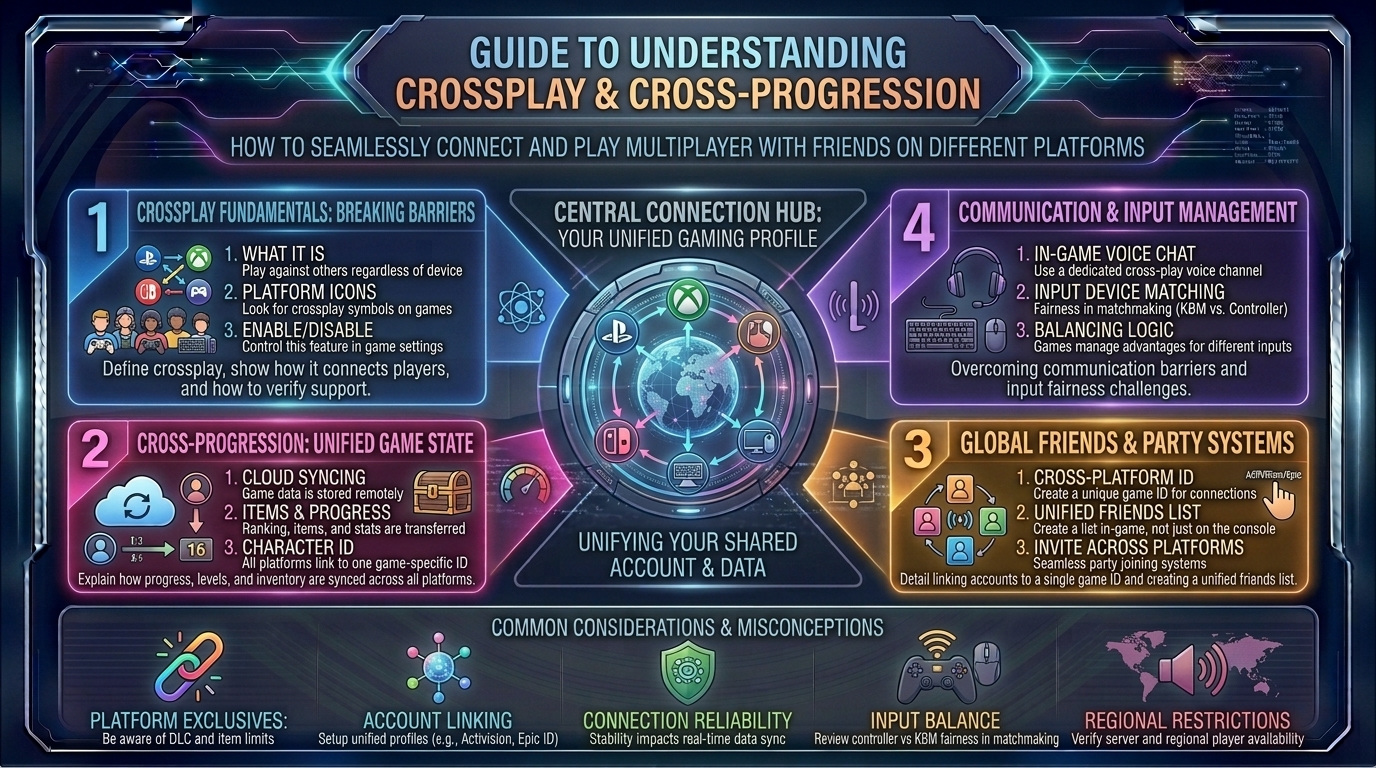
How to Understand Crossplay and Cross-Progression Features When Playing Multiplayer Games with Friends on Different Platforms
Introduction: Breaking Down the Walls Between Gaming Platforms
Remember when playing a multiplayer game meant matching your hardware choice directly to your friends’? If your best friend owned a PlayStation and you played on an Xbox, entire libraries of games were completely walled off. Multiplayer communities were heavily fractured, forcing players to buy specific consoles simply to join a squad.
Today, that digital segregation is rapidly fading. Across gaming hubs from Austin and Seattle to New York, Los Angeles, and San Francisco, players expect friction-free multiplayer integration. Whether your teammate is grinding on a high-end gaming PC, a PlayStation 5, an Xbox Series X|S, a Nintendo Switch, or even a mobile phone, terms like crossplay and cross-progression have completely reshaped modern social gaming.
However, navigating these systems can sometimes feel like decoding a maze of corporate accounts, third-party launchers, and platform-specific restrictions. At thegamerbuzz.com, we cut through the confusion. This comprehensive guide breaks down exactly how crossplay and cross-progression work, how to set them up, and how to avoid common pitfalls when gaming with friends across different devices.
Part 1: Defining the Core Concepts – Crossplay vs. Cross-Progression
While people often use these terms interchangeably, they refer to two completely different back-end technologies. Understanding the distinction prevents nasty surprises when switching devices.
+------------------------+-----------------------------------+-----------------------------------+
| Feature                | What It Does                      | Primary Benefit                   |
+------------------------+-----------------------------------+-----------------------------------+
| Crossplay              | Joins different platforms in-game | Play together in the same lobby   |
| Cross-Progression      | Syncs account saves and unlocks   | Take your stats anywhere          |
+------------------------+-----------------------------------+-----------------------------------+
1. Crossplay (Cross-Platform Matchmaking)
Crossplay allows players on entirely different hardware ecosystems to join the same match, queue together in a party, and communicate via in-game voice chat.
- Example: A PC player, a PlayStation 5 user, and an Xbox Series X owner drop into the same Call of Duty: Warzone lobby or squad up in Apex Legends seamlessly.
2. Cross-Progression (Cross-Save / Unified Profiles)
Cross-progression means your in-game identity, unlocked cosmetics, battle pass ranks, and character levels are tied to a cloud-hosted publisher account rather than a local console profile.
- Example: You unlock a rare weapon skin while playing Diablo IV on your gaming PC at your desk, and when you log into your Xbox or PlayStation in the living room later that evening, that exact skin is waiting for you.
Part 2: The Ecosystem Web – Third-Party Accounts vs. Console IDs
To make crossplay and cross-progression function smoothly, games must bypass restrictive console-specific networks (like PlayStation Network or Xbox Live) by routing social connections through an independent, centralized publisher profile.
+-----------------------+-----------------------------------+-----------------------------------+
| Publisher Ecosystem   | Central Account System            | Key Games Utilizing It            |
+-----------------------+-----------------------------------+-----------------------------------+
| Epic Games            | Epic Account ID                   | Fortnite, Rocket League, Fall Guys|
| Activision            | Activision ID                     | Call of Duty Series               |
| Electronic Arts (EA)  | EA Account                        | Apex Legends, Battlefield         |
| Blizzard              | Battle.net Account                | Overwatch 2, Diablo IV            |
+-----------------------+-----------------------------------+-----------------------------------+
Why You Need Third-Party Display Names
When playing cross-platform titles, your standard PlayStation Online ID or Xbox Gamertag is often secondary. Instead, games utilize a universal identifier—such as an Epic Account ID or an Activision ID (e.g., PlayerName#1234567).
To invite a friend playing on a different system, you cannot use platform-native friends lists; you must use the game’s internal social menu, type out their unique publisher ID, and accept the friend request there.
Part 3: The Fine Print – Common Caveats and Restrictions
While the industry has made massive strides toward universal compatibility, crossplay and cross-progression are rarely 100% seamless across every title. Watch out for these common gotchas:
1. The Virtual Currency Wall (Shared Wallets)
While most cosmetic skins and battle pass tiers transfer cleanly across devices through cross-progression, premium in-game currencies (like V-Bucks or Apex Coins) frequently do not transfer.
- The Rule: Currency purchased on a Nintendo Switch or PlayStation often stays locked to that specific platform ecosystem due to digital storefront revenue-sharing rules. Always spend your virtual currency on your primary gaming device to avoid getting funds trapped.
2. DLC and Expansion Licensing
If you buy an expansion pack or campaign DLC for a game on your PlayStation, that license does not automatically grant you ownership of that content on PC or Xbox. You typically have to purchase platform-specific licenses if you intend to play campaign or expansion content across multiple machines, though unlocked characters or gear often carry over.
Part 4: Regional Networking & Competitive Balance in Crossplay
Mixing PC and console players in competitive multiplayer introduces unique technical and balance dynamics that players across tech hubs like San Francisco, New York, and Austin debate heavily:
- Input Method Disparities: PC players rely on mouse and keyboard, offering precision aiming speed, while console players traditionally use thumbstick controllers backed by aim-assist mechanics. Many competitive games utilize input-based matchmaking in ranked modes to ensure fair play, grouping controller users together while isolating mouse-and-keyboard lobbies.
- Framerate and Performance Gaps: Playing on a 240Hz high-end gaming rig gives a distinct visual clarity advantage over older base-model consoles running at 60Hz. Utilizing crossplay in hyper-competitive shooters requires understanding these hardware ceilings.
Frequently Asked Questions (FAQ)
1. Is crossplay completely free to use?
Yes. Crossplay functionality itself is provided by the game developers and does not carry an extra subscription fee. However, keep in mind that playing online multiplayer on dedicated consoles still requires an active subscription to PlayStation Plus or Xbox Game Pass Core, regardless of whether crossplay is enabled.
2. Can I turn crossplay off if I only want to play with people on my system?
Most major multiplayer games (like Call of Duty or Apex Legends) include a toggle in the settings menu allowing you to disable crossplay. Be warned: turning it off may drastically increase your matchmaking queue times, as the game can only draw players from your specific console’s active user pool.
3. How do I link my console account to a cross-progression service?
When you first boot up a cross-progression game (such as Diablo IV or Overwatch 2), the game will prompt you to log into or create a publisher account (like Battle.net or an Epic ID) and link it directly to your PlayStation Network, Xbox, or Nintendo account via a web browser QR code link.
4. Why aren’t my purchased items showing up on my second platform?
This is usually caused by unlinked accounts or mismatched primary profiles. Verify on the publisher’s official website account settings page that both your console profile and your PC profile are actively bound to the exact same master email account.
5. Does Nintendo Switch support full crossplay?
Yes, many major crossplay titles (including Fortnite, Minecraft, and Rocket League) fully support Nintendo Switch. However, due to hardware constraints, Switch versions often feature reduced graphic fidelity, capped 30fps frame rates, and smaller player counts in large-scale lobbies.
6. Can I play Xbox Game Pass games with my friends on PlayStation?
Only if the specific game is a multiplatform title that explicitly supports crossplay (such as Call of Duty or Overwatch 2). First-party Xbox exclusive titles remain restricted to Xbox and PC ecosystems.
7. What happens to my progress if I unlink my accounts?
Unlinking a console account from a publisher cross-progression profile will typically orphan your progress on that platform. If you re-link a different account, you risk losing access to historical stats, battle pass unlocks, and cosmetics. Proceed with caution and contact customer support if you need to switch accounts.
8. Does crossplay cause higher ping or lag?
Crossplay itself does not increase latency. Matchmaking servers pair players based on geographical region and server ping. However, mixed-platform lobbies can occasionally experience varied synchronization if players are connecting over unstable Wi-Fi connections instead of wired ethernet lines.
9. Are mobile devices included in crossplay ecosystems?
In specific free-to-play titles like Fortnite and Minecraft (via Bedrock Edition), mobile players on iOS and Android can join console and PC lobbies, though performance and control limitations make touchscreens at a distinct competitive disadvantage.
10. Where can I find out if a newly released game supports crossplay?
For ongoing updates, feature deep-dives, and comprehensive multiplayer compatibility lists, keep your browser locked right here to thegamerbuzz.com!
Conclusion
Crossplay and cross-progression have transformed multiplayer gaming from a fragmented, platform-locked experience into a genuinely connected global community. Whether you are coordinating late-night raids with college friends across different states or jumping between your gaming PC and a living room console, unified profiles and cross-platform matchmaking give you the ultimate freedom to play how you want, with who you want.
At thegamerbuzz.com, we help you stay connected across every ecosystem. Link your accounts properly, watch out for platform currency quirks, and squad up with your friends today!
Leave a Reply