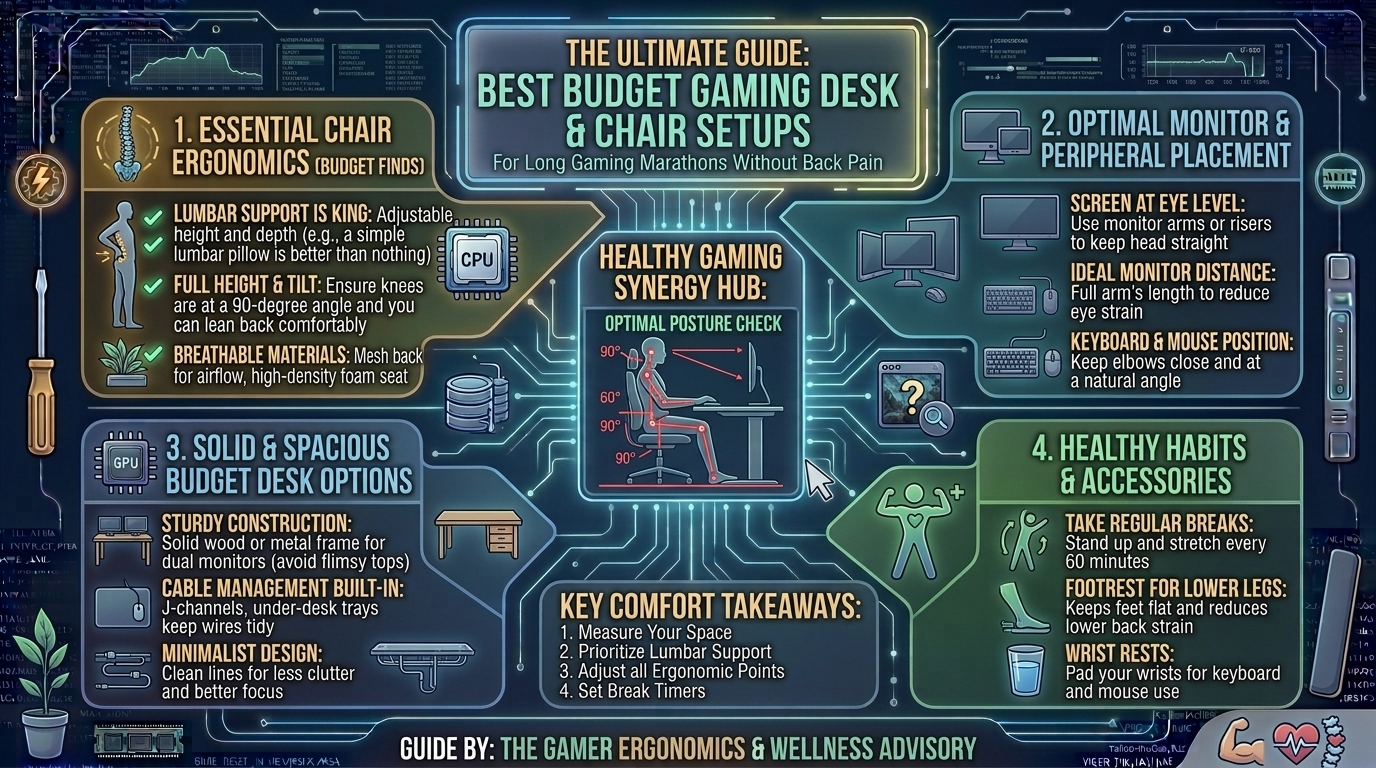
What Are the Best Budget Gaming Desk and Ergonomic Chair Setups for Long Gaming Marathons Without Back Pain?
Long gaming sessions put tremendous pressure on your lumbar spine, neck, shoulders, and wrists. While multi-thousand-dollar ergonomic office setups are ideal, you do not need to spend a fortune to build a comfortable, healthy gaming station. With the right combination of an adjustable desk, an ergonomically supportive chair, and proper alignment practices, you can eliminate lower back ache, prevent neck strain, and maintain peak gaming performance during extended marathons—all while staying under a reasonable budget.
This guide breaks down top affordable desk and chair recommendations, essential ergonomic posture metrics, and step-by-step adjustment techniques designed for endurance gamers.
Budget Ergonomic Setup Matrix
| Category | Recommended Model | Approx. Price | Key Ergonomic Feature | Ideal For |
| Ergonomic Chair (Mesh) | SIHOO M18 / M57 | $130 – $170 | 2D Adjustable Lumbar Support & Breathable Mesh | All-day cooling & lower back support |
| Ergonomic Chair (Value) | BIFMA-Certified Office Task Chair | $80 – $110 | Dynamic Tilt & High-Density Foam Seat Cushion | Budget-conscious endurance gamers |
| Adjustable Desk (Electric) | SANODESK / FLEXISPOT EG1 | $140 – $180 | Single-Motor Electric Height Adjustment (28″–48″) | Sit-stand position switching |
| Adjustable Desk (Fixed) | Cubiker / IKEA UTESPELARE | $90 – $130 | Manual Height Adjustment & Built-in Cable Management | Heavy multi-monitor setups |
| Monitor Arm Accessory | HUANUO Single/Dual Monitor Arm | $30 – $50 | Full Articulation Gas Spring Height Control | Preventing neck strain and hunching |
1. The Ergonomics of Gaming Back Pain
Understanding how body mechanics fail during long gaming sessions is the first step to preventing chronic spinal discomfort.
THE ERGONOMIC POSTURE TRIANGLE:
[ Eye Level aligned with top 1/3 of monitor ]
                    |
[ Elbows bent at 90°-100° flush with armrests ]
                    |
[ Knees bent at 90° with feet flat on floor / footrest ]
Why “Racing-Style” Gaming Chairs Cause Back Pain
Many budget “gaming chairs” prioritize visual aesthetics over spinal biomechanics. They feature flat bucket seats, fixed non-adjustable lumbar pillows, and non-breathable PU leather:
- Bucket Seat Bolsters: Pinch your hips and restrict leg positioning, cutting off circulation during multi-hour sessions.
- Lack of Adjustable Lumbar Support: Forces your lower spine into a rounded C-shape (kyphosis) rather than maintaining its natural inward S-curve (lordosis).
- Trapped Body Heat: PU leather retains heat and humidity, causing discomfort and micro-adjustments that break proper posture.
The Mesh Ergonomic Alternative
A dedicated mesh ergonomic office chair redistributes your body weight evenly across the seat pan while actively supporting your lumbar curve and allowing airflow to keep your core cool.
2. Key Features to Look For in a Budget Setup
Essential Chair Metrics
- Dynamic Lumbar Support: Look for height- and depth-adjustable lumbar support that presses firmly into your lower back ($L_4/L_5$ vertebrae).
- 3D/2D Armrests: Armrests must adjust vertically so your shoulders remain relaxed while your forearms sit parallel to your desk surface.
- Seat Depth & Breathable Mesh: Ensure 2 to 3 fingers of clearance exist between the edge of the seat cushion and the back of your knees to prevent hamstring pressure.
Essential Desk Metrics
- Desk Height Range: Standard non-adjustable desks sit at 29–30 inches high—often too tall for users under 6’0″, forcing them to raise their shoulders awkwardly. An adjustable desk allows you to lower the surface to 26–28 inches for neutral arm placement.
- Sit-Stand Capability: Alternating between sitting for 45 minutes and standing for 15 minutes reduces spinal compression by up to 40% over an 8-hour marathon.
3. Step-by-Step Ergonomic Alignment Protocol
Follow this setup sequence to align your desk and chair correctly:
1.Adjust Chair Height for Feet Placement:Establish the foundation of your posture.
Lower or raise your chair until your feet rest completely flat on the floor with your knees bent at a 90-degree angle. If your legs dangle, add an inexpensive under-desk footrest.
2.Position the Lumbar Support:Protect your lumbar spine.
Slide your chair’s lumbar cushion or mechanism directly into the small of your lower back, right above your beltline, ensuring your back sits flush against the backrest.
3.Align Desk & Armrest Height:Prevent shoulder shrugging and wrist strain.
Adjust your armrests and desk surface height so your elbows bend at 90 to 100 degrees, allowing your wrists to rest flat on your mousepad without tilting upward.
4.Set Monitor Height & Distance:Eliminate forward neck posture (‘Tech Neck’).
Mount your display using a gas-spring monitor arm. Adjust the height so the top third of the screen is at direct eye level, positioned roughly one arm’s length (20–30 inches) away.
4. Low-Cost Accessories That Improve Ergonomics
If replacing your current desk or chair is not immediately feasible, these low-cost accessories can upgrade your current setup:
+---------------------------------------------------------------------------------+
|                       BUDGET ERGONOMIC ACCESSORY CHECKLIST                      |
+---------------------------------------------------------------------------------+
| [ ] High-Density Memory Foam Lumbar Cushion (Adds lower back support to basic chairs)|
| [ ] Adjustable Angle Footrest (Relieves pressure under thighs when feet don't reach floor)|
| [ ] Gas-Spring Desktop Monitor Arm (Frees up desk space & enables eye-level tracking)|
| [ ] Padded Wrist Rest for Keyboard & Mouse (Prevents Carpal Tunnel compression)    |
| [ ] Under-Desk Cable Management Tray (Keeps legs free from tangled wire clutter)  |
+---------------------------------------------------------------------------------+
Frequently Asked Questions (FAQ)
Q1: Are mesh chairs really better than leather gaming chairs for long gaming sessions?
A: Yes. Mesh chairs provide superior weight distribution, adapt to your body shape, and allow air to circulate, keeping you cool during long gaming marathons. Leatherette gaming chairs tend to trap heat and encourage slouching.
Q2: What is the ideal desk height for gaming without shoulder pain?
A: For most adults between 5’7″ and 6’0″, the ideal typing and gaming desk height sits between 26 and 28 inches. Standard 30-inch fixed desks are often too high, forcing shoulders to shrug upward and causing upper back tension.
Q3: Can an under-desk footrest really reduce back pain?
A: Absolutely. A footrest stabilizes your hips, ensures your thighs remain parallel to the floor, and takes pressure off your lower spine if your feet cannot rest flat on the ground.
Q4: How often should I stand up during a long gaming marathon?
A: It is recommended to follow the 50/10 rule: for every 50 minutes of sitting, stand up, stretch, or switch your sit-stand desk to a standing position for 10 minutes to promote blood circulation.
Q5: What is the best way to prevent wrist pain while aiming in FPS games?
A: Keep your wrists in a neutral, straight position rather than bending them upward. Ensure your armrests sit flush with your desk surface so your forearm—not your wrist joint—bears the weight of your arm.
Q6: Are standing desks worth it for gaming?
A: Yes. Electric standing desks allow you to quickly change positions without interrupting your workflow or gaming queue, significantly reducing spinal pressure built up from prolonged sitting.
Q7: How do I fix “tech neck” while gaming?
A: Raise your monitor so your eyes align with the upper third of the screen. This prevents you from tilting your head downward, which can add up to 60 pounds of extra gravitational force on your cervical spine.
Q8: What should I look for if I am a heavier gamer (over 250 lbs)?
A: Look for chairs rated with BIFMA-certified Class-4 gas lifts, heavy-duty steel bases, and high-density molded foam seat cushions rated for higher load capacities.
Q9: Can I turn a basic office chair into an ergonomic gaming chair?
A: Yes. Adding a firm memory foam lumbar pillow, an ergonomic footrest, and aftermarket armrest pads can transform an inexpensive office chair into a supportive setup.
Q10: What is the difference between 2D, 3D, and 4D armrests?
A: 2D armrests adjust up/down and forward/back. 3D armrests add side-to-side angling. 4D armrests offer full movement, including width adjustments, allowing you to position them precisely where your elbows rest naturally.
Conclusion
Building a healthy, high-performance gaming station does not require a massive budget. By replacing unsupportive bucket-style chairs with breathable mesh ergonomic seats, setting your desk and monitor to proper eye- and arm-level heights, and incorporating simple standing breaks, you can eliminate back pain, reduce fatigue, and maintain focus during your longest gaming marathons.
Leave a Reply