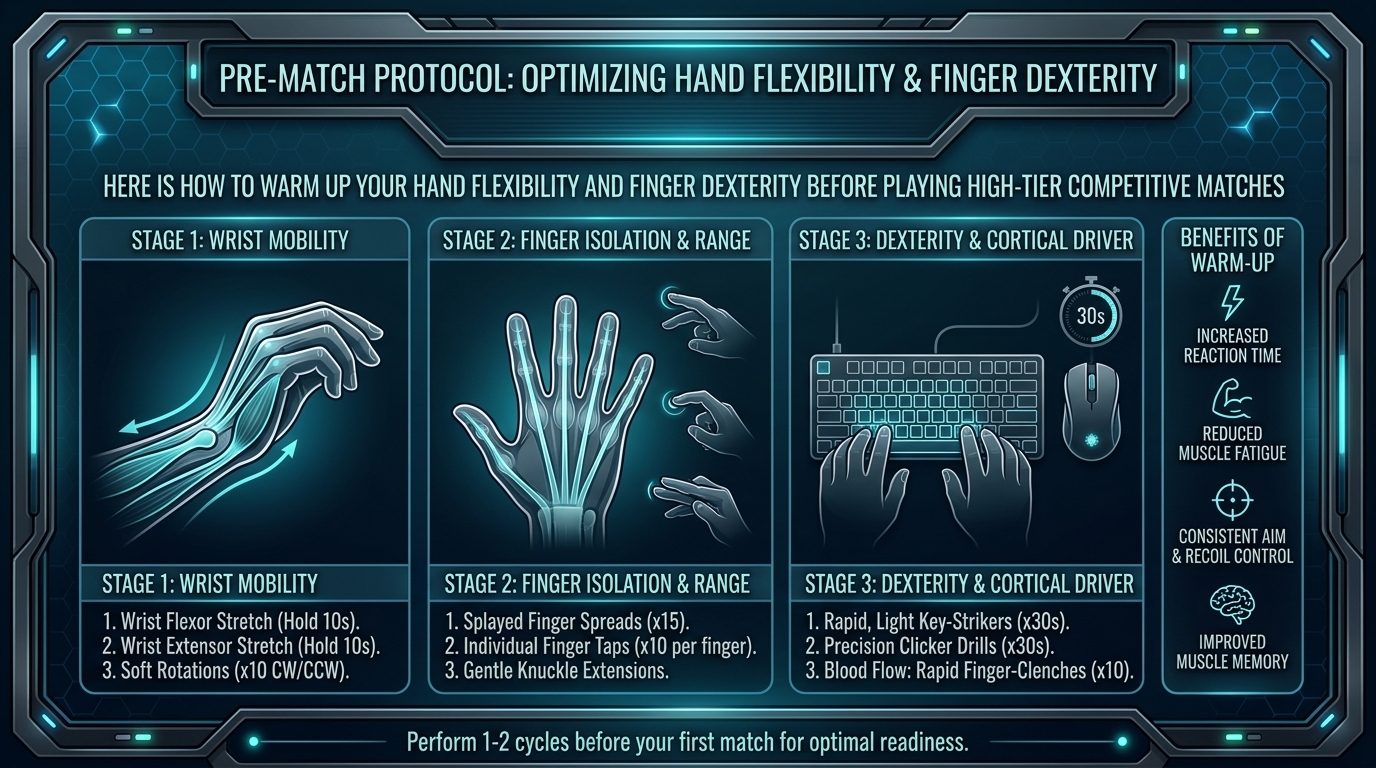
How to Warm Up Your Hand Flexibility and Finger Dexterity Before Playing High-Tier Competitive Matches
Whether you are clicking heads in VALORANT, executing 180 APM build fights in Fortnite, micro-managing units in StarCraft II, or pulling off frame-perfect combos in Street Fighter 6, your hands are your primary input device. In high-tier competitive gaming, milliseconds define the difference between winning a round and getting sent back to the lobby.
Yet, millions of competitive gamers jump directly into ranked matches cold. Cold hands lead to stiff joints, sluggish reaction times, missed inputs, and worst of all, chronic repetitive strain injuries (RSI) like carpal tunnel syndrome, de Quervain’s tenosynovitis, and wrist tendonitis.
At The Gamer Buzz, we dive deep into esports performance, hardware, and physical wellness. This definitive guide breaks down the science, routines, and strategies needed to warm up your hand flexibility, optimize finger dexterity, and protect your joints before jumping into high-stakes ranked matches.
Whether competing in regional LAN tournaments in Texas, esports arenas across California and San Francisco, gaming lounges in Washington, or grinding the ladder from an apartment in New York, proper physical warm-ups give you a measurable competitive edge.
1. The Science of Hand Warm-Ups: Why Cold Hands Ruin APM
Your hands contain a complex network of 27 bones, 34 muscles, and dozens of tendons and nerves working in precise sync. The muscles that control finger movements are located in your forearm and palm, connected to your fingers via long tendons running through your wrist.
What Happens When You Play “Cold”
- Reduced Nerve Conduction Velocity: Cold temperatures slow down electrical signals traveling along the median and ulnar nerves, resulting in delayed reaction times.
- Synovial Fluid Viscosity: Synovial fluid acts as a natural lubricant inside your finger and wrist joints. When cold, it thickens, increasing friction and joint stiffness.
- Reduced Blood Flow and Oxygenation: Inactive or cold hands receive less oxygenated blood, causing muscle fatigue, cramping, and shaky aim during tense clutch moments.
| Metric / Aspect | Cold Un-Warmed Hands | Warm-Up Prepared Hands | Performance Impact |
| Nerve Signal Speed | Slower (Delayed reaction) | Optimal (Instant input execution) | High: 10–30ms faster reaction time |
| Joint Friction | High (Stiff finger clicks) | Low (Fluid, effortless micro-adjustments) | High: Smoother tracking and recoil control |
| Grip & Control | Tense, jittery micro-movements | Relaxed, precise motor control | Critical: Reduces over-flicking in FPS games |
| RSI & Injury Risk | High (Elevated tendon strain) | Extremely Low (Protects wrist longevity) | Essential: Prolongs competitive gaming career |
2. Phase 1: Thermal Warm-Up (5 Minutes)
Never stretch cold tendons. Stretching cold tissue can create micro-tears and worsen inflammation. The first step of any elite esports warm-up is increasing hand tissue temperature.
Passive Thermal Methods
- Warm Water Submersion: Run warm (not boiling) water over your hands, wrists, and forearms for 2 to 3 minutes, gently flexing your fingers into fists under the stream.
- Rehab Hand Warmers or Heat Packs: Hold a microwavable gel pack or electric hand warmer between rounds to keep blood flowing in cold, air-conditioned tournament venues.
- Self-Massage: Rub your palms together briskly for 60 seconds, then use your opposite thumb to massage the fleshy muscle at the base of your thumb (thenar eminence) and outer palm (hypothenar eminence).
3. Phase 2: Hand Flexibility and Tendon Gliding Stretches (5 Minutes)
Once your hands are warm, perform dynamic stretches to improve mobility without losing muscular tension. Hold stretches for 15 to 20 seconds; never bounce or force movements past comfortable resistance.
1.The Extended Wrist Flexor and Extensor Stretch:Targets forearm flexors and wrist flexors.
Extend your right arm straight in front of you with your palm facing up. Use your left hand to gently pull your right fingers back toward your body. Hold for 15 seconds. Flip your hand over (palm facing down) and pull fingers toward your body to stretch the top of your wrist. Repeat on the left arm.
2.Nerve and Tendon Gliding Sequence:Frees median nerve sliding inside the carpal tunnel.
Hold your hand straight up like a stop sign. Bend your fingers into a hook fist (finger tips touching upper pads), then make a full fist, then unbend into an L-shape (knuckles bent 90 degrees), and finally return to an flat open hand. Repeat 5 smooth cycles per hand.
3.Thumb Abductor and Webbing Stretch:Relieves thumb tension from WASD and spacebar spam.
Spread your hand wide. Gently pull your thumb back and away from your index finger using your opposite hand to stretch the webbing between thumb and forefinger. Hold for 15 seconds.
4.Individual Finger Separations:Improves independent key clicking.
Place your hand flat on your desk. Keep your palm flat while lifting one individual finger off the desk surface at a time, holding for 2 seconds. Focus on isolating your ring finger and pinky, which share tendon sheaths.
5.Prayer and Reverse Prayer Stretches:Relieves forearm tension after heavy mouse flicks.
Place your palms together in front of your chest in a prayer position. Slowly lower your hands toward your waist while keeping your palms pressed together until you feel a stretch in your lower wrists. Reverse by pressing the backs of your hands together pointing downward.
4. Phase 3: Fine Motor Dexterity Drills (5 Minutes)
After stretching, activate your motor nervous system with targeted dexterity drills before launching into your game client.
Desk-Side Dexterity Drills
- The Finger Tap Sprint: Tap your thumb to index finger, thumb to middle finger, thumb to ring finger, and thumb to pinky in a rapid sequence. Cycle forward and backward for 30 seconds per hand.
- Stress Ball / Putty Squeezes: Use medium-resistance grip putty or a silicone stress ball. Perform 10 quick pulses, followed by a 5-second isometric hold.
- Pen / Stylus Twirling: Spin a pen or stylus between your index, middle, ring, and pinky fingers. This challenges fine-motor coordination and spatial hand awareness.
5. Phase 4: In-Game Aim and APM Activation (10 Minutes)
Now that your hands are warm, flexible, and responsive, transition into game-specific micro-drills to recalibrate eye-hand coordination.
- FPS Players (VALORANT, CS2, Apex Legends): Spend 5–10 minutes in Aim Labs or KovaaK’s running micro-flex and tracking scenarios (e.g., Gridshot, Smoothness Trainer). Avoid heavy flick training immediately before a match.
- MOBA & RTS Players (League of Legends, Dota 2, StarCraft II): Practice camera box scrolling, hotkey cycling, and precise unit micro in custom lobbies before entering ranked queues.
- Fighting Game Players (Street Fighter, Tekken, Smash): Practice motion inputs (quarter-circles, DP motions, wave dashes) on your stick, leverless controller, or gamepad in training mode.
10 Frequently Asked Questions (FAQ)
1. How long before a competitive match should I start my hand warm-up?
Begin your warm-up routine 15 to 20 minutes before queuing. This gives your body enough time to increase joint temperature and motor activation without inducing muscle fatigue.
2. Can stretching cold hands cause injuries?
Yes! Stretching cold, stiff tendons acts like pulling on a frozen rubber band—it can cause micro-tears, joint inflammation, and tendon strain. Always perform a 2-minute thermal warm-up (warm water or massage) before stretching.
3. What is the difference between wrist stiffness and Carpal Tunnel Syndrome?
Wrist stiffness is temporary joint friction solved by warm-ups. Carpal Tunnel Syndrome involves chronic numbness, tingling, or burning sensations radiating into the thumb, index, and middle fingers due to median nerve compression. If you experience persistent numbness, consult a physical therapist or doctor immediately.
4. Should I use compression gloves while gaming?
Compression gloves help retain heat and promote blood circulation, making them great for players prone to cold hands in air-conditioned rooms. However, ensure they are not so tight that they restrict finger movement or cut off circulation.
5. Why do my hands get cold while playing intense competitive matches?
Cold hands during gaming are often caused by stress-induced vasoconstriction (the “fight-or-flight” response), where your nervous system draws blood away from extremities toward core organs. Deep breathing exercises combined with thermal hand warmers counter this reaction.
6. Are hand grippers good for esports training?
Heavy crushing hand grippers are generally not recommended for esports. They build bulk forearm strength rather than fine motor control and can overwork your flexor tendons. Light grip putty or finger band extensions are far safer and more effective.
7. How often should I take hand breaks during a long gaming session?
Follow the 50/10 Rule: After every 50 minutes of intense gaming, take a 10-minute break. Step away from your desk, shake out your hands, drink water, and perform light wrist flexor stretches.
8. What ergonomics adjustments prevent hand strain?
Ensure your desk and chair allow your elbows to rest at a 90-to-100-degree angle, with your wrists lying flat (neutral spine position) rather than bent upward or downward against the edge of your desk.
9. Can warm-ups improve my in-game APM (Actions Per Minute) and aim accuracy?
Yes! Scientific studies in motor performance show that warm, lubricated joints and active nerve pathways reduce latency between your brain’s command and your finger’s physical click, improving both APM stability and micro-aim adjustments.
10. How do I maintain finger dexterity as I grow older in competitive gaming?
Consistent daily hand mobility work, proper desk ergonomics, staying hydrated, and avoiding playing through joint pain will maintain your finger flexibility and response speeds well into your late 20s, 30s, and beyond.
Conclusion
Your hands are your physical interface with the digital world. Treating them with the same care professional athletes give their bodies is the secret to unlocking peak APM, sharp aim, and career longevity in competitive gaming. By combining thermal heat, dynamic tendon stretches, dexterity activation drills, and structured in-game practice, you ensure your hands perform flawlessly in every high-stakes clutch.
Leave a Reply