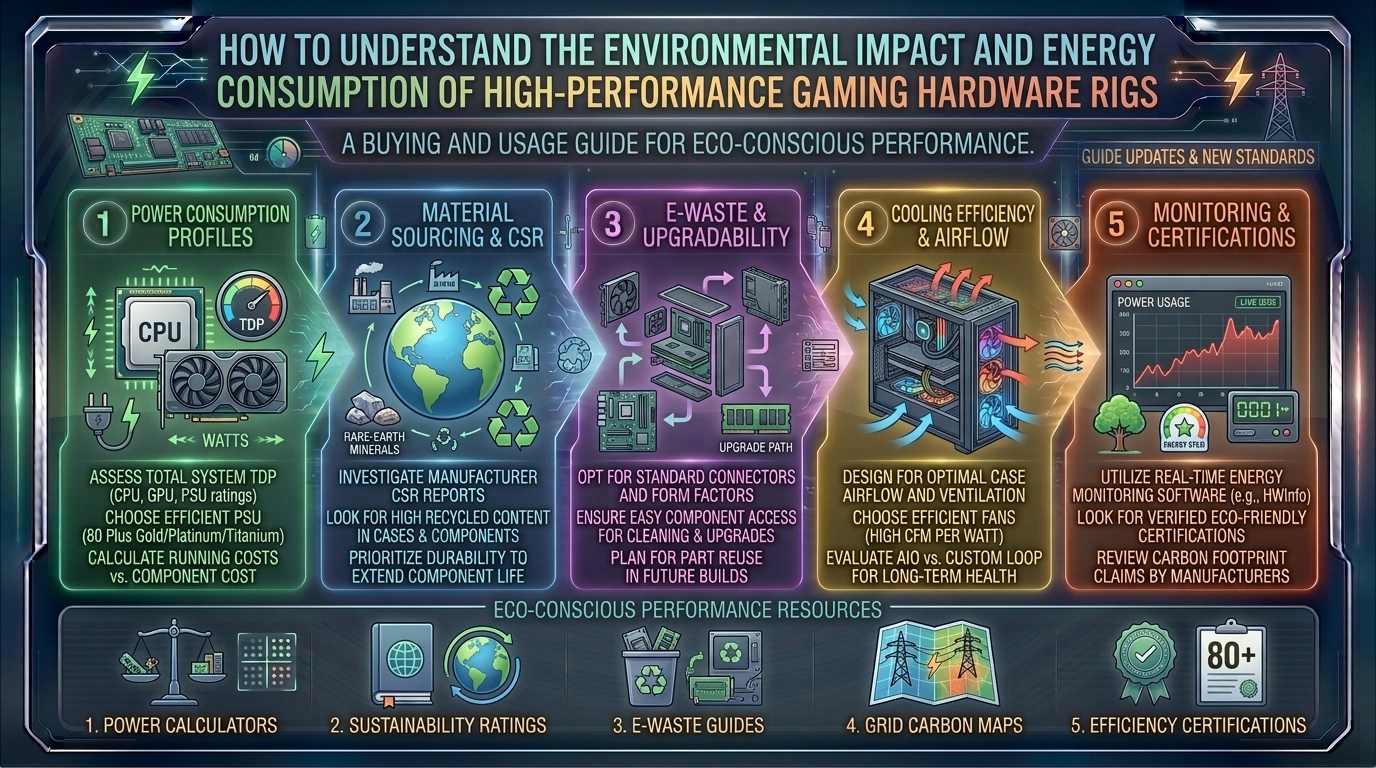
How to Understand the Environmental Impact and Energy Consumption of High-Performance Gaming Hardware Rigs
Introduction: The Hidden Power Behind Modern Gaming
For millions of enthusiasts across tech hubs and gaming epicenters like Texas, New York, California, Washington, and San Francisco, building and operating a high-performance gaming rig is a passion. We chase higher frame rates, ray-traced visuals, 4K resolutions, and ultra-responsive refresh rates. Yet, behind every glowing RGB chassis, fluid-cooled loop, and triple-fan graphics card lies a stark reality: extreme power consumption.
Modern high-end graphics cards and multi-core processors pull staggering amounts of electricity, transforming your sleek battle station into a localized space heater. As energy grids face rising pressures and electricity costs fluctuate wildly across different states—from the wind-and-hydro heavy grids of Washington to the complex urban grids of New York and San Francisco—understanding the environmental footprint of our hobby is no longer optional.
At thegamerbuzz.com, we believe that true gaming excellence includes technical awareness. This deep-dive guide explores how high-performance hardware impacts energy grids, the carbon footprint of manufacturing, and actionable tips to optimize your rig without sacrificing a single frame.
The Anatomy of Power: What Do High-Performance Rigs Actually Consume?
Unlike standard office laptops or home computers that idle quietly at 15 to 30 watts, a modern enthusiast gaming PC is a miniature power plant. Under heavy gaming loads, a high-end system equipped with top-tier components can easily draw anywhere from 400 to 800+ watts. When factoring in multi-monitor setups, external DACs, audio gear, and charging stations, total power draw can flirt with the 1,000-watt threshold.
Breakdown of Major Energy-Hungry Components
- The Graphics Processing Unit (GPU): The undisputed king of power consumption. Modern flagship GPUs can draw anywhere from 300 to 450+ watts under peak gaming loads alone.
- The Central Processing Unit (CPU): High-end multi-core processors routinely pull between 125 and 250+ watts when pushed during intense simulation, physics processing, or open-world gameplay.
- Cooling Systems & Aesthetics: Custom liquid cooling loops (pumps and multiple PWM fans) alongside extensive RGB arrays add an extra 30 to 60 watts of parasitic load to your system.
- Power Supply Unit (PSU) Inefficiency: No power supply is 100% efficient. Even with an 80 PLUS Platinum or Titanium rating, energy is lost as heat during the AC-to-DC conversion process (usually a 5% to 15% overhead penalty).
From Silicon to Landfill: The Full Lifecycle Carbon Footprint
The environmental impact of PC gaming extends far beyond the electricity bill sitting on your kitchen counter. It begins years before you plug the system into the wall and continues long after a component becomes obsolete.
1. Extraction and Manufacturing (Scope 3 Emissions)
The components that make our games look breathtaking—silicon wafers, rare earth metals (like neodymium for magnets and tantalum for capacitors), gold, copper, and lithium—must first be mined from the earth. Mining operations cause heavy habitat destruction, soil erosion, and chemical runoff.
Once extracted, processing silicon chips requires ultra-clean industrial environments, massive volumes of ultrapure water, and chemical baths. Manufacturing a single high-end processor or graphics card generates a disproportionately high amount of embedded carbon emissions before it even leaves the assembly plant.
2. Operational Energy Use
During its operational lifecycle (typically 3 to 5 years for a hardcore gamer), the system burns continuous kilowatt-hours (kWh). If your local grid relies heavily on fossil fuels (coal and natural gas), every hour spent in a virtual world translates directly into carbon emissions pumped into the atmosphere.
3. E-Waste and Disposal
Because hardware cycles move fast, graphics cards and CPUs are frequently retired while still functional simply because they cannot maintain ultra settings on brand-new game releases. Discarded electronics (e-waste) contain toxic materials such as lead, mercury, and cadmium. When dumped improperly into landfills, these elements leach into local soil and water tables.
Regional Energy Realities: How Location Changes Your Impact
The environmental cost of running a high-end rig depends heavily on where you live, as local power grid compositions dictate how much carbon is emitted per kilowatt-hour consumed.
+------------------+----------------------------------+-------------------------------------------------+
| Region           | Primary Grid Energy Mix          | Environmental / Carbon Intensity                |
+------------------+----------------------------------+-------------------------------------------------+
| Washington       | Hydroelectric & Wind             | Very low carbon intensity (Clean energy abundant)|
| California / SF  | Solar, Wind, Natural Gas         | Moderate intensity; heavy solar penetration     |
| New York         | Nuclear, Natural Gas, Hydro      | Low to moderate carbon intensity                |
| Texas            | Natural Gas, Wind, Solar, Coal   | Moderate to high intensity depending on season  |
+------------------+----------------------------------+-------------------------------------------------+
- Washington State: Thanks to vast hydroelectric infrastructure, gamers in Washington enjoy some of the cleanest and cheapest electricity in the country, meaning their operational carbon footprint is remarkably low.
- Texas: Texas features an independent grid with massive wind and solar integration, but high reliance on natural gas and fossil peaker plants during extreme heatwaves spikes the carbon output of gaming sessions.
- California & San Francisco: Driven by aggressive clean energy mandates, the grid features heavy solar and wind presence during the day, though evening gaming sessions often draw on natural gas reserves.
- New York: New York balances a mix of upstate nuclear and hydro power with downstate natural gas generation, maintaining a moderate overall carbon footprint.
Actionable Tips to Optimize Your Rig’s Energy Efficiency
You do not need to quit gaming to protect the planet. Small, intelligent adjustments to your hardware settings can drastically slash your power draw without dropping your frame rates into unplayable territory.
1. Frame Rate Limiting (Cap Your FPS)
If your monitor only refreshes at 144Hz, running a game at an uncapped 300 FPS forces your GPU to work at 100% capacity for frames your eyes cannot even perceive. Use the NVIDIA Control Panel, AMD Software, or in-game settings to cap your maximum frame rate to match your monitor’s exact refresh rate. This simple tweak can cut GPU power consumption by 20% to 40% instantly.
2. Undervolting Your GPU
Most graphics cards leave the factory with excess voltage pumped into the silicon to guarantee stability across poorly manufactured chips. Undervolting allows you to systematically lower the voltage supplied to the GPU core while maintaining stock clock speeds. The result? Dramatically lower temperatures, quieter fans, and a 15% to 30% reduction in power draw with zero performance loss.
3. Optimize Power Plans and Sleep States
Do not leave your high-end rig running idle at the desktop overnight while you sleep. A system sitting idle can still draw 70 to 100 watts. Configure Windows Power Plans to put the display to sleep after 10 minutes of inactivity and spin down hard drives when not in use.
4. Invest in an 80 PLUS Titanium or Platinum PSU
If your power supply is old or rated only at 80 PLUS White/Bronze, it wastes a significant amount of electricity as heat. Upgrading to a modern, high-efficiency power supply ensures that less energy is lost during conversion, immediately lowering your monthly utility bill.
5. Adopt Smart Peripherals
Use smart power strips or smart plugs that automatically cut power to your monitor, speakers, and peripherals when your PC enters a complete shutdown state, eliminating phantom “vampire draw” loads.
Frequently Asked Questions (FAQ)
1. How much does running a high-end gaming PC actually cost on my monthly electric bill?
A high-end rig consuming an average of 500 watts under gaming loads, played for 3 hours daily, consumes roughly 45 kWh per month. Multiplied by your local utility rate (which varies from roughly 12 cents to over 30 cents per kWh depending on whether you live in Texas, New York, or San Francisco), this adds about $6 to $15+ a month to your bill for the PC alone.
2. Does undervolting my graphics card void its warranty?
No. Undervolting is executed via software utilities like MSI Afterburner by lowering voltage curves rather than altering physical hardware or flashing unauthorized BIOS variants. If an undervolt is unstable, the software simply resets or the PC reboots safely back to default stock settings.
3. Why do graphics cards use so much more power than they used to?
Modern game engines demand immense parallel processing power for real-time ray tracing, complex physics calculations, and high-resolution textures. To deliver generational performance leaps, chip designers have continuously raised the thermal design power (TDP) thresholds of flagship GPUs.
4. Are gaming laptops more environmentally friendly than desktop rigs?
Generally, yes, in terms of raw energy consumption. Gaming laptops typically draw between 100 and 200 watts total because their mobile components are engineered for strict thermal and battery efficiency. However, laptops have a shorter functional lifespan and are significantly harder to repair or upgrade, introducing separate e-waste concerns.
5. Does cloud gaming (like GeForce NOW or Xbox Cloud) save energy?
Not necessarily. While cloud gaming shifts the heavy rendering hardware workload away from your local device to a massive data center, those data centers run continuously at immense scale. Studies indicate that high-bitrate streaming over complex network routers can sometimes consume comparable or even higher total end-to-end energy than running efficient local hardware.
6. How does ray tracing affect my PC’s power consumption?
Ray tracing introduces complex calculations for light simulation, path tracing, and reflections. Turning ray tracing on forces RT cores inside the GPU to run at maximum capacity, significantly increasing both power draw and thermal output compared to traditional rasterized rendering.
7. What is the single most effective way to lower my gaming carbon footprint?
The absolute best approach is hardware longevity. Keeping your existing gaming rig for an extra generation or upgrading individual parts (like just swapping the GPU) rather than buying an entirely new pre-built system every three years cuts down enormously on embedded manufacturing emissions and e-waste.
8. Do RGB lights and extra case fans consume a noticeable amount of power?
Individually, a single LED strip or fan uses very little power (2 to 5 watts). However, a fully decked-out enthusiast rig featuring 10 RGB fans, liquid cooling pumps, and elaborate lighting hubs can easily compound into a 50-watt parasitic load—equivalent to leaving a bright household light bulb burning constantly while you game.
9. What should I do with old PC hardware when I upgrade?
Never throw old graphics cards or motherboards into household trash bins. Instead, sell functional hardware on secondary markets, donate working components to local school tech programs, or drop them off at certified e-waste recycling facilities that safely reclaim precious metals.
10. Where can I find more hardware efficiency benchmarks and guides?
For the latest deep dives into hardware efficiency, green tech initiatives, and performance optimization guides tailored for modern gamers, keep reading right here at thegamerbuzz.com.
Conclusion
High-performance PC gaming is an incredible digital art form, offering immersive worlds and unmatched interactive experiences. However, the hardware that fuels these experiences comes with a real environmental price tag. By understanding where our energy goes, choosing efficient components, practicing smart hardware maintenance, and capping unneeded frame rates, gamers can enjoy top-tier performance while minimizing their ecological footprint.
Leave a Reply