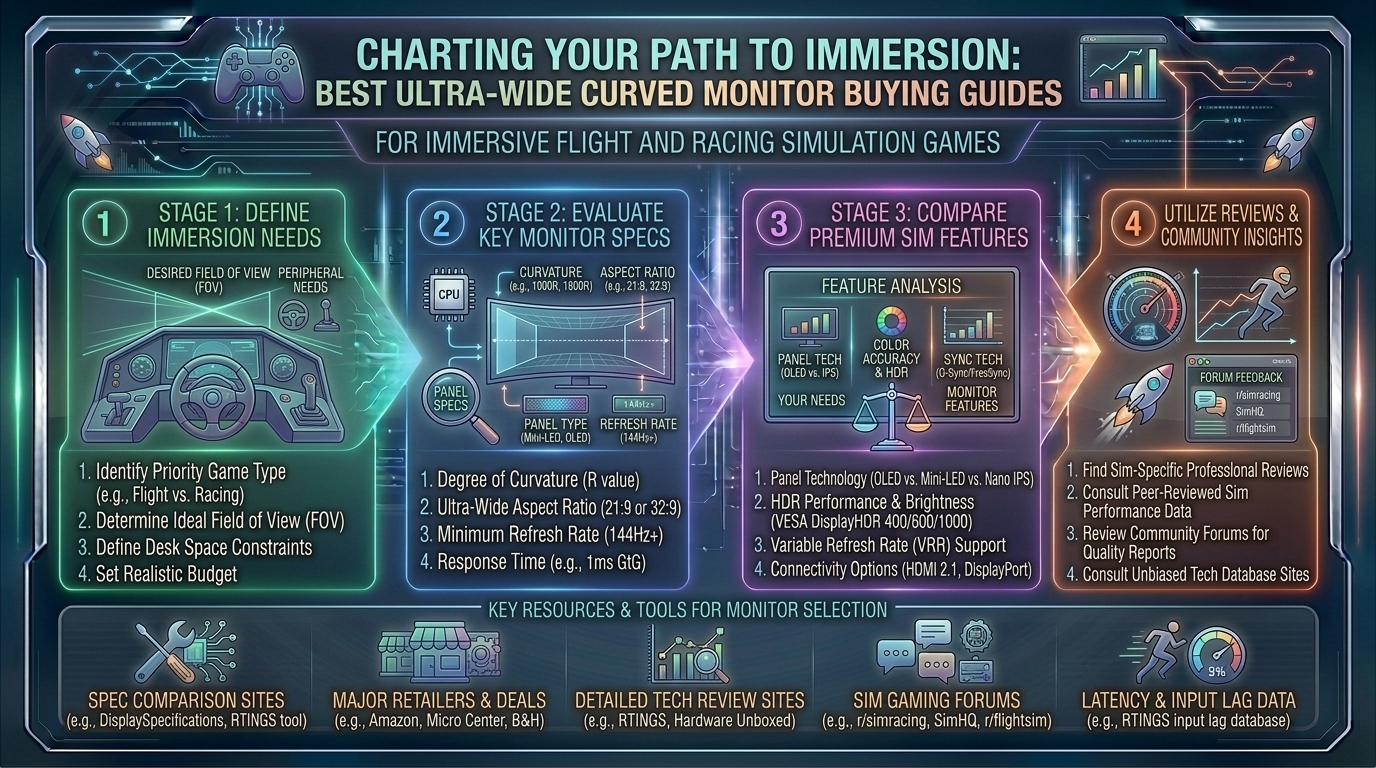
What Are the Best Ultra Wide Curved Monitor Buying Guides for Immersive Flight and Racing Simulation Games
Welcome to thegamerbuzz.com! Whether you are finalizing a high-end sim rig in a sleek San Francisco apartment, configuring a multi-monitor enthusiast setup in New York, calibrating controls across Texas and Washington, or optimizing frame rates in California, immersion is the holy grail of simulation gaming.
When you are dropping into the cockpit of an F/A-18 Hornet in DCS World or fighting for apex positioning through Eau Rouge in Assetto Corsa Competizione, flat standard displays fail to trick your brain into believing you are actually there. Enter ultrawide curved monitors and super-ultrawide display systems—the ultimate compromise-free solution to massive fields of view (FOV) without the structural nightmares and bezel lines of traditional triple-screen setups.
This master buying guide walks you through every technical nuance, curvature specification, panel type, and top hardware recommendation to help you choose the best curved ultrawide monitor for your sim rig.
1. Why Curved Ultrawides Rule Flight and Racing Sims
Simulation games are unique. Unlike fast-paced first-person shooters where your eyes lock onto a crosshair dead center, simulation titles require active peripheral awareness.
- Natural Peripheral Vision Expansion: A 21:9 or 32:9 aspect ratio wraps images around your natural sightlines, letting you track clipping points, apexes, runway approach lights, and rival racing mirrors without panning your camera manually.
- The Curvature Factor (R-Rating): Monitor curves are measured in radii (e.g., 1000R, 1800R). A lower number means a tighter, more aggressive curve. For simulation rigs where your face sits 70cm to 90cm from the glass, an aggressive curve (like 1000R) mirrors the wrap-around geometry of a real vehicle or aircraft cockpit.
- Bezel-Free Immersion: Unlike triple-monitor rigs—which suffer from plastic frame lines slicing right through your side mirrors or cockpit gauges—a single continuous curved ultrawide panel delivers uninterrupted visual flow.
2. Understanding Aspect Ratios: 21:9 vs. 32:9 Super-Ultrawides
Before shopping, you must decide how much horizontal stretch your desk space and graphics card can handle.
+-------------------------------------------------------------------------+
                    ASPECT RATIO COMPARISON GUIDE
+-------------------------------------------------------------------------+
  Option A: 21:9 Ultrawide (e.g., 3440 x 1440 UWQHD)
  -> Ideal screen sizes: 34-inch to 38-inch panels.
  -> Sweet spot: Balances immense peripheral depth with manageable GPU loads.

  Option B: 32:9 Super-Ultrawide (e.g., 5120 x 1440 DQHD)
  -> Ideal screen sizes: 49-inch panels (replaces dual/triple setups).
  -> Sweet spot: Maximum cockpit wrap-around; requires high-end GPU power.
+-------------------------------------------------------------------------+
3. Top Curved Ultrawide Monitors for Simulators
The market features incredible panels tailored specifically for high-speed motion, deep shadow contrast, and rapid response times.
A. The Ultimate 32:9 Super-Ultrawide King: Samsung Odyssey OLED G9 (G93SC / G95SC)
- Specs: 49-inch | 5120 x 1440 (DQHD) | OLED | 240Hz | 0.03ms GtG | 1800R Curve
- Why it wins for Sims: If you want total cockpit dominance without messing with three separate monitors, the Samsung Odyssey OLED G9 is the gold standard. The combination of infinite OLED contrast, absolute true blacks for night racing, and a blistering 240Hz refresh rate makes every track surface texture and runway light pop with stunning realism.
B. The Best Balanced 21:9 Performance Pick: Alienware AW3423DWF (or ASUS ROG Swift OLED PG34WCDM)
- Specs: 34-inch | 3440 x 1440 (UWQHD) | QD-OLED / OLED | 165Hz–240Hz | 0.1ms–0.03ms GtG | 1800R Curve
- Why it wins for Sims: For sim racers or flight simmers with limited desk space or mid-tier graphics cards, a 34-inch 21:9 QD-OLED display hits the absolute sweet spot. It provides a clean, highly immersive FOV without demanding the massive pixel-pushing power of a 49-inch super-ultrawide.
C. The High-Speed Alternative: MSI MPG 341CQR QD-OLED X36
- Specs: 34-inch | 3440 x 1440 | QD-OLED | 360Hz | 0.03ms GtG | 1800R Curve
- Why it wins for Sims: Featuring a stunning 360Hz refresh rate and advanced DisplayPort 2.1a connectivity, this monitor is engineered for hardcore enthusiasts who want zero motion blur during high-speed open-wheel racing.
4. Crucial Buying Considerations & Pro Tips
- Match Your GPU Power: Running a 5120×1440 super-ultrawide at 144Hz+ requires heavy lifting. Ensure your graphics card (e.g., NVIDIA RTX 4070 Super / 4080 or AMD Radeon equivalent) can handle high resolutions before buying a top-tier panel.
- OLED vs. VA Panels: OLED panels offer instantaneous 0.03ms response times and pitch-black levels, which drastically elevate night-flying or night-racing immersion. High-end VA panels remain a great budget-friendly alternative with deep contrast, though they may suffer from minor black smearing.
- VSI / Mount Compatibility: Ultrawide and super-ultrawide monitors are heavy. If you are mounting your display directly to an aluminum profile sim rig (like a Next Level Racing, Track Racer, or Sim-Lab chassis), check the VESA mount dimensions (usually 100x100mm) and weight limits carefully.
- Field of View (FOV) Calculators: Always use online sim-racing FOV calculators (such as those provided by Coach Dave Academy or Kunos Simulazioni) once your monitor is mounted. Correct FOV math prevents spatial distortion and ensures accurate speed perception.
10 Frequently Asked Questions (FAQs)
1. Are curved ultrawides better than VR headsets for flight and racing sims?
It depends on user preference. VR offers unmatched 3D depth and head-tracking, but curved ultrawides offer superior visual clarity, vibrant HDR brightness, zero screen-door effect, and long-term comfort without motion sickness.
2. Is 32:9 too wide for flight simulators?
Not at all. In flight sims like Microsoft Flight Simulator, a 32:9 super-ultrawide lets you view the entire main instrument panel, yoke, and side windows simultaneously without awkward camera panning.
3. What is the ideal curvature for a simulation monitor?
For single-monitor setups viewed at close range (70–80 cm), a tight 1000R to 1800R curve is ideal because it wraps the edges into your natural peripheral vision.
4. Do I need G-Sync or FreeSync support?
Yes. Variable Refresh Rate (VRR) technologies like NVIDIA G-Sync and AMD FreeSync synchronize your monitor’s refresh rate with your GPU frame output, eliminating screen tearing when frame rates fluctuate during heavy grid starts.
5. Will my console (PS5 or Xbox Series X) work with a 32:9 super-ultrawide?
Console support for ultra-wide aspect ratios is limited. Most current-gen consoles output natively in 16:9, meaning a 32:9 monitor will display black vertical bars on the sides unless the console stretches or crops the image.
6. Can I use a curved ultrawide for work and productivity too?
Absolutely. A 49-inch 32:9 super-ultrawide replaces a dual-monitor setup seamlessly, offering immense workspace real estate for multitasking, video editing, and daily office tasks.
7. Do OLED monitors suffer from burn-in with static racing HUDs?
Modern OLED monitors feature advanced built-in protections (such as pixel shifting, logo brightness reduction, and custom heatsinks), minimizing burn-in risks during long simulation sessions.
8. What cable should I use to get maximum refresh rates?
Always use a high-speed DisplayPort 1.4 / 2.1 cable or an HDMI 2.1 cable that matches your monitor’s maximum bandwidth specifications to avoid bottlenecking your refresh rate.
9. How do I calculate the correct FOV for an ultrawide monitor?
You plug three metrics into an in-game calculator: your monitor’s screen width, your exact eye distance from the screen, and your game selection. This computes a mathematically accurate perspective.
10. Are curved monitors difficult to mount on a sim rig?
They can be heavy and awkward due to their length. It is always recommended to have two people assemble and mount 49-inch or larger super-ultrawide monitors onto a dedicated cockpit stand.
Conclusion
Upgrading to a curved ultrawide monitor is single-handedly one of the most transformative investments you can make for your flight or racing simulation rig. Whether you choose the immersive, expansive canvas of the Samsung Odyssey OLED G9 or the refined performance workspace of a 34-inch QD-OLED panel, your virtual cockpit will never look or feel the same. Gear up, dial in your FOV, and claim your spot on the podium.
Sim Racing Monitor Setup and FOV Guide
This video provides a practical, visual demonstration of how to mount ultrawide screens, configure correct in-game FOVs, and optimize graphic settings for maximum immersion.
Leave a Reply