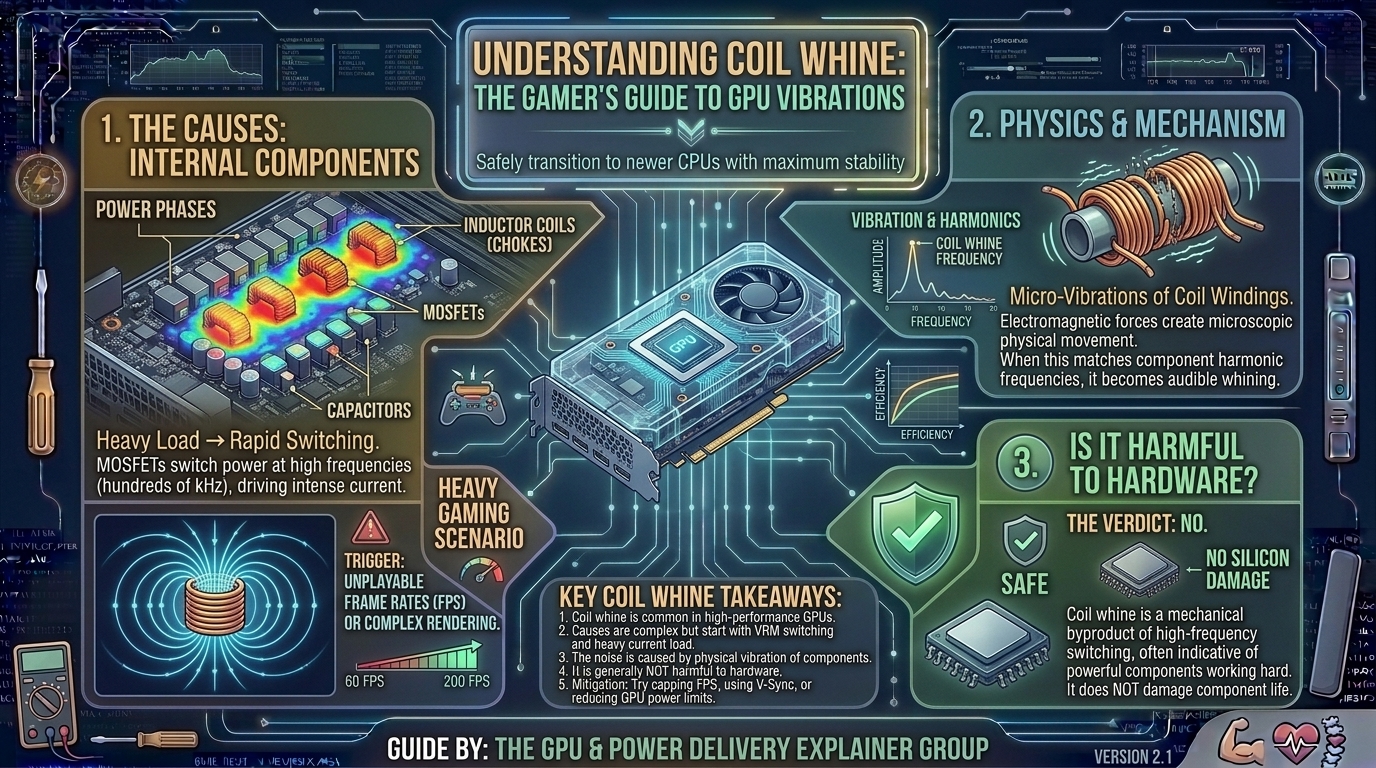
Coil whine is a high-pitched buzzing, squeaking, or electronic hiss coming directly from your PC tower. It gets louder the moment you boot up a graphically demanding game, launch a benchmark, or load into an uncapped game menu.
Coil whine is an acoustic byproduct of high-performance electronics. This guide explains the physics of coil whine, assesses potential system risks, and details steps to reduce or eliminate the noise.
1. What Exactly Is Coil Whine? The Physics Explained
Coil whine is the sound produced by electromagnetic components inside your PC—most notably on your graphics card (GPU) and Power Supply Unit (PSU).
Modern graphics cards use a Voltage Regulator Module (VRM) to convert incoming 12V direct current (DC) power from your power supply into precise, low-voltage power (often around 1.0V to 1.4V) usable by the GPU die and VRAM.
+-------------------------------------------------------------+
|                     GPU VRM POWER DELIVERY                  |
+-------------------------------------------------------------+
| 12V DC Input (PSU)                                          |
|      │                                                      |
|      ▼                                                      |
| MOSFETs (High-Frequency Power Switching)                    |
|      │                                                      |
|      ▼                                                      |
| Inductors / Chokes (Smooth & Filter Current)                |
|      │  └─► High Current Causes Electromagnetic Field       |
|      │  └─► Magnetostriction Triggers Physical Vibration    |
|      │  └─► High Frequency (Khz) Creates Audible "Whine"  |
|      ▼                                                      |
| GPU Core & VRAM Clean Low-Voltage Power Supply              |
+-------------------------------------------------------------+
Key components involved in coil whine include:
- Inductors (Chokes): Small wire coils wrapped around a magnetic core (such as ferrite) designed to smooth out current and filter voltage ripples.
- Magnetostriction: When high electrical current passes through these coils, it creates a magnetic field. This field causes the wire windings and magnetic core to expand and contract at microscopic scales millions of times per second.
- Audible Frequency Range: When your GPU operates under heavy gaming loads, these micro-vibrations occur thousands of times per second (kHz frequencies), producing audible sound waves.
2. What Causes Coil Whine During Heavy Gaming?
Coil whine fluctuates depending on what your computer is doing. Specific triggers include:
1. High Power Draw and Heavy Current Load
Modern high-end GPUs consume anywhere from 250W to over 450W of power. As power draw spikes during heavy 4K gaming or ray-tracing workloads, the amount of current passing through the VRM chokes increases. Higher current generates stronger magnetic forces, leading to physical vibrations.
2. Extremely High Frame Rates (Uncapped FPS)
Loading screens, game menus, or older titles can run at uncapped frame rates exceeding 500+ FPS. At these ultra-high frame rates, the GPU switches power states thousands of times a second. This rapid power switching forces the inductors to vibrate at higher frequencies, making the whine louder.
3. Component Silicon and Manufacturing Tolerances
Coil whine varies between individual graphics cards, even across two identical GPU models from the same manufacturer. Minor variations in wire winding tightness, glue density, or how tightly the choke is sealed create slight differences in acoustic resonance.
4. Power Supply Unit (PSU) Harmonics and Voltage Ripple
A GPU does not operate in total isolation; it receives power from the PSU. If a power supply produces dirty power (high voltage ripple) or has loose electrical tolerance loops, it amplifies vibrations inside the GPU’s VRM chokes.
3. Is Coil Whine Harmful to Your Graphics Card or System?
No. Standard coil whine is not harmful to your hardware.
+-------------------------------------------------------------+
|                COIL WHINE DIAGNOSTIC MATRIX                 |
+-------------------------------------------------------------+
| Symptom                        | Harmful? | Action Required |
+--------------------------------+----------+-----------------+
| High-pitched hiss under load   |   NO     | None (Acoustic) |
| Sound pitch changes with FPS   |   NO     | Cap Framerate   |
| Game crashes + Burning smell   |   YES    | RMA / Replace   |
| Visual artifacts on screen     |   YES    | Troubleshoot    |
+--------------------------------+----------+-----------------+
Coil whine is purely an acoustic byproduct of physical vibration. It does not indicate component failure or degrade system performance:
- It does not shorten hardware lifespan: The microscopic vibrations causing the sound do not wear out solid-state inductors.
- It does not lower performance: A GPU with loud coil whine operates at the exact same clock speeds and stability as a completely silent card.
- It does not mean your GPU is defective: Major manufacturers (ASUS, MSI, Gigabyte, XFX, Sapphire) explicitly treat coil whine as normal physical behavior rather than a manufacturing defect.
When Is a Noise Cause for Concern?
If the sound is accompanied by game crashes, sudden system reboots, visual artifacts, thermal throttling, or a burning smell, the noise may be coming from failing capacitors or overheating VRMs rather than standard inductor magnetostriction. In these scenarios, test your hardware stability immediately.
4. How to Reduce or Eliminate GPU Coil Whine: Proven Fixes
While you cannot completely eliminate inductor vibration via software, you can lower its volume using these steps:
Method A: Cap Your Frame Rate (FPS Limiter)
Running games at uncapped frame rates causes sharp current spikes.
- Open your graphics control panel (e.g., NVIDIA Control Panel or AMD Software).
- Set a Max Frame Rate limit that matches your monitor’s refresh rate (e.g., 144Hz, 165Hz, or 240Hz).
- Enable V-Sync, G-Sync, or FreeSync to prevent the GPU from pushing thousands of redundant frames in game menus.
Method B: Undervolt Your Graphics Card
Undervolting lowers the voltage supplied to the GPU core while maintaining stock clock speeds. Lower voltage reduces current draw, heat output, and inductor vibration intensity.
- Download MSI Afterburner.
- Press
Ctrl + Fto open the Voltage-Frequency Curve Editor. - Flatten the voltage curve beyond a stable target frequency (e.g., locking the GPU to 0.950V instead of the stock 1.050V+).
- Run stress tests to confirm system stability under load.
Method C: Upgrade to a High-Quality Power Supply (PSU)
If your PSU has high voltage ripple or weak power filtering, swapping to an 80-Plus Gold or Platinum unit with clean power delivery can significantly dampen GPU coil whine. Ensure you use separate PCIE power cables from the PSU to each GPU power connector, avoiding daisy-chained splitter cables.
Method D: Let the GPU Break In
Newly unboxed graphics cards often exhibit stronger coil whine during their first few days of use. Running a heavy benchmark or playing demanding games for 20 to 40 hours can cause the thermal pads, solder joints, and dampening resins to settle, often reducing acoustic noise over time.
5. Summary Table: Mitigation Strategies
| Method | Ease of Implementation | Impact on Noise | Impact on Performance |
| Cap Frame Rate (FPS Limit) | Very Easy | High | None (Match Monitor Hz) |
| Undervolt GPU | Moderate | High | None (Improves Thermals) |
| Upgrade Power Supply (PSU) | Moderate / Requires Purchase | Moderate to High | Improved System Stability |
| Acoustic Dampening Case | Easy / Requires Purchase | Moderate | Slightly Warmer Thermals |
| Burn-In Period (Usage) | Automatic | Low to Moderate | None |
6. Frequently Asked Questions (FAQ)
1. Will manufacturers accept an RMA return for GPU coil whine?
Most hardware manufacturers (such as ASUS, MSI, and Gigabyte) consider coil whine normal physical behavior rather than a defect. Standard RMA requests based solely on coil whine are frequently denied unless the noise is abnormally loud or accompanied by component failure. However, retailer return windows (like Amazon or Micro Center) usually allow hassle-free exchanges.
2. Is coil whine covered under warranty?
Generally, no. Because coil whine does not harm the graphics card or degrade electrical performance, it is classified as an acoustic nuisance rather than a warranty breach.
3. Does undervolting void my graphics card warranty?
No. Undervolting lowers power supply consumption and operating temperatures, making it safer for components than overvoltaging. Software-level undervolting via tools like MSI Afterburner does not void your warranty.
4. Why does my coil whine get louder in game menus?
In game menus or loading screens, 3D rendering loads drop significantly, allowing frame rates to surge into the hundreds or thousands of FPS. This causes rapid power switching in the VRM inductors, magnifying acoustic whine.
5. Can a bad power supply (PSU) cause GPU coil whine?
Yes. A power supply with loose voltage regulation or high voltage ripple feeds unclean power to the graphics card, causing the GPU’s VRM inductors to vibrate more violently.
6. Can liquid hot glue or custom damping pads fix coil whine manually?
While applying non-conductive silicone or hot glue directly onto inductors can dampen physical vibrations, doing so voids your graphics card warranty and risks damaging surrounding micro-components. It is not recommended for standard users.
7. Does coil whine get worse over time?
Typically, no. Coil whine is usually loudest when the card is brand new and tends to soften slightly over time as component thermal materials set. If coil whine suddenly develops or gets noticeably louder after years of use, inspect your PSU for aging capacitors.
8. Is coil whine more common on NVIDIA or AMD graphics cards?
Coil whine is platform-agnostic. It occurs on high-power NVIDIA GeForce RTX cards and AMD Radeon RX cards alike. Higher wattage boards generally carry a higher probability of audible whine due to increased current draw through the VRM.
9. Will a power conditioner or UPS help reduce coil whine?
If your home AC outlet suffers from dirty power or voltage dips, feeding your PC through an online Uninterruptible Power Supply (UPS) or power line filter can help stabilize input power and reduce noise.
10. Does liquid cooling eliminate coil whine?
No. Water blocks cool the GPU die and VRMs, but they do not stop electrical current from causing magnetostriction in the inductors. In fact, removing noisy GPU cooling fans can make raw coil whine more audible.
Coil whine can be annoying during quiet gaming sessions, but it is a harmless physical phenomenon caused by electrical current moving through power delivery coils. It does not damage your hardware, reduce your GPU’s lifespan, or degrade gaming performance.
To reduce coil whine, cap your frame rates in your GPU control panel, undervolt your card using MSI Afterburner, and ensure your system is powered by a high-quality, clean-power supply unit.
Leave a Reply