What Are the Best Vertical GPU Mount Kits That Do Not Restrict Airflow or Cause High Temperatures?
Mounting a graphics card vertically inside a custom PC build turns a powerful component into the visual center of your setup. However, standard vertical mounting often comes with a performance trade-off: thermal throttling.
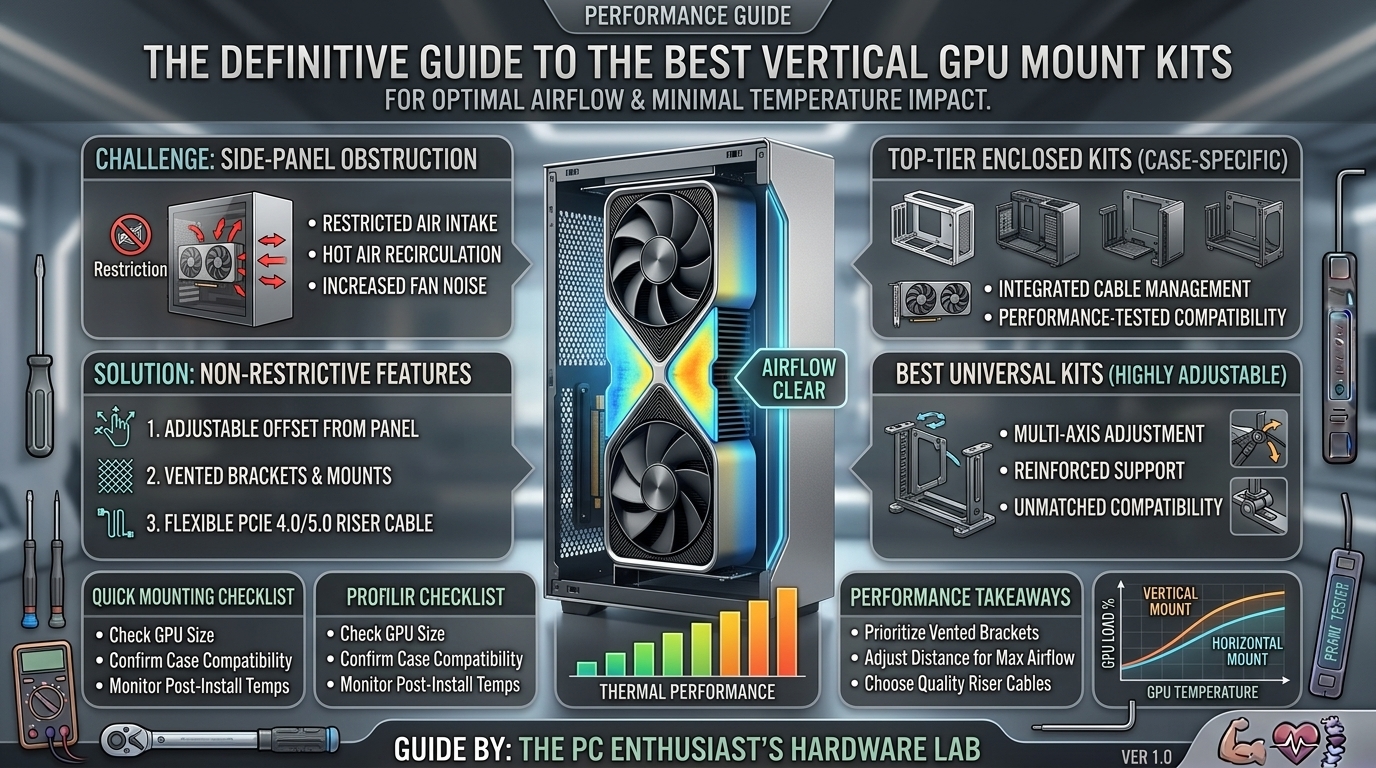
When a large multi-slot graphics card is mounted flush against a solid glass side panel, its cooling fans are starved for fresh intake air. This air restriction causes GPU core temperatures to climb, forcing fans to run at maximum noise levels and triggering thermal throttling that drops frame rates during long gaming sessions.
Modern case design and universal vertical GPU brackets have evolved to solve this problem. Today’s best vertical GPU mount kits use adjustable recessed positioning, full PCI-e slot shift designs, or angled layouts to ensure your graphics card receives clean airflow while maintaining lower temperatures.
This guide breaks down how vertical mounting affects thermal dynamics, what features to look for in airflow-focused brackets, and the top vertical GPU mounts available today.
1. The Physics of Vertical GPU Airflow and Thermals
Understanding how a vertical mount affects thermals requires looking at your PC case’s internal airflow paths.
+-------------------------------------------------------------------------+
|                    STANDARD VS POOR VERTICAL MOUNT                      |
+-------------------------------------------------------------------------+
| Standard Horizontal Mount (Optimal Intake)                              |
|   ├─► Fans Pull Cold Air From Front/Bottom Intakes                      |
|   └─► Ample Clearance (50mm+) Below GPU Shroud                          |
|                                                                         |
| Poor Vertical Mount (Glass Restriction - Severe Recirculation)          |
|   ├─► Fans Pressed Against Glass (< 15mm Clearance)                     |
|   └─► Fans Vacuum Cold Air -> Hot Exhaust Recirculates -> Throttling    |
+-------------------------------------------------------------------------+
The “Glass Clearance” Problem
Traditional PC cases often include built-in vertical PCIe slots positioned directly next to the side panel. Mounting a 2.5-slot or 3.5-slot modern graphics card (like an NVIDIA RTX 4080/4090 or AMD RX 7900 XTX) in these stock slots places the GPU intake fans just 10mm to 15mm away from the tempered glass.
This tight clearance creates three main issues:
- Intake Air Restriction: The fans struggle to draw air through the tiny gap between the shroud and the panel, creating a partial vacuum.
- Hot Air Recirculation: Trapped hot exhaust air circulating around the side panel is pulled back into the GPU intake rather than exhausting out the back or top of the chassis.
- Thermal Throttling: Operating temperatures can jump by 8°C to 15°C, pushing core speeds down to protect the silicon.
The Solution: Recessed and Off-Set Brackets
Aftermarket vertical mounting kits replace your case’s horizontal PCIe expansion slots entirely. By shifting the graphics card inward toward the motherboard, these brackets create 40mm to 70mm+ of clearance from the side panel, restoring unobstructed intake airflow.
2. Key Features to Look for in an Airflow-Focused Vertical GPU Mount
When selecting a vertical bracket to keep temperatures low, prioritize these design elements:
+-------------------------------------------------------------------------+
|                  HIGH-PERFORMANCE BRACKET SELECTION MATRIX              |
+-------------------------------------------------------------------------+
| [X] Full PCIe Slot Recessing (Replaces 7 Bridge-less PCIe Expansion Slots)|
| [X] PCIe 4.0 or PCIe 5.0 Riser Cable Included (Gen 4/5 Bandwidth)      |
| [X] Horizontal & Depth Adjustability (Slide Closer to Motherboard)     |
| [X] Angled Mounting Capability (15° to 30° Tilt for Air Access)         |
| [X] Heavy-Duty Steel Construction (Prevents Heavy GPU Sag)              |
+-------------------------------------------------------------------------+
1. Depth and Recessing Adjustability
Look for brackets that feature sliding track mechanisms. This allows you to position the graphics card closer to the motherboard or move it forward/backward to clear tall CPU air coolers or bottom-mounted radiator fans.
2. Angled/Tilted Mounting Designs
Some modern vertical mounts allow you to tilt the graphics card at a 15° to 45° angle. Angling the GPU faces its intake fans directly toward cold airflow coming from bottom case intake fans, lowering core and VRAM temperatures.
3. PCIe Riser Cable Generation (PCIe 4.0 / PCIe 5.0)
Modern graphics cards utilize PCIe 4.0 or PCIe 5.0 interfaces. Ensure the vertical kit includes a certified PCIe 4.0 or PCIe 5.0 riser cable. Running a PCIe 4.0 GPU through an older PCIe 3.0 riser cable can cause signal instability, black screens, or force you to manually downgrade PCIe speeds in your BIOS.
4. Bridge-less Slot Requirement
Many high-performance universal mounts require a PC case with a bridge-less PCIe slot design (no metal bars dividing the horizontal slot covers on the back of the case). If your case has metal bars between slots, look for brackets designed to sit offset inside the chassis, or choose a mount that includes a replacement rear bracket.
3. Top Vertical GPU Mount Kits for Optimal Airflow and Thermals
Here are the leading vertical GPU mounting kits designed to preserve intake airflow and keep system thermals low:
1. Cooler Master Universal Vertical GPU Holder Kit V3
- Best For: Maximum adjustability and heavy 3-slot graphics cards.
- Airflow Design: Features a multi-axis sliding mechanism that moves the GPU horizontally up to 65mm away from the side panel and allows back-and-forth movement along a steel rail.
- Riser Cable: Certified PCIe 4.0 included.
- Why It Keeps Temps Low: Allows you to position even 3.5-slot GPUs deep inside the main air path of your case, providing thermal performance virtually identical to a standard horizontal setup.
2. Lian Li Universal Digital / Adjustable Vertical GPU Kit (VG4-4)
- Best For: Lian Li cases (O11 Dynamic series, LANCOOL III) and mid-to-full tower builds.
- Airflow Design: Mounts securely to the bottom or rear PCIe slots, allowing generous clearance from side glass while maintaining space beneath for intake fans.
- Riser Cable: High-speed PCIe 4.0 Riser.
- Why It Keeps Temps Low: Built specifically to accommodate bottom-mounted 120mm/140mm intake fans, feeding cold air directly up into the vertically mounted GPU.
3. HYTE Y60 / Y70 Integrated PCIe Riser & Corner Mounts
- Best For: Panoramic glass cases.
- Airflow Design: Designed with a floor-recessed intake vent beneath the riser card.
- Why It Keeps Temps Low: Draws fresh air directly from beneath the power supply shroud floor, bypassing side-glass restrictions entirely.
4. EZDIY-FAB Multi-Angle Vertical GPU Mount
- Best For: Custom airflow angles and showcase builds.
- Airflow Design: Allows users to adjust the tilt angle of the GPU from 0° to 45°.
- Riser Cable: PCIe 4.0 compliant.
- Why It Keeps Temps Low: Tilting the fans upward scoops cool air moving across the bottom of the case, improving GPU shroud intake efficiency.
4. Summary Table: Vertical GPU Kit Comparison
| Mount Kit | Cable Generation | Adjustability | Airflow Impact | Key Thermal Advantage |
| Cooler Master V3 | PCIe 4.0 | Multi-Axis Sliding | Excellent | 65mm side-glass clearance adjustment |
| Lian Li VG4-4 | PCIe 4.0 | Height & Depth | Excellent | Maintains clearance for bottom intake fans |
| EZDIY-FAB Multi-Angle | PCIe 4.0 | 0° to 45° Tilt | Superior | Angled intake catches bottom case airflow |
| Fractal Flex B-20 | PCIe 3.0 / 4.0 | Fixed Recessed | Good | Full slot displacement design |
5. Tips for Optimizing Airflow with a Vertical GPU Mount
To maintain low temperatures after installing a vertical GPU mount, follow these cooling best practices:
- Install Bottom Intake Fans: Position two or three 120mm/140mm intake fans at the bottom of your case to blow cold air directly up into the vertical GPU fans.
- Maintain a Minimum 40mm Glass Gap: Ensure there is at least 40mm (1.5 inches) of free space between the front of the GPU fans and the side panel glass.
- Use a High-Static Pressure Fan Curve: Adjust your case intake fan curves to respond to GPU temperatures rather than CPU temperatures, ensuring extra airflow under heavy graphical loads.
- Remove Unused Rear Slot Covers: Opening up rear expansion slots behind the vertical mount improves heat dissipation out the back of the chassis.
6. Frequently Asked Questions (FAQ)
1. Do vertical GPU mounts cause higher temperatures?
Only if the graphics card is mounted too close to a solid side panel. Using an adjustable, recessed vertical bracket that maintains 40mm+ of clearance yields operating temperatures identical to—or within 1°C to 2°C of—a traditional horizontal mount.
2. Will a vertical GPU mount reduce my FPS or gaming performance?
No. As long as you use a certified PCIe 4.0 or PCIe 5.0 riser cable matching your GPU and motherboard specs, there is zero performance or bandwidth loss compared to plugging the card directly into the motherboard.
3. What happens if I use a PCIe 3.0 riser cable with a PCIe 4.0 GPU?
Your system may display a black screen, fail to boot, or experience driver crashes. To fix this, temporarily plug the GPU directly into the motherboard, enter BIOS settings, change the PCIe slot speed from “Auto / Gen 4” to “Gen 3”, and then reconnect the PCIe 3.0 riser cable.
4. Can 3.5-slot GPUs (like the RTX 4090) be vertically mounted safely?
Yes, but you must select a heavy-duty steel bracket (like the Cooler Master V3) that supports thick multi-slot cards and features robust anti-sag support to prevent damage to the riser slot.
5. Do I need a bridge-less PC case to install a vertical GPU bracket?
Many universal mounts require a case without metal bars between the expansion slots. However, brackets like the Cooler Master V3 sit slightly inset from the back panel, allowing them to work in cases with standard bridged PCIe slots without requiring modding.
6. Does vertical GPU mounting help prevent GPU sag?
Yes. Because the weight of the graphics card is supported by the steel base of the vertical bracket attached to the bottom or rear of the chassis, vertical mounting completely eliminates traditional GPU sag on the motherboard PCIe slot.
7. Is an angled vertical GPU mount better for airflow?
Angled mounts (tilted 15° to 30°) are often better for airflow in cases with solid front or side panels, as they align the GPU intake fans directly with the stream of cold air coming from bottom intake fans.
8. Will a vertical GPU mount interfere with CPU air coolers?
It can. Large dual-tower air coolers (like the Noctua NH-D15) extend far down toward the first PCIe slot. If you use a large air cooler, ensure your vertical mount allows you to slide the GPU downward or outward away from the CPU socket.
9. Are vertical GPU riser cables safe long-term?
Quality riser cables from reputable brands are fully shielded to prevent electromagnetic interference (EMI) and built with durable trace wiring. Avoid unbranded, unshielded riser cables, which degrade signals over time.
10. Can I install a vertical GPU mount in a Micro-ATX or ITX case?
Yes, provided the small-form-factor case has enough physical clearance and depth. Some SFF cases (like the SSUPD Meshlicious or Cooler Master NR200P) feature native vertical layout options optimized for mesh panels.
Vertical GPU mounting doesn’t have to compromise your PC’s thermal performance. By opting for a recessed, adjustable, or angled vertical bracket—and ensuring at least 40mm of clearance from side panel glass—you can show off your graphics card while keeping temperatures low, acoustics quiet, and frame rates stable.
Leave a Reply