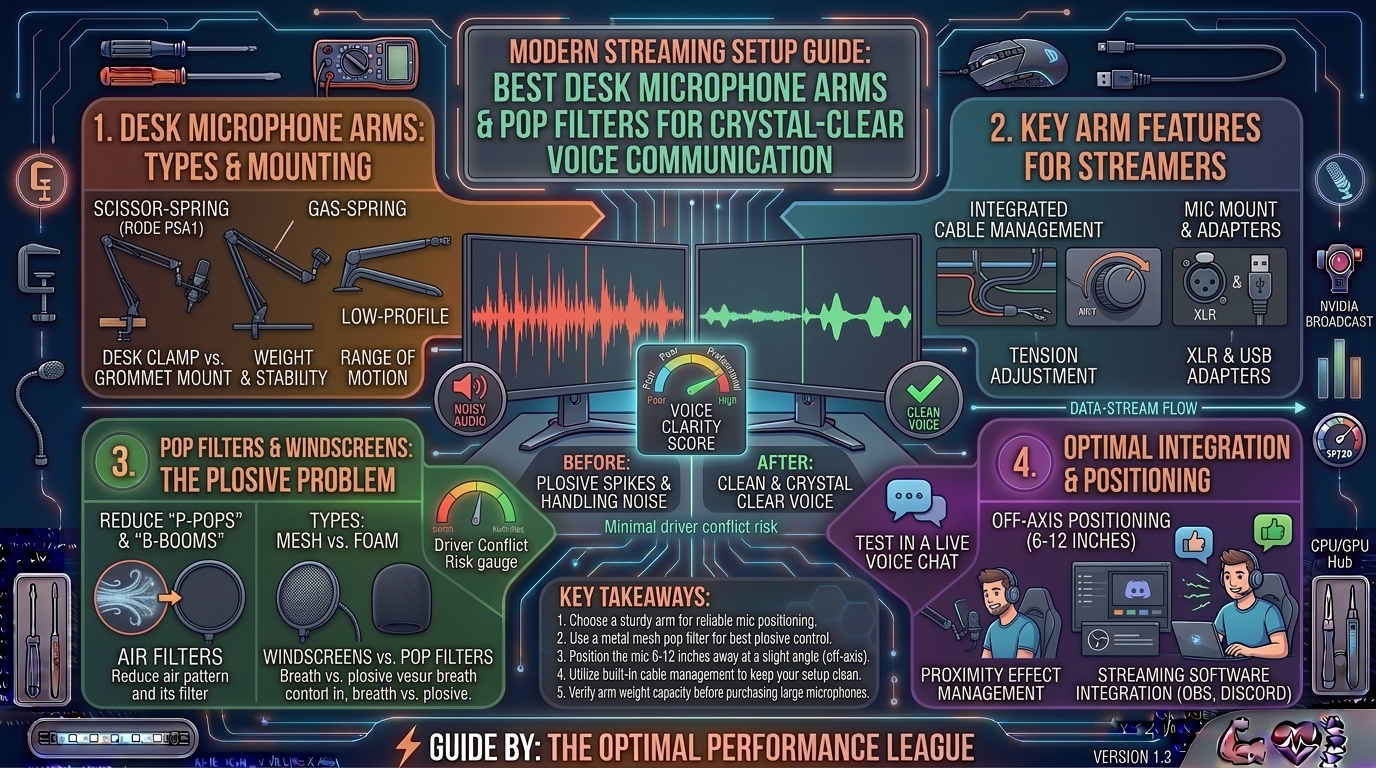
When building a high-performance streaming setup for Twitch, YouTube, or high-stakes Discord comms on The Gamer Buzz, your audio quality matters just as much as your frame rates. Viewers will tolerate a 1080p stream stream-scaling down, but the moment ear-piercing keyboard clacks, heavy plosive pops, and weak, distant audio hit their ears, they click away instantly.
Achieving studio-grade broadcast vocals doesn’t just require an expensive microphone; it requires the physical infrastructure to isolate your voice from environmental noise. That means ditching clunky factory desk tripods and investing in a professional articulating microphone boom arm and an effective pop filter.
This exhaustive guide covers the physics of broadcast acoustics, how to eliminate mechanical vibrations, and reviews the absolute best desk microphone arms and pop filters on the market for streamers today.
1. The Anatomy of Broadcast Audio: Why Arms and Filters Matter
To understand why a boom arm and pop filter transform your stream, you have to look at how sound waves travel across a desktop workspace.
+-------------------------------------------------------------------------+
|                    THE BROADCAST AUDIO PIPELINE                         |
+-------------------------------------------------------------------------+
| Mechanical Keyboard & Desk Vibrations ──► Desk Tripod ──► Mic Capsule   |
| (Creates low-frequency rumble and harsh clacks)                         |
|                                                                         |
| Optimized Isolation Pipeline:                                           |
| Desk Boom Arm (Absorbs shock) ──► Shock Mount ──► Pop Filter ──► Mic    |
| (Suspends mic in free air, blocks wind gusts, purges plosives)          |
+-------------------------------------------------------------------------+
The Inverse-Square Law and Proximity
Microphones capture sound best when they are close to the source. A cheap desk stand places your mic two feet away, forcing you to crank your digital gain high. This turns minor ambient noises—like PC fan hum, chair creaks, and keyboard bottom-outs—into loud distractions. A boom arm lets you float the microphone 3 to 4 inches from your mouth, allowing you to lower your gain and capture a warm, intimate vocal tone.
Conquering Plosives with Pop Filters
When you pronounce words starting with hard consonants like “P”, “B”, and “T”, your mouth releases a burst of compressed air known as a plosive. When this blast hits an unprotected microphone diaphragm, it creates a loud, destructive low-frequency thud that distorts audio streams. A quality mesh or acoustic foam pop filter disperses this air column before it reaches the capsule.
2. Best Microphone Boom Arms for Streaming
Selecting a boom arm comes down to weight capacity, internal cable management, and smooth articulation. Here are the industry-leading choices:
+-------------------------------------------------------------------------+
|                  BOOM ARM SELECTION MATRIX                              |
+-------------------------------------------------------------------------+
| 1. Elgato Wave Mic Arm LP     ──► Low-profile, sleek desk-hugging view  |
| 2. Rode PSA1+                 ──► Premium silent internal springs       |
| 3. Blue Compass               ──► Classic broadcast aluminum channel    |
| 4. InnoGear Heavy Duty Arm    ──► Budget-friendly reliable workhorse    |
+-------------------------------------------------------------------------+
1. Elgato Wave Mic Arm LP (Best Low-Profile Arm)
- Design: Sub-desk mounting style that sits below the shoulder line.
- Why It’s Great: Traditional boom arms tower vertically, blocking your face or your monitor setup. The Wave Mic Arm LP runs parallel to your desk, keeping your field of view completely open while offering seamless swivel movement and hidden internal cable channels.
- Max Weight: Supports heavy broadcast mics up to 2 kg (4.4 lbs).
2. Rode PSA1+ (Best Studio-Grade Articulating Arm)
- Design: Traditional overhead studio arm wrapped in a neoprene sleeve.
- Why It’s Great: The PSA1+ uses innovative internal spring mechanics wrapped in dampening rubber. It moves completely silently, eliminating the squeaky spring noises common with cheap metal arms. Its extended reach and heavy-duty friction hinges hold large XLR microphones (like the Shure SM7B) dead steady.
3. Blue Compass (Best Aesthetic Broadcast Arm)
- Design: Fully enclosed aluminum tube chassis with internal springs.
- Why It’s Great: Looks incredible on camera with a sleek, minimalist aesthetic. It features built-in channel cable management to hide your XLR or USB-C wire cleanly inside the arm housing.
3. Best Pop Filters and Windshields for Voice Clarity
Choosing the right pop filter depends on whether you prefer physical distance screens or direct clip-on acoustic foam.
1. Shure A7WS (Best Foam Windshield / Pop Filter)
- Design: High-density acoustic foam block tailored for dynamic mics.
- Why It’s Great: If you use a broadcast dynamic mic (like the Shure MV7, SM7B, or PodMic), the A7WS slides directly over the capsule. It blocks severe wind gusts, breath plosives, and saliva without requiring a bulky ring clamp attached to your desk.
2. Stedman Corporation Proscreen XL (Best Metal Mesh Filter)
- Design: Patented louvered metal screen.
- Why It’s Great: Unlike fabric nylon screens that degrade over time or muffle high-end vocal frequencies, the Stedman Proscreen XL uses angled metal louvers that redirect plosive air blasts downward away from the microphone capsule while maintaining crisp vocal brilliance.
3. Elgato Wave Pop Filter (Best Custom-Fit Filter)
- Design: Dual-layer steel mesh built specifically for the Elgato Wave:1 and Wave:3 USB microphones.
- Why It’s Great: Snaps securely onto the microphone chassis with a custom magnetic/clip fit, providing studio-grade plosive reduction with zero sagging or wobbly goosenecks.
4. Summary Table: Gear Comparison Matrix
| Product | Type | Weight Capacity | Key Advantage | Best For |
| Elgato Wave Mic Arm LP | Low-Profile Arm | Up to 2.0 kg | Stays completely out of camera view | Clean, modern desk setups |
| Rode PSA1+ | Overhead Studio Arm | Up to 1.2 kg | Silent internal springs & wide reach | Traditional overhead placement |
| Stedman Proscreen XL | Metal Mesh Pop Filter | N/A | Redirects air without high-end muffling | Professional voice clarity |
| Shure A7WS | Foam Windshield | N/A | Direct slip-on design for dynamic mics | Streamlined podcast/gaming mics |
5. Pro-Tips for Optimizing Your Stream Audio Setup
- Keep the Mic Off the Table: Never mount your boom arm directly to the same surface your mechanical keyboard rests on if you don’t have a desk mat, as heavy typing shockwaves will travel up the clamp.
- The “Two-Finger” Rule: Position your microphone capsule roughly two to three fingers’ width away from the corner of your mouth. Avoid placing it dead-center in front of your lips to minimize direct breath impact.
- Combine With AI Suppression: Pair your hardware arm and pop filter with software tools like NVIDIA Broadcast or Krisp to achieve a completely silent background noise floor.
6. Frequently Asked Questions (FAQ)
1. Are low-profile boom arms better than traditional overhead arms for streaming?
Low-profile arms (like the Elgato Wave Mic Arm LP) are superior if you want your face and monitor setup completely visible on camera without a giant metal bar blocking your view. Traditional overhead arms offer a wider vertical range of motion if you prefer positioning your mic from above.
2. What is the difference between a metal mesh pop filter and a nylon fabric filter?
Nylon fabric filters are inexpensive but absorb some high-frequency vocal clarity and tend to tear or wear out over time. Metal mesh or louvered filters (like the Stedman Proscreen) last forever, are easy to sanitize, and preserve natural vocal crispness while redirecting plosive air drafts.
3. Will a heavy boom arm sag over time?
High-end arms from brands like Rode and Elgato use heavy-duty tension springs and locking friction hinges engineered to hold their position for years without sagging. Avoid ultra-cheap unbranded arms, which often lose tension within a few months of adjustment.
4. Do I need a shock mount if I already have a good boom arm?
A good boom arm absorbs low-frequency desk rumbles, but adding an elastic shock mount isolates the microphone capsule from high-frequency mechanical vibrations (like bumping your desk or slamming your keyboard). They work best in tandem.
5. Can I use a foam windscreen instead of a circular pop filter?
Yes. Foam windscreens (like the Shure A7WS) act as omnidirectional pop filters. They are exceptionally space-efficient and great for dynamic microphones, though dual-layer mesh filters offer slightly superior air dispersion for sensitive studio condensers.
6. How do I prevent my boom arm desk clamp from scratching my wooden desk?
Most quality arms feature thick EVA rubber pads on the underside of the C-clamp. If your desk has a delicate finish (like soft wood or glass), place a small microfiber cloth or rubber coaster between the clamp and the desk surface for extra protection.
7. Why does my microphone still sound boomy even with a pop filter?
A boomy sound is usually caused by the proximity effect—standing or sitting too close to a directional cardioid microphone, which artificially boosts low frequencies. Move the microphone back half an inch or enable a high-pass filter (HPF) in your audio software.
8. Are XLR microphones better for streaming than USB microphones?
XLR microphones connect to an external audio interface or mixer, giving you cleaner preamp amplification, zero digital interference, and professional routing control. USB microphones are plug-and-play and budget-friendly, making them great for beginner streamers.
9. How do I hide messy cables along my boom arm?
Arms like the Rode PSA1+ and Elgato Wave Mic Arm feature built-in cable management channels or snap-on clips. Press your XLR or USB-C cable firmly into these routing tracks so the wire travels flush along the arm tubing without dangling.
10. What is the ideal microphone angle to eliminate keyboard noise?
Position your microphone so the front capsule faces your mouth, while pointing the rear dead-zone of its cardioid polar pattern directly downward toward your mechanical keyboard to maximize acoustic rejection.
Upgrading your setup with a professional desk microphone arm and an effective pop filter transforms your audio profile from amateur to broadcast-ready. Whether you choose the sleek, unobtrusive design of the Elgato Wave Mic Arm LP or the silent articulation of the Rode PSA1+, investing in proper hardware isolation ensures your voice cuts through crystal clear on every stream.
Leave a Reply