Welcome to The Gamer Buzz—your ultimate source for performance optimization, hardware reviews, and pro gaming wellness guides, proudly serving players from New York and San Francisco to Texas, Washington, and California.
There is nothing quite like locking into a multi-hour gaming session. Whether you are climbing the ranked ladder in Counter-Strike 2, raiding in World of Warcraft, or exploring open-world masterpieces in Cyberpunk 2077, time flies when you are having fun. However, as the hours tick away, you might notice a familiar discomfort creeping in: burning eyes, blurred vision, a dull throbbing headache, neck tension, and overall mental exhaustion.
This condition—clinically known as Digital Eye Strain (DES) or Computer Vision Syndrome (CVS)—affects millions of gamers and office workers alike. Staring at high-refresh-rate, brightly lit monitors for extended periods forces your visual system into overdrive.
If you want to maintain peak competitive performance, protect your long-term eye health, and prevent painful fatigue, you need an actionable strategy. This comprehensive, expert-backed guide covers everything you need to know to bulletproof your eyes during marathon gaming sessions.
1. Understanding Digital Eye Strain (DES) in Gaming
To fix eye fatigue, you first need to understand why gaming triggers it so intensely. Unlike reading a printed book, your eyes are tracking rapidly changing digital pixels, high-contrast HUDs, flashing particle effects, and sudden bursts of motion on an illuminated panel.
When you game intensely, several physiological changes occur:
- Reduced Blink Rate: Studies show that humans normally blink around 15 to 20 times per minute. When locked into a high-intensity gaming match, your blink rate can plummet by 50% or more (down to 5–7 times per minute). This lack of blinking stops the uniform distribution of tear film, leading to dry, irritated eyes.
- Constant Accommodation Stress: Your eyes rely on tiny intraocular muscles to focus (accommodate) on near objects. Staring fixedly at a monitor 24 to 28 inches away for hours keeps these focusing muscles locked in a static state, causing spasm and fatigue.
- High Contrast and Glare: Intense lighting setups, glaring reflections on your monitor glass, and mismatched room lighting force your pupils and iris muscles to constantly overcompensate.
2. Optimize Your Physical Gaming Ergonomics
Your physical environment lays the foundation for comfortable, strain-free viewing. Small layout adjustments can instantly relieve pressure on your eyes, neck, and shoulders.
Monitor Placement and Viewing Distance
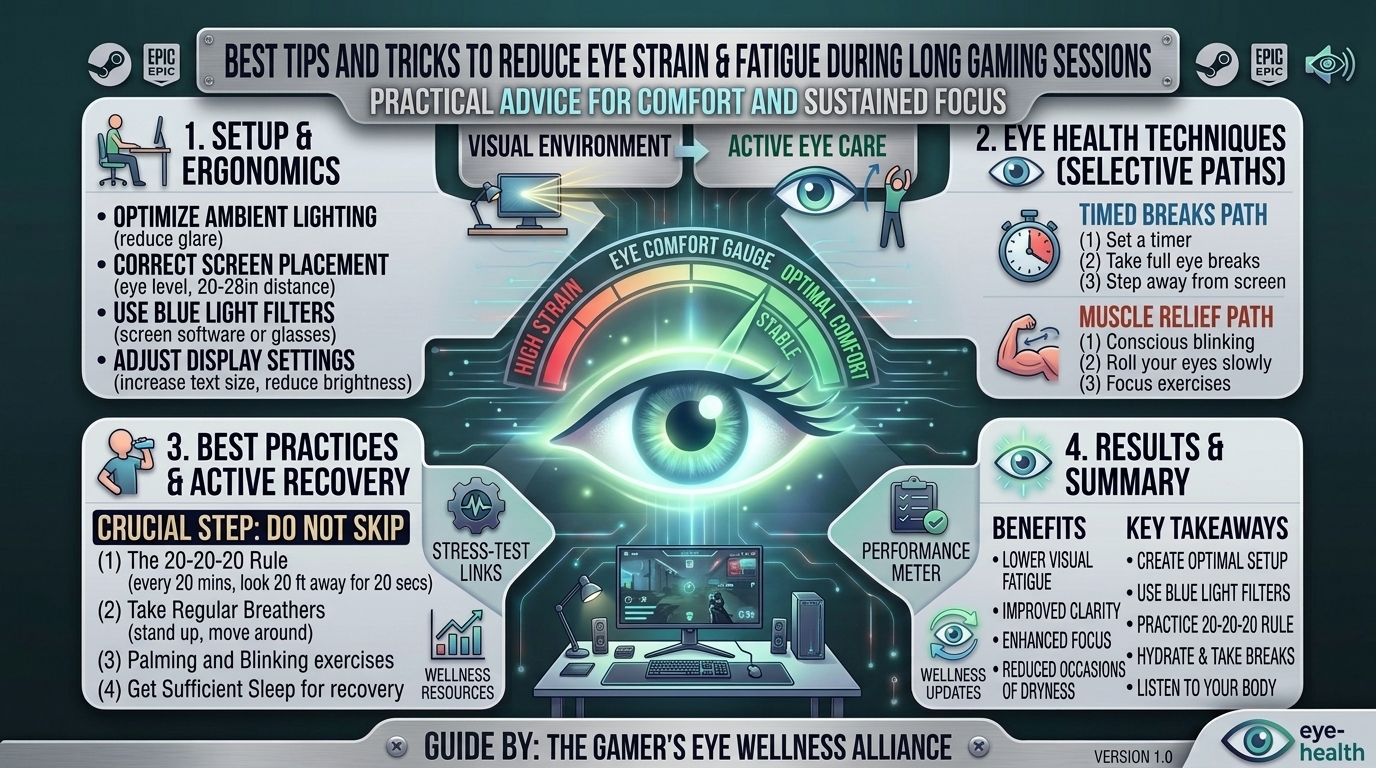
- The Arm’s Length Rule: Position your monitor roughly 20 to 28 inches away from your face (about an arm’s length). Sitting too close forces your eye muscles to work significantly harder to converge and focus.
- The Golden Height Rule: The top of your computer monitor should sit at or slightly below eye level. When your screen is positioned too high, your eyelids open wider, exposing more of the ocular surface to air and accelerating dry eye symptoms. Looking slightly downward creates a more relaxed, natural gaze.
Ambient Room Lighting and Glare Control
- Never Game in Total Darkness: Playing in a completely dark room while a high-brightness monitor blasts your retinas creates extreme contrast, rapidly exhausting your visual cortex. Always maintain a soft, balanced ambient light source behind or around your monitor (such as bias lighting or a dim desk lamp).
- Eliminate Screen Glare: Position your desk so that windows are perpendicular to your monitor, not directly behind or facing you. Use blackout curtains or blinds to control natural sunlight, and tilt your monitor slightly downward to deflect reflections from overhead ceiling lights.
3. Master the Rules of Visual Rest (The 20-20-20 Rule)
During fast-paced competitive games, taking a formal break can feel impossible. However, incorporating micro-breaks is vital for resetting your eye muscles.
- The 20-20-20 Rule: Endorsed by optometrists worldwide, this rule dictates that every 20 minutes, you should look at an object at least 20 feet away for at least 20 seconds.
- How Gamers Can Apply It: Use the natural downtime in your gaming routine to trigger breaks. In-between matches in Valorant, during queue times in League of Legends, or while riding a transport vehicle in Apex Legends, force yourself to look away from the monitor toward a far wall or out a window. This relaxes your focusing muscles and resets your blink reflex.
4. Tune Your Display Settings for Maximum Visual Comfort
Factory default monitor settings are often calibrated for showroom floors—meaning they are cranked to maximum brightness with harsh blue-light profiles designed to look punchy under fluorescent lights.
Brightness and Color Temperature
- Match Room Brightness: Your monitor should never act as a flashlight in a dark room. Adjust your monitor’s brightness slider until the white background of a blank web page matches the ambient lighting of your room.
- Leverage Night Mode / Warm Tints: Enable Windows Night Light or macOS Night Shift (or your monitor’s built-in low blue light modes) during evening gaming sessions. Reducing high-frequency blue light softens the visual intensity and prepares your circadian rhythm for sleep after late-night matches.
- Maximize Text Scaling and Resolution: If you are squinting to read game menus, quest logs, or chat boxes, increase the user interface (UI) scaling inside your game settings. Never force your eyes to strain over tiny, low-contrast text fonts.
5. Combat Dry Eyes: Blinking Habits and Lubrication
Dry eye is the leading cause of the gritty, burning sensation gamers experience after long sessions.
- Practice Conscious Blinking: Set a mental sticky note or a subtle reminder to blink completely and deliberately. Make sure your eyelids fully close during a blink to refresh the tear film across your cornea.
- Use Preserved-Free Artificial Tears: Keep a bottle of preservative-free lubricating eye drops on your desk. Unlike “redness-remover” drops (which constrict blood vessels and can worsen dryness over time), artificial tears safely replenish moisture. Apply a drop before a long gaming session or during major breaks.
- Optimize Room Humidity: Air conditioners, heaters, and ceiling fans dry out indoor air rapidly. Placing a small desk humidifier near your gaming station keeps the air moist and prevents your tears from evaporating too quickly.
6. Summary Comparison Table: Gaming Habits vs. Healthy Visual Habits
| Habit Category | Bad Gaming Habit (Causes Strain) | Healthy Habit (Prevents Fatigue) |
| Viewing Distance | Hunching 12 inches away from the glass. | Maintaining an arm’s length (20–28 inches). |
| Room Lighting | Gaming in pitch darkness with max monitor brightness. | Keeping soft ambient lighting and balanced contrast. |
| Blinking | Staring unblinkingly for minutes during intense firefights. | Practicing conscious, full blinks and using artificial tears. |
| Pacing | Grinding 6 hours straight without looking away. | Utilizing queue times and matches for the 20-20-20 rule. |
| Monitor Tuning | Default 100% brightness and cold color temps. | Calibrated brightness matching room light with blue-light reduction. |
7. Advanced Gear: Do Blue Light Glasses and Gaming Monitors Help?
The gaming market is flooded with products promising to eliminate eye strain. Here is what science and optometry actually say:
- Blue Light Glasses: While blue light from screens does not inherently cause structural eye damage, yellow-tinted or clear anti-reflective blue-light blocking lenses can reduce glare and ease visual contrast, making screen time feel more comfortable for many users.
- High-Refresh-Rate & Flicker-Free Monitors: Cheap older monitors use Pulse Width Modulation (PWM) to control brightness, creating invisible screen flickering that triggers headaches. Investing in a Flicker-Free certified monitor with a high refresh rate (144Hz+) provides smoother motion rendering, drastically reducing the neurological processing load on your eyes.
- Anti-Reflective Coatings: If you wear prescription glasses, ensure your lenses feature a quality Anti-Reflective (AR) coating to eliminate distracting internal reflections from your monitor and room lights.
8. Frequently Asked Questions (FAQ)
1. Does gaming cause permanent damage to your eyesight?
No. While extended gaming causes temporary digital eye strain, dryness, and fatigue, it does not cause permanent structural damage or progressive blindness. However, chronic strain can severely impact your daily comfort.
2. Are blue-light blocking glasses worth buying for gaming?
Yes and no. While they don’t block the primary cause of eye strain (which is lack of blinking and muscle fatigue), many gamers find that anti-reflective, yellow-tinted blue light glasses significantly reduce harsh glare and visual fatigue during night sessions.
3. Why do my eyes feel dry and burn after playing fast-paced shooters?
In high-intensity games like Valorant or Apex Legends, adrenaline spikes cause your blink rate to drop by up to 60%, leading to rapid tear evaporation and surface irritation.
4. How far away should my gaming monitor be?
Your monitor should be placed approximately 20 to 28 inches away from your face, roughly matching the length of your outstretched arm.
5. Can eye strain cause headaches and neck pain?
Absolutely. Straining your eye muscles and holding rigid postures to focus on a screen frequently triggers tension headaches, shoulder tightness, and neck discomfort.
6. Can I use regular eye drops to combat gaming eye fatigue?
You should use preservative-free artificial tears rather than redness-relief drops. Redness relievers can cause rebound irritation if used frequently.
7. Does lowering in-game graphics settings help reduce eye strain?
Not directly, but disabling aggressive motion blur, screen shake, and excessive chromatic aberration can make fast-moving games much easier on your eyes.
8. What is the 20-20-20 rule, and does it actually work?
Every 20 minutes, look at an object 20 feet away for 20 seconds. It works by forcing your intraocular focusing muscles to relax, preventing eye spasms.
9. Why does gaming in the dark hurt my eyes?
A bright screen in a dark room forces your pupils to constantly adjust to extreme contrast levels, accelerating eye fatigue and headaches.
10. When should I see an optometrist about my gaming eye strain?
If you experience persistent double vision, chronic headaches, blurred vision that doesn’t clear up after resting, or severe light sensitivity, schedule a comprehensive eye exam to check for uncorrected refractive errors.
9. Conclusion
Protecting your eyes doesn’t mean you have to give up your favorite hobby. By optimizing your monitor ergonomics, mastering the 20-20-20 rule, keeping your eyes lubricated, and balancing your room lighting, you can game for hours without the punishing side effects of digital eye strain. Take care of your vision, and your gameplay will stay sharp from the first match to the final victory screen.
Leave a Reply