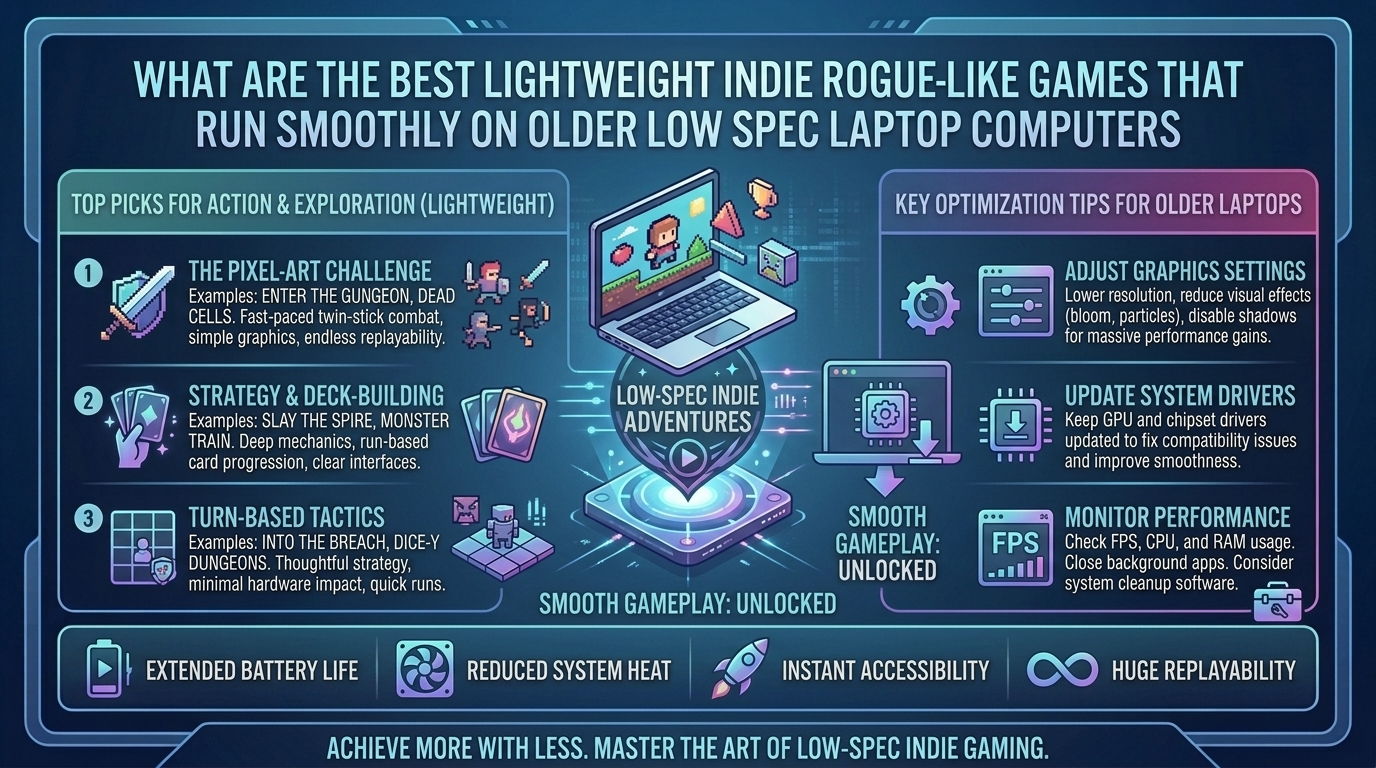
What Are the Best Lightweight Indie Rogue-Like Games That Run Smoothly on Older Low Spec Laptop Computers?
Older laptops with integrated graphics cards (such as Intel HD/UHD Graphics or older AMD APUs), 4GB of RAM, and low-power dual-core processors often struggle with modern 3D AAA gaming. However, the indie development scene has perfected the rogue-like and rogue-lite genre, producing titles that offer high replayability, deep mechanical complexity, and rewarding progression loops without demanding dedicated GPU horsepower.
Rogue-likes and rogue-lites are uniquely suited for low-spec hardware because their reliance on procedural generation, clean 2D vector art, pixel graphics, and turn-based mechanics reduces overall system overhead. These games install within small file sizes, launch quickly, and run at a smooth 60 FPS even on decade-old laptop hardware.
At The Gamer Buzz, we test low-spec PC optimization, handheld power efficiency, frame-rate limits, and indie game performance. This guide breaks down the best lightweight indie rogue-likes, system performance tuning, and essential tips for getting smooth gameplay out of older laptop computers.
Whether gaming on low-power hardware across Texas and California, working on older laptops in San Francisco and Washington, or commuting through New York, these lightweight rogue-likes deliver endless hours of strategic gaming without overheating your system.
1. What Makes a Rogue-Like Ideal for Low-Spec Laptop Hardware?
Understanding why certain indie games run smoothly on older laptops requires examining how engine overhead, rendering techniques, and CPU threads interact with integrated graphics.
Low-Spec Architecture Breakdown
- 2D Pixel & Sprite Rendering: 2D pixel-art engines (like GameMaker Studio or lightweight custom C engines) require minimal VRAM, making them run easily on shared integrated system memory.
- Procedural Math Over 3D Geometry: Rogue-likes generate levels using mathematical seed algorithms rather than heavy 3D asset streaming. This shifts workload to basic CPU logic without stressing the GPU.
- Pausable or Turn-Based Loops: Games featuring turn-based actions or pausable combat (like FTL or Slay the Spire) do not suffer when frame pacing dips slightly, maintaining full playability.
- Minimal Storage Footprints: Most top-tier lightweight rogue-likes occupy less than 1 GB of disk space, making them ideal for laptops with small SSDs or older mechanical hard drives.
| Game Title | Storage Required | Recommended RAM | Target iGPU | Key Gameplay Loop | Hardware Optimization Note |
| Slay the Spire | ~500 MB | 2 GB to 4 GB | Intel HD 4000+ | Deckbuilding tactical card battler | Runs at 60 FPS on almost any dual-core system |
| Balatro | ~150 MB | 2 GB | Intel HD 3000+ | Poker-themed rogue-like deckbuilder | Minimal VRAM footprint; instant boot times |
| FTL: Faster Than Light | ~400 MB | 1 GB to 2 GB | Legacy Integrated Graphics | Starship command & resource management | Pausable combat; extremely lightweight on CPU |
| Vampire Survivors | ~600 MB | 4 GB | Intel HD 4000+ | Auto-attacking wave survival bullet heaven | Engine optimized for thousands of simultaneous sprites |
| Into the Breach | ~200 MB | 2 GB | Intel HD 3000+ | Turn-based tactical grid mech combat | 8×8 grid tactics requiring zero 3D acceleration |
| Dead Cells | ~1.5 GB | 4 GB | Intel HD 520+ | Fast-paced 2D action platformer metroidvania | Fluid animations; cap at 60 FPS for thermal stability |
| The Binding of Isaac: Rebirth | ~500 MB | 2 GB | Intel HD 4000+ | Top-down dungeon crawler shooter | Vector/pixel art runs natively on low-end hardware |
2. Top Verified Lightweight Indie Rogue-Like Games
1.Category 1: Deckbuilding & Tactical Turn-Based Rogue-Likes:Deckbuilders and turn-based games requiring zero twitch reflexes.
- Slay the Spire: The definitive rogue-like deckbuilder. Combine cards, relic synergies, and pathing decisions to climb the Spire. Because combat is entirely turn-based, frame drops never impact gameplay performance.
- Balatro: A poker-inspired deckbuilder where you play illegal hands, discover game-changing Jokers, and unlock massive point multipliers. Its lightweight presentation allows it to run smoothly on older laptops without heating up your system.
- Into the Breach: From the creators of FTL, command futuristic mechs on an 8×8 grid to defeat giant alien invaders. Every enemy move is telegraphed, turning each encounter into a tactical puzzle that runs on basic integrated graphics.
2.Category 2: Action, Hack-and-Slash & Bullet-Heaven Rogue-Lites:Fast-paced 2D action and bullet-survival games.
- Vampire Survivors: A bullet-heaven game where your character attacks automatically while you dodge horde waves. Designed to run smoothly on modest hardware, offering endless progression loops.
- Dead Cells: A fast 2D action platformer featuring responsive controls, diverse weapon builds, and satisfying combat. Turning down screen shake and particle effects in the options menu ensures locked 60 FPS performance on low-end systems.
- The Binding of Isaac: Rebirth: A classic top-down dungeon crawler featuring thousands of item combinations, hidden rooms, and endless replay value that demands minimal system specs.
3.Category 3: Strategy & Ship Management Rogue-Likes:Strategic management and space simulation rogue-likes.
- FTL: Faster Than Light: Pilot a starship across procedurally generated sectors while fleeing a hostile fleet. Manage power allocation, crew roles, and target ship systems in real-time pausable combat that puts virtually zero stress on older laptop fans.
- Crypt of the NecroDancer: A rhythm-based rogue-like where you move and attack to the beat of an electronic soundtrack. Grid movements and low-spec 2D art keep system resource usage minimal.
3. Laptop Performance Tuning: Getting 60 FPS on Integrated Graphics
Optimizing your laptop OS ensures lightweight games run quietly without battery drain or thermal throttling:
- Cap Your Frame Rate to 60 FPS (or 30 FPS): Uncapped frame rates cause your laptop’s integrated GPU to render 150+ frames per second unnecessarily in lightweight 2D games, creating excess heat. Enable V-Sync or cap the frame rate to 60 FPS in game settings or graphics control panels (Intel Graphics Command Center / AMD Software).
- Lower Desktop Resolution: If an older laptop struggles to render games at native 1080p, lower the in-game display resolution to 720p (1280×720) or 1366×768. On small 13-inch or 15-inch laptop screens, pixel-art games still look crisp at lower resolutions while cutting GPU load significantly.
- Adjust Windows Power Plan Settings: Switch your OS power mode to Balanced rather than High Performance when playing on battery power to prevent high thermal output.
- Close Background Web Browsers: Modern web browsers with active media tabs can consume 2GB to 4GB of RAM. Closing background browser tasks frees up critical system memory for your games.
10 Frequently Asked Questions (FAQ)
1. Will Slay the Spire run smoothly on an old laptop with 4GB of RAM?
Yes! Slay the Spire requires less than 500 MB of storage space and runs on 2GB to 4GB of RAM using integrated Intel graphics.
2. What is the difference between a rogue-like and a rogue-lite?
Rogue-likes feature permadeath with no permanent stat progression between runs. Rogue-lites (such as Rogue Legacy 2 or Vampire Survivors) let you unlock permanent upgrades, weapons, and character stats to make future runs easier.
3. Can I play these lightweight games using a USB mouse or laptop trackpad?
Turn-based titles like Slay the Spire, Balatro, Into the Breach, and FTL play easily using a standard laptop trackpad or basic USB mouse. For action titles like Dead Cells, using a USB or Bluetooth controller is recommended.
4. Why does my old laptop fan spin loudly when playing basic 2D games?
Uncapped frame rates are usually the cause. Without a frame limiter, your system renders unnecessary extra frames, heating up the CPU/iGPU. Setting a 60 FPS cap keeps thermals low and fans quiet.
5. Are there free lightweight rogue-like games available for PC?
Yes! Titles like Caves of Qud offer lightweight demos, and classic ASCII rogue-likes like NetHack and Tales of Maj’Eyal (TOME) are completely free to download and run on low-spec hardware.
6. Does Vampire Survivors get laggy on older laptops when the screen fills with enemies?
During late-game 29-minute waves with thousands of active sprites, low-end CPUs may experience slight frame drops. Enabling “Performance Mode” or turning off damage numbers in the options menu maintains smooth gameplay.
7. How much battery life can I expect when playing indie rogue-likes on a laptop?
Because these games draw low wattage (5W to 12W total system power), most older laptops achieve 3 to 5 hours of continuous battery play—double the runtime of 3D games.
8. Do I need a dedicated graphics card (NVIDIA/AMD) to play Dead Cells?
No. Dead Cells runs on integrated Intel HD 520 graphics or newer when played at 720p or 1080p resolution.
9. Can I run these games off a USB flash drive or external hard drive?
Yes. Indie games with small file sizes (FTL, Balatro, Into the Breach) launch quickly from external USB 3.0 flash drives without performance penalties.
10. What is the smallest indie rogue-like in terms of file storage size?
Balatro (~150 MB), Into the Breach (~200 MB), and FTL (~400 MB) feature tiny installation footprints while delivering hundreds of hours of gameplay.
Conclusion
You do not need an expensive high-end gaming laptop to enjoy deep, highly replayable video games. Titles like Slay the Spire, Balatro, FTL: Faster Than Light, Vampire Survivors, Into the Breach, and Dead Cells prove that brilliant gameplay design, tactical depth, and procedural mechanics trump high-end 3D graphics. By applying simple frame-rate caps and resolution tweaks, your older laptop computer can serve as an ideal handheld indie gaming machine.
For more low-spec optimization tests, indie game reviews, and hardware guides across Texas, California, San Francisco, Washington, and New York, stay tuned to The Gamer Buzz.
Leave a Reply