Welcome to thegamerbuzz, your premier destination for elite hardware breakdowns, peripheral optimization guides, and deep-dive technical evaluations. Whether you are tuning your hardware setup late into the night in a high-rise New York apartment, optimizing your frame rates and latency in San Francisco, building rigs in Texas and Washington, or curating your desktop aesthetic from sunny California, we know one foundational truth: your gaming mouse can make or break your performance.
Nothing induces hand cramps, sluggish tracking, and missed headshots faster than using a mouse built for someone else’s hand. With hundreds of shapes, weights, and sensor layouts flooding the market, picking an ergonomic gaming mouse is a science.
If you want to eliminate wrist strain, improve your tracking accuracy, and find a rodent that feels like an extension of your body, this comprehensive buying guide breaks down how to choose the right mouse based on your exact hand size and grip style.
1. The Anatomy of Ergonomics: Hand Size and Grip Mechanics
Before looking at specific models, you must evaluate two variables: your physical hand measurements and how you naturally hold your mouse.
How to Measure Your Hands
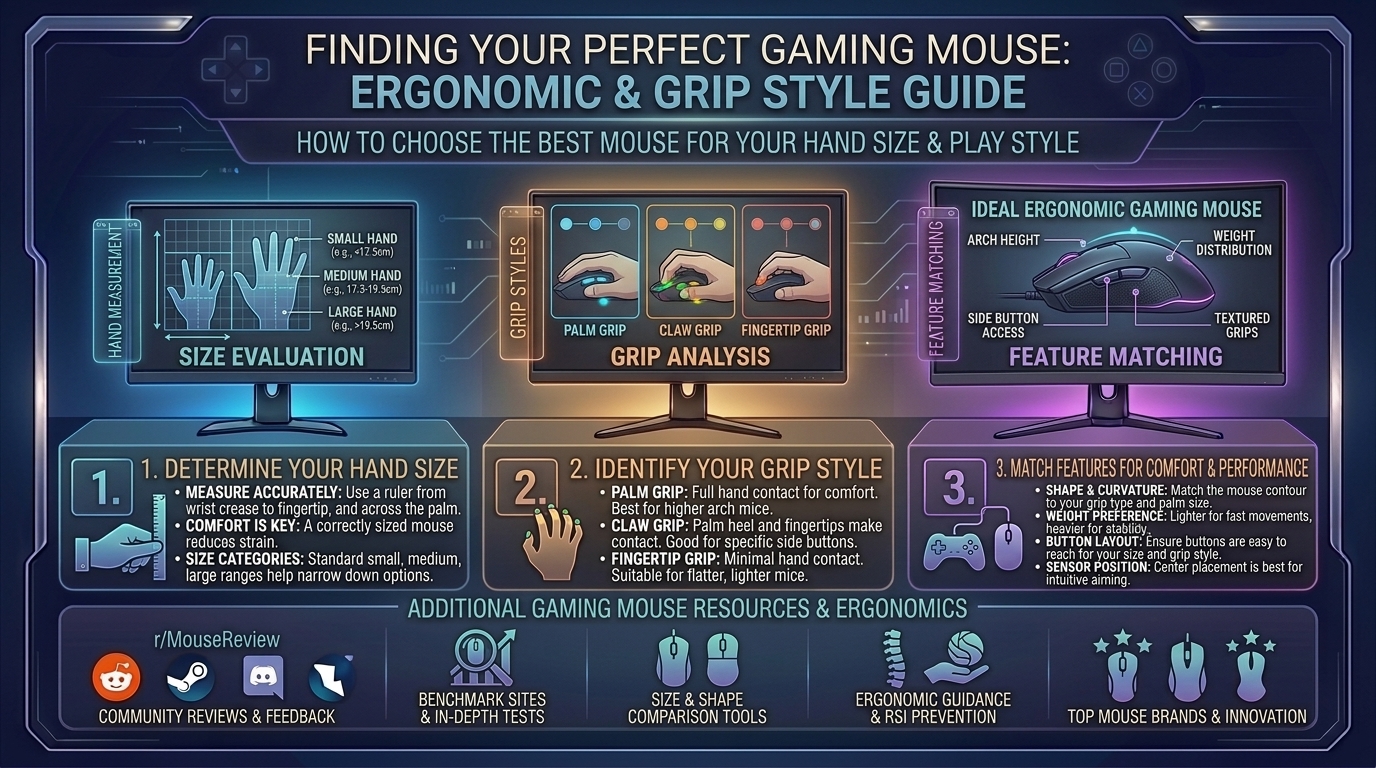
Grab a metric ruler or measuring tape and measure from the base of your palm (where your wrist meets your hand) to the tip of your middle finger, then measure the width across your knuckles:
- Small Hands: Under 17 cm length / Under 9 cm width
- Medium Hands: 17 cm to 19.5 cm length / 9 cm to 10 cm width
- Large Hands: Over 19.5 cm length / Over 10 cm width
The Three Core Grip Styles
- Palm Grip: Your entire palm rests flat against the back shell, and your fingers drape fully over the primary mouse buttons. This grip prioritizes maximum comfort and stability, benefiting from larger, contoured ergonomic shapes.
- Claw Grip: Your palm rests lightly on the rear hump, your fingers arch up like claws over the triggers, and your knuckles provide micro-adjustment stability. This style thrives on medium-sized ambidextrous or semi-ergo shapes.
- Fingertip Grip: Only your fingertips contact the mouse surface; your palm floats completely free in the air. This grip requires ultra-light, short mice that allow lightning-fast vertical and horizontal wrist/finger flicks.
2. Choosing by Hand Size: Best Recommendations
For Small Hands (Under 17 cm)
Small hands struggle massively with oversized mice, leading to finger strain and poor reach over side buttons.
- Top Picks: Razer Cobra Pro, Pulsar X2V2 Mini, or Lamzu Atlantis Mini 4K.
- Why They Work: These mice feature narrow widths (around 60–63 mm) and short lengths, letting smaller fingers cleanly actuate switches without overextending.
For Medium Hands (17 cm to 19.5 cm)
Medium hands represent the “sweet spot” where almost 80% of standard gaming mice are targeted.
- Top Picks: Logitech G Pro X Superlight 2, Razer Viper V2 Pro, or Lamzu Maya.
- Why They Work: Balanced mid-sized footprints (120–125 mm long) provide safe, versatile profiles that support comfortable switching between claw and fingertip styles.
For Large Hands (Over 19.5 cm)
Using a small mouse with large hands forces a cramped, claw-like posture that causes severe carpal fatigue over long sessions.
- Top Picks: Razer DeathAdder V3 Pro / V4 Pro or Teevolution Terra Pro.
- Why They Work: These models feature extended chassis lengths (124+ mm) and high ergonomic right-handed humps that fill out the palm entirely, offering natural wrist alignment.
3. Matching Mice to Specific Grip Styles
- For Palm Grips (Full Hand Contact): Look for dedicated asymmetric ergonomic shapes (like the DeathAdder line) with flared thumb rests and sloping right-side contours that prevent your pinky from dragging on the mousepad.
- For Claw Grips (Arching Fingers): Look for mice with pronounced rear humps (such as the Lamzu Atlantis or Pulsar X2 series) that lock securely into the base of your knuckle joints while leaving room for finger travel.
- For Fingertip Grips (Pure Agility): Look for ultra-lightweight symmetrical shells under 50 grams with low profiles that allow total clearance for vertical adjustments.
4. Frequently Asked Questions (FAQ)
1. Are ergonomic vertical mice good for gaming?
Traditional vertical ergonomic mice (like office productivity models) rotate your wrist into a handshake position. While great for preventing carpal tunnel during typing or video editing, they lack the rapid sensor precision and stability required for competitive gaming. Dedicated gaming ergo mice strike a balance by sloping comfortably without forcing a full vertical twist.
2. Does mouse weight actually affect my gaming performance?
Yes. Modern competitive FPS players generally favor mice weighing between 50 and 70 grams. They reduce inertia, allowing for faster target acquisition and less wrist strain during long sessions, though some casual or palm-grip players prefer a slightly heavier, planted feel (75g+).
3. What is the difference between symmetric and asymmetric ergonomic mice?
Symmetric (ambidextrous) mice have equal left and right sides, making them ideal for fingertip and claw grips. Asymmetric ergonomic mice are curved specifically for right-handed users, featuring a high left side and a sloping right side designed to completely fill a palm grip.
4. How do I know if my current mouse is too small for me?
If your hand cramps, your fingers ache from curling too tightly over the front buttons, or your pinky finger drags uncomfortably on the mousepad, your mouse is likely too small or narrow for your hand dimensions.
5. Can I use a palm grip mouse with a fingertip grip style?
Technically yes, but it feels clunky. A palm mouse is usually too long and heavy to maneuver solely with your fingertips, leading to sluggish micro-adjustments.
6. Are wireless gaming mice as responsive as wired mice today?
Not only are they just as responsive, but top-tier 2.4GHz wireless technologies often exhibit lower click latency than older wired mice. Battery life on modern gaming mice easily spans 70 to 100+ hours on a single charge.
7. What polling rate should I look for in an ergonomic gaming mouse?
Standard 1000Hz polling is smooth and reliable, but modern mice supporting 4000Hz or 8000Hz polling offer even lower input lag—though they consume more battery power.
8. How often should I clean my mouse and its sensor window?
Clean your mouse skates and wipe down the shell every few weeks using a microfiber cloth and isopropyl alcohol. Ensure no dust or hair blocks the optical sensor lens underneath, as obstruction causes erratic cursor tracking.
9. Do grip tapes help with ergonomic comfort?
Yes! If your hands tend to sweat during intense gaming matches, applying pre-cut polyurethane grip tape enhances friction, allowing you to hold the mouse securely with a lighter, more relaxed grip force.
10. Where is the best place to test mouse shapes before buying?
If possible, visit local electronics or computer hardware specialty stores to try display units. If buying online, always purchase from retailers with hassle-free 30-day return policies so you can test the shape in your actual gaming environment.
5. Conclusion
Finding the ideal ergonomic gaming mouse is a personalized journey that hinges entirely on matching physical dimensions to your hand size and preferred grip style. Ditch the one-size-fits-all mentality, respect your wrists, and invest in a shape that enhances both your comfort and your competitive edge.
Leave a Reply