Welcome to thegamerbuzz, your premier authority on gaming economics, subscription service evaluations, and smart digital value strategies. Whether you are budgeting your entertainment costs late at night in a New York apartment, optimizing your gaming library from San Francisco, balancing frame rates and streaming apps in Texas and Washington, or curating your entertainment ecosystem from sunny California, we know how complex modern gaming bills can get.
Gone are the days when building a gaming library meant buying individual $70 discs or digital storefront keys one by one. Today, the industry is dominated by high-value digital subscription tiers like Xbox Game Pass (Ultimate/Premium) and PlayStation Plus Extra and Premium. Promising hundreds of games on demand for a single monthly fee, these platforms look like consumer savings paradises.
However, with recent tier restructuring and price adjustments across the industry, determining whether these subscriptions actually save you money requires a clinical financial and behavioral evaluation. This master-level guide breaks down how to calculate the true value of modern game subscription services and decide which tier deserves your hard-earned money.
1. The Core Economic Model: Rental vs. Ownership
Before crunching the numbers, you must understand the foundational psychological and financial shift of subscription gaming: you are renting access, not building a permanent library.
- The Traditional Ownership Model: You pay $70 for a game, own the license indefinitely, can replay it years later whenever you want, and can resell physical copies if you are on console.
- The Subscription Model: You pay a recurring monthly or annual fee (e.g., $13.99 to $22.99 for Xbox tiers or $134.99 annually for PlayStation Plus Extra). As long as you stay subscribed, a library of 400+ games is open to you. The moment you cancel, access to those downloaded subscription games locks instantly.
Subscription services are a phenomenal financial deal if you consume multiple games a year that you would have otherwise bought at launch. If you only play one game (like Call of Duty or EA Sports FC) for twelve straight months, subscriptions become an expensive trap.
2. Breaking Down the Major Ecosystems
To evaluate value, you need to map out what each service costs and what structural benefits it delivers.
Xbox Game Pass (Focus on Ultimate and Premium Tiers)
- The Price Point: Ranging from $9.99/month for Essential up to $22.99/month for Xbox Game Pass Ultimate (which bundles console, PC access, cloud gaming, EA Play, and perks).
- The Value Proposition: Game Pass is legendary for its flexibility across PC, Xbox consoles, handhelds, and cloud devices, alongside perks like Ubisoft+ Classics and day-one access windows on select internal drops.
- The Catch: With recent pricing pivots and tier separation, you must explicitly check whether your tier covers day-one first-party releases or if you are paying for features you never use.
PlayStation Plus Extra (The Sweet-Spot Tier)
- The Price Point: PlayStation Plus Extra costs roughly $16.99 monthly, $43.99 quarterly, or $134.99 annually. (Compare this to Essential at $79.99/year and Premium at $159.99/year).
- The Value Proposition: PS Plus Extra is widely regarded by industry analysts as the “sweet spot” for modern PlayStation 5 owners. It layers a massive curated catalogue of over 400 modern PS4 and PS5 titles on top of standard online multiplayer and monthly free games.
- The Catch: Unlike Xbox’s historical model, Sony rarely drops major first-party blockbusters (like God of War or Spider-Man) onto PS Plus Extra on launch day. Instead, games arrive 12 to 24 months after initial retail release.
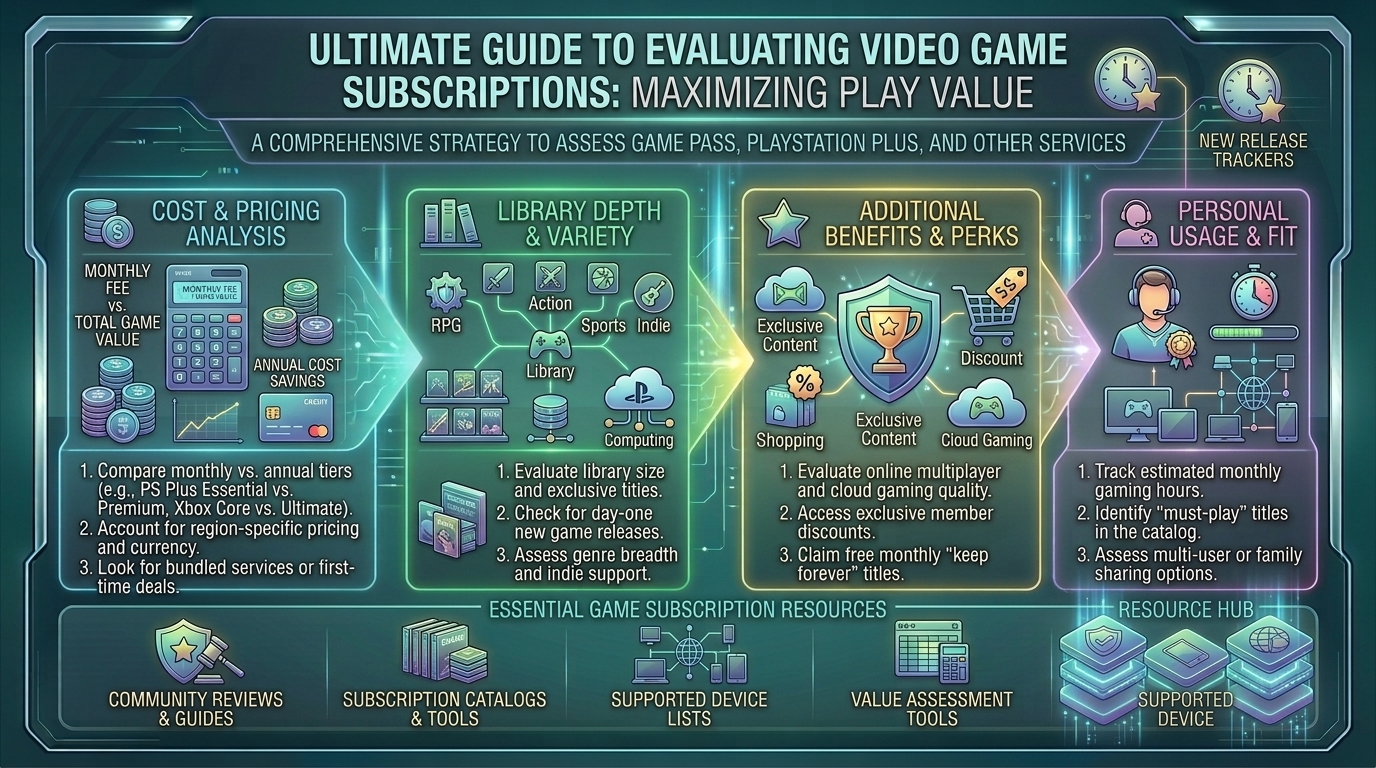
3. The Personal Value Formula: Are You Actually Saving Money?
To determine if a subscription service is worth your money, run this simple personal audit:
Step 1: Calculate Your Annual Spend
- Multiply your chosen subscription’s annual cost (e.g., ~$135 for PS Plus Extra or ~$275 for Game Pass Ultimate annually).
Step 2: List the Games You Intended to Buy
- Look at the service’s current library catalogue. Identify how many games you realistically plan to play and finish over the next 12 months that you would have otherwise purchased individually.
- Example Math: If PlayStation Plus Extra costs $135 a year, and you play and finish just two major AAA games from the catalogue that would have cost $70 each at retail ($140 total value), the subscription has already paid for itself, before even counting the monthly free games and online multiplayer access.
Step 3: Factor in the “Completionist Trap”
- Be honest with your gaming habits. If you suffer from “catalog paralysis”—scrolling through 400 games for an hour, playing a game for 20 minutes, and never finishing anything—you are wasting money. Subscriptions reward active explorers who enjoy sampling diverse genres.
4. Hidden Benefits and Extra Perks to Consider
When calculating value, don’t ignore the supplementary perks bundled into these subscriptions:
- Cloud Gaming & Demo Access: Xbox Cloud Gaming lets you test games instantly without waiting hours for massive file downloads, while higher PS Plus tiers offer timed game trials.
- Integrated Rewards Programs: Services like Microsoft Rewards allow you to earn points redeemable for gift cards simply by playing Game Pass titles or completing daily quests.
- Cross-Platform Synergy: Subscriptions like PC Game Pass bridge desktop gaming and handheld systems (like the ROG Ally or Lenovo Legion Go) under a single recurring fee.
5. Frequently Asked Questions (FAQ)
1. Is it cheaper to pay monthly or annually for gaming subscriptions?
Annually, without a doubt. Subscribing to services like PlayStation Plus on a 12-month billing cycle offers massive savings compared to paying the recurring monthly rate, which often includes a convenience markup.
2. What happens to my game save data if I cancel my subscription?
Your cloud save data is safely stored on Sony or Microsoft servers for a grace period (typically 6 months), meaning if you resubscribe later, your progress won’t be lost. However, downloaded games become locked and unplayable until your subscription is renewed.
3. Do games stay on Xbox Game Pass and PS Plus Extra forever?
No. Subscriptions operate on a rotating licensing model. Games typically stay on the service anywhere from 3 to 12+ months before rotating out. Publishers usually give a 2-week warning before a game leaves the library.
4. Can I buy games that leave a subscription service at a discount?
Yes! While a game is active on Game Pass or PS Plus, subscribers typically receive an exclusive digital store discount (usually 10% to 20% off) to purchase and permanently own the game before it rotates out.
5. Is Xbox Game Pass Ultimate worth it if I only play on PC?
If you only play on PC, you should subscribe to PC Game Pass rather than Game Pass Ultimate. PC Game Pass provides the exact same PC game library and day-one access at a significantly lower monthly cost.
6. Why do Sony and Microsoft keep raising the prices of these services?
As the cost of developing AAA games skyrockets and content pipelines expand, maintaining massive library licensing deals requires increased revenue, leading to industry-wide subscription tier price adjustments.
7. Does PlayStation Plus Extra include day-one releases like Xbox?
Generally no. While Sony occasionally drops indie titles or smaller games day-one, major PlayStation Studios blockbusters arrive on the service long after their initial retail lifecycle.
8. What is the difference between PS Plus Extra and PS Plus Premium?
Extra gives you the 400+ modern PS4/PS5 game catalogue, while Premium adds a retro classics library (PS1, PS2, PS3, PSP), game trials, and cloud streaming capabilities. If you don’t care about retro games, Extra is the superior value choice.
9. Can I share my subscription with family members in the same household?
Yes, on both Xbox and PlayStation consoles, you can designate a “home” console, allowing secondary profiles on the same physical hardware to share your subscription benefits, online multiplayer access, and game libraries.
10. How can I track when games are leaving Game Pass or PS Plus?
Check the “Leaving Soon” tab directly on your console dashboard launcher each month, or follow community-driven trackers on Reddit and gaming news sites to rush through any games on your backlog before they disappear.
6. Conclusion
Evaluating video game subscription services like Xbox Game Pass and PlayStation Plus Extra comes down to a simple math problem mapped against your personal gaming habits. If you love exploring diverse genres, playing games at your own pace without buying them individually, and taking advantage of annual billing cycles, these services offer staggering value. If you only play one or two live-service titles all year, sticking to individual purchases or baseline multiplayer tiers is the smarter financial move.
Analyze your backlog, pick the tier that matches your playstyle, and maximize your digital entertainment budget right here with thegamerbuzz!
What game subscription service do you find yourself using the most, and has it changed how you buy video games?
Leave a Reply