What Are the Best Flight Yoke and Throttle Setup Buying Guides for Flight Simulation Game Hobbyists
Welcome to thegamerbuzz, your trusted destination for elite flight simulation hardware breakdowns, cockpit engineering tips, and aviation peripheral guides. Whether you are flying instrument approaches through heavy cloud cover late at night in a New York high-rise, practicing smooth landings in San Francisco, configuring complex multi-engine turboprops across Texas and Washington, or building out your dream home cockpit ecosystem from sunny California, we know one absolute truth: keyboard commands and generic game controllers completely kill the realism of virtual aviation.
The difference between casually flying a plane and truly mastering flight simulation lives in your hands and feet. Feeling the physical resistance of pulling back on a heavy control column, managing engine mixture or jet thrust via dedicated physical levers, and trimming your aircraft manually turns a PC video game into an authentic aviation experience.
If you are looking to upgrade your setup or build your first realistic flight deck, this comprehensive master buying guide breaks down yoke mechanics, throttle configurations, sensor technologies, and top hardware picks for every budget.
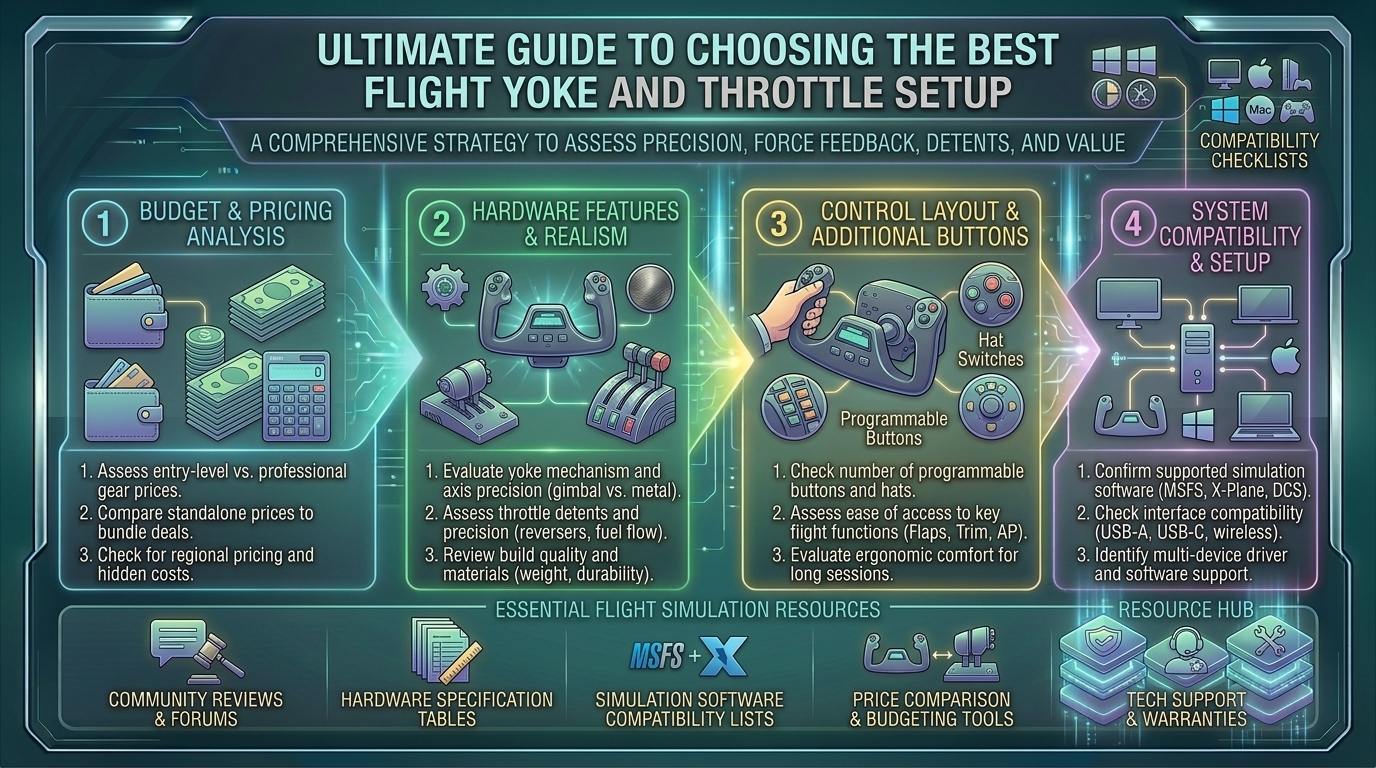
1. Understanding Flight Yokes: Mechanics and Internal Design
When evaluating flight simulator yokes, the most critical factor is not how many buttons are printed on the plastic shell—it is how the pitch and roll axes are mechanically engineered.
1. Traditional Push-Pull Shaft Yokes (The General Aviation Standard)
- How They Work: The control wheel is mounted to a metal or plastic shaft that slides directly in and out of a central housing to control pitch, while rotating left and right to control roll.
- The Experience: This mimics iconic light aircraft like the Cessna 172 or Piper Cherokee. They are reliable and familiar, though budget models can exhibit a slight mechanical center detent or friction as the shaft moves through its bushing.
2. Pendular Yokes (The Heavy Airliner Standard)
- How They Work: Instead of sliding straight in and out of a box, the entire yoke assembly is suspended from an overhead or floor-mounted pivot point, swinging in an arc.
- The Experience: Replicates heavy commercial airliners like Boeing 737s, 777s, and 787s. The arc movement feels drastically more authentic when pitching a massive twin-jet airliner down a glide slope.
3. Sensor Technology: Potentiometers vs. Hall Effect / Magnetic Sensors
- Potentiometers: Older or entry-level yokes use mechanical sliding contact resistors. Over time, dust buildup causes “pot jitter,” leading to erratic inputs and twitchy control surfaces.
- Hall Effect & GMR Magnetic Sensors: Modern gold-standard yokes use non-contact magnetic sensors. They measure magnetic fields to determine angle and position, ensuring butter-smooth precision that never degrades or wears out over years of heavy use.
2. Choosing the Right Throttle Quadrant
A yoke handles your attitude, but the throttle quadrant manages your power plants, mixture, prop pitch, flaps, and landing gear. Depending on what you fly, your throttle requirements change entirely:
- For General Aviation & Piston Twins: You need a quadrant with multiple axes (Throttle, Propeller, Mixture—traditionally color-coded black, blue, and red) to manage engine tuning, turbocharging, and fuel-air ratios accurately.
- For Modern Commercial Jets (Boeing & Airbus): You want robust dual or quad thrust levers featuring mechanical detents for takeoff/go-around (TOGA), climb (CL), and reverse thrust gates.
- Modular Ecosystems: Modern flight setups increasingly favor modular quadrants (such as the Honeycomb Bravo or MOZA MTQ) that allow you to swap lever handles and faceplates depending on whether you are flying a twin-engine jet or a single-engine bush plane.
3. Top Flight Yoke and Throttle Setup Recommendations
Whether you are looking for an all-in-one introductory bundle or a professional-grade simulation desk, these standout hardware packages represent the best choices on the market:
- Best Overall Value & General Aviation Pick: Honeycomb Alpha Flight Controls & Bravo Throttle Quadrant. Widely considered the gold standard for desktop simmers. The Alpha features a smooth 180-degree yoke rotation with no center detent, while the Bravo is a modular masterpiece featuring six lever axes, an integrated autopilot panel, gear/flap switches, and a dedicated trim wheel.
- Best All-In-One Console & PC Hybrid: Turtle Beach VelocityOne Flight Universal Control System. A brilliant integrated unit combining a smooth yoke, built-in throttle quadrant, trim wheel, and a status display screen. It is fully compatible with PC and Xbox, making it the ultimate plug-and-play solution for living room or desk setups.
- Best Dedicated Boeing Airliner Setup: Thrustmaster TCA Yoke Pack Boeing Edition. Officially licensed by Boeing, this features a realistic pendular mechanism that mimics a real 787 flight deck, paired with adjustable spring resistance and a dual-throttle quadrant equipped with magnetic Hall effect sensors.
- Best Entry-Level Budget Choice: Logitech G Flight Yoke System. A classic bundled entry package featuring a yoke and a 3-axis throttle quadrant. While it has a shorter rotation arc and a more noticeable mechanical center, it remains a reliable, accessible entry point for beginners.
4. Frequently Asked Questions (FAQ)
1. Can I use a flight yoke for combat flight sims or helicopters?
While you can fly anything with a yoke, rotary-wing aircraft (helicopters) and military fighter jets (like the F/A-18 or F-16) are fundamentally designed around center-mounted or side-mounted joysticks (HOTAS), not yokes. For combat sims, a joystick is vastly superior.
2. Do flight yokes require a dedicated desk mount or cockpit?
Most mid-to-high-end yokes include heavy-duty steel desk clamps or suction systems that secure tightly to wooden or glass desks up to a few inches thick. Heavy force-feedback or professional metal yokes may require a dedicated aluminum profile cockpit to prevent desk flex.
3. Are PC flight yokes compatible with Xbox or PlayStation consoles?
Not automatically. Console hardware requires security chips. Always verify compatibility labels; a yoke explicitly built for Windows PC will not work on an Xbox or PlayStation unless it bears official console certification.
4. Why is a separate throttle quadrant important instead of just using keyboard shortcuts?
Smoothly modulating engine power, managing propeller pitch during climbs, and deploying reverse thrust instantly upon touching down are core components of safe flight management that cannot be replicated via digital keyboard taps.
5. What is the difference between a potentiometer and a Hall effect sensor?
Potentiometers rely on physical friction across an electronic strip that wears down over time. Hall effect sensors use magnets to track movement without physical contact, ensuring zero drift and exceptional longevity.
6. Do I need rudder pedals immediately, or can I use twist/yoke-twist controls?
Many entry yokes allow you to twist the yoke shaft or use rocker paddles on the back for rudder control. However, for crosswind landings and coordinated turns in serious flight sims, dedicated floor rudder pedals are a transformative upgrade.
7. How do I prevent my yoke from slipping or moving during a heavy flight maneuver?
Ensure your desk surface is clean before attaching clamps, tighten the mounting screws evenly on both sides to distribute pressure, and use rubber grip pads if your desk has a slick laminate finish.
8. Which flight simulator software works best with these hardware setups?
Modern platforms like Microsoft Flight Simulator, X-Plane, and DCS World feature robust native peripheral menus that automatically recognize major hardware brands, allowing quick drag-and-drop axis mapping.
9. How much desk space do I need for a full yoke and throttle setup?
You will typically need at least 24 to 30 inches of clear horizontal desk space to accommodate both the central yoke housing and a separate multi-lever throttle quadrant side-by-side, along with adequate clearance for the yoke shaft to push all the way in.
10. Can I mix and match hardware brands (e.g., a Honeycomb yoke with a Thrustmaster throttle)?
Yes! On Windows PC, every flight peripheral connects via independent USB cables. Windows treats them as separate game controllers, allowing you to seamlessly mix and match yokes, throttles, and rudder pedals from entirely different manufacturers.
5. Conclusion
Investing in a high-quality flight yoke and throttle setup completely transforms flight simulation from a keyboard puzzle into an immersive, realistic aviation discipline. By prioritizing non-contact magnetic sensors, matching your hardware to your favorite aircraft types (whether bush-flying a Cessna or captaining a Boeing airliner), and utilizing modular throttle controls, you build a cockpit that responds precisely to your touch.
Secure your desk clamps, run your pre-flight checklists, and conquer the skies right here with thegamerbuzz!
What is your absolute favorite aircraft to fly on long-haul routes, and what hardware setup do you use to pilot it?
Leave a Reply