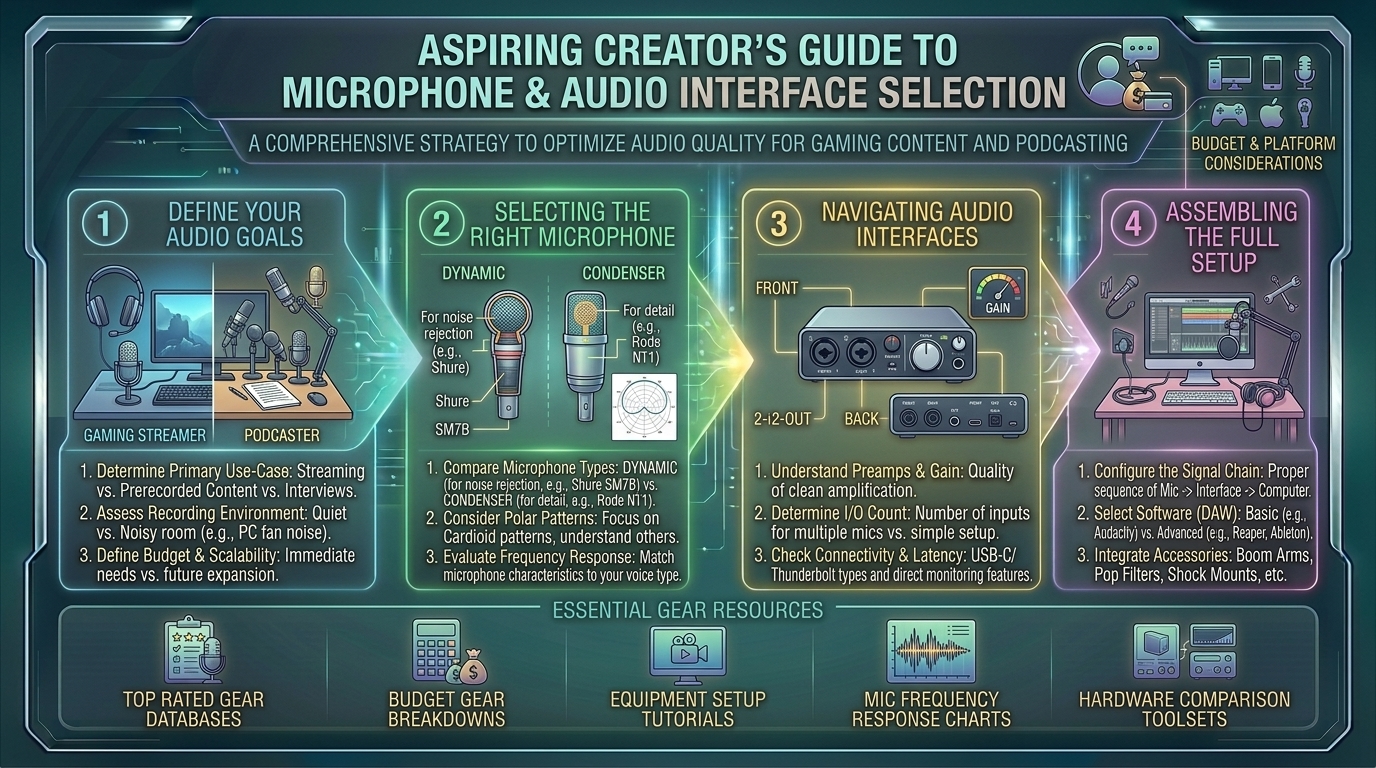
Welcome to thegamerbuzz, your definitive authority on studio-grade audio hardware, streaming tech, and high-performance content creation ecosystems. Whether you are cutting voiceover lines late into the night in a New York studio apartment, calibrating broadcast audio mixing levels in San Francisco, streaming competitive matches across Texas and Washington, or building a pristine acoustic environment from sunny California, we know one foundational truth: viewers will forgive subpar 720p video, but they will click away from bad audio in under three seconds.
The difference between an amateur stream and a professional broadcast production lives in your microphone choice and signal chain. Understanding how to navigate dynamic versus condenser capsules, USB versus XLR workflows, and preamps versus audio interfaces is vital.
If you are an aspiring content creator or podcaster looking to build the ultimate audio setup, this master-level buying guide breaks down everything you need to know to secure pristine vocal clarity.
1. The Golden Rule of Audio: Dynamic vs. Condenser Microphones
Before looking at specific brands, you must choose the right capsule type for your recording environment. This decision dictates how your voice interacts with background noise.
1. Condenser Microphones (The Studio Detail Kings)
- How They Work: Uses an ultra-thin electrostatic diaphragm suspended close to a metal backplate. They are exceptionally sensitive and capture wide-frequency audio with immense detail, air, and high-end sparkle.
- The Catch: Because they are so sensitive, they pick up everything—including your mechanical keyboard clatter, PC cooling fans, ceiling fans, and traffic outside your window.
- Best For: Fully sound-treated vocal booths or quiet recording spaces.
2. Dynamic Microphones (The Streaming & Podcast Workhorses)
- How They Work: Uses a tiny moving wire coil attached to a diaphragm inside a magnetic field. They are heavier and less sensitive to distant sound waves.
- The Experience: They excel at off-axis noise rejection, meaning they isolate your voice while ignoring background room noise (like your keyboard or mouse clicking). This makes dynamic microphones the undisputed standard for modern gaming creators and live streamers.
2. USB vs. XLR: Choosing Your Signal Path
When building your kit, you must decide how your microphone connects to your PC or streaming rig:
- USB Microphones (Plug-and-Play Simplicity): Connect directly to your computer via USB-C. They have built-in analog-to-digital converters, requiring zero extra hardware. Perfect for beginners who want instant results.
- XLR Microphones (The Professional Modular Ecosystem): Output a pure analog signal through a 3-pin XLR cable. They require an audio interface to translate the signal into your PC. XLR systems give you absolute control, upgradeability, and zero latency routing.
- The Modern Hybrid Revolution: Many top-tier modern microphones (such as the Shure MV7+ or Rode PodMic USB) feature both USB and XLR outputs. You can run them via USB today and plug them into an XLR interface when you scale up your setup tomorrow.
3. Understanding Audio Interfaces and Preamps
If you choose a pure XLR microphone, you need an audio interface—an external hardware box that plugs into your PC via USB, supplies phantom power (+48V) if required, and hosts the microphone preamps.
- What is a Preamp? A preamp boosts the quiet electrical signal coming from your microphone up to a usable line level. Some famous broadcast mics (like the Shure SM7B) are “gain-hungry” and require powerful clean preamps or inline signal boosters (like a Cloudlifter) to sound their best.
- Key Interface Features to Look For:
- Independent Gain Knobs: For controlling individual mic levels if you have multiple co-hosts.
- Direct Hardware Monitoring: Headphone jacks on the interface that let you hear your voice with zero digital delay.
- Loopback Audio: Crucial for streamers wanting to route Discord calls, game audio, and sound effects cleanly into OBS.
4. Top Microphone and Audio Interface Recommendations
These standout hardware picks represent the best performance tiers on the market for creators:
- Best Overall Streaming Microphone: Shure MV7+. A hybrid USB/XLR dynamic powerhouse featuring onboard DSP (Digital Signal Processing), auto-leveling modes, and incredible room isolation.
- Best Budget XLR Workhorse: Elgato Wave DX or Rode PodMic USB. Exceptional dynamic capsules that capture deep broadcast warmth while ignoring mechanical keyboard clatter.
- Best End-Game Broadcast Microphone: Shure SM7dB. The legendary SM7B studio sound paired with a built-in active preamp, eliminating the need for an external booster box.
- Best Audio Interface for Solo Creators & Duos: Focusrite Scarlett 2i2 (4th Gen) or Focusrite Vocaster Two. Industry-standard crystal-clear preamps, ultra-low noise floors, and robust instrument/mic combo inputs.
- Best All-in-One Podcast Console: RødeCaster Duo or Pro II. Premium standalone broadcast mixers featuring physical sound pads, multi-channel routing, and Bluetooth call-in integration for professional multi-host setups.
5. Frequently Asked Questions (FAQ)
1. Do I need an audio interface if I buy a USB microphone?
No. USB microphones contain internal analog-to-digital converters and preamps built right into the mic body, plugging directly into your computer’s USB port.
2. Why does my XLR microphone sound extremely quiet when I plug it in?
Certain dynamic microphones (like the Shure SM7B) require a massive amount of clean gain (up to 60 dB). If your budget interface doesn’t have enough clean gain, your audio will sound faint or hiss heavily, requiring an inline preamp booster or a high-gain interface.
3. Can I use an XLR microphone for gaming on a PS5 or Xbox Series X?
Consoles generally do not support standard USB audio drivers for complex XLR interfaces. However, hybrid USB/XLR microphones (like the Shure MV7+) can plug directly into a PlayStation console via USB mode.
4. What is the difference between a cardioid and hypercardioid polar pattern?
Polar patterns dictate where the mic picks up sound. Cardioid patterns reject sound from behind the mic, while hypercardioid patterns offer an even tighter directional pickup cone, making them ideal for untreated, noisy rooms.
5. How close should my mouth be to a broadcast dynamic microphone?
Dynamic broadcast mics are designed to be used close—typically 2 to 4 inches away from your mouth. This utilizes the proximity effect to give your voice a rich, deep, radio-broadcast warmth.
6. What causes a high-pitched buzzing sound in my microphone recordings?
This is usually electrical ground loop interference caused by USB bus power or sharing dirty wall outlets. Using balanced XLR cables, plugging your interface into a clean USB port, or using a USB ground loop isolator typically resolves the issue.
7. Do I need a pop filter if my microphone has an internal mesh?
An external pop filter or foam windscreen is still recommended to catch aggressive plosive bursts (hard “P” and “B” sounds) before they hit the microphone capsule and distort the audio signal.
8. What software do I need to clean up my voice audio for streaming?
OBS Studio features native audio filters (Noise Suppression, Compressor, and Limiter) that clean up background noise and balance your volume levels in real-time. Dedicated software like NVIDIA Broadcast also uses AI to strip out room echo and keyboard clicks entirely.
9. Are expensive studio monitor headphones necessary for audio editing?
Yes. Unlike gaming headsets with artificially boosted bass, flat-response studio monitor headphones let you hear your raw audio accurately so you can catch clipping, mouth clicks, and harsh frequencies during editing.
10. Can I connect two USB microphones to one computer for a two-person podcast?
Operating systems like Windows and macOS struggle natively when trying to aggregate two separate USB audio devices simultaneously. If you are hosting a two-person show, it is vastly easier to use an XLR audio interface with two microphone inputs.
6. Conclusion
Investing in the right microphone and audio interface transforms your content from amateur noise into professional-grade broadcasting. By prioritizing a dynamic capsule if you record in an untreated room, selecting a robust USB/XLR hybrid path, and pairing it with a clean audio interface, you ensure your audience hears every word with absolute clarity.
Calibrate your gains, check your levels, and elevate your broadcast presence right here with thegamerbuzz!
What audio setup are you currently running on your stream or podcast, and what is your biggest audio headache when editing content?
Leave a Reply