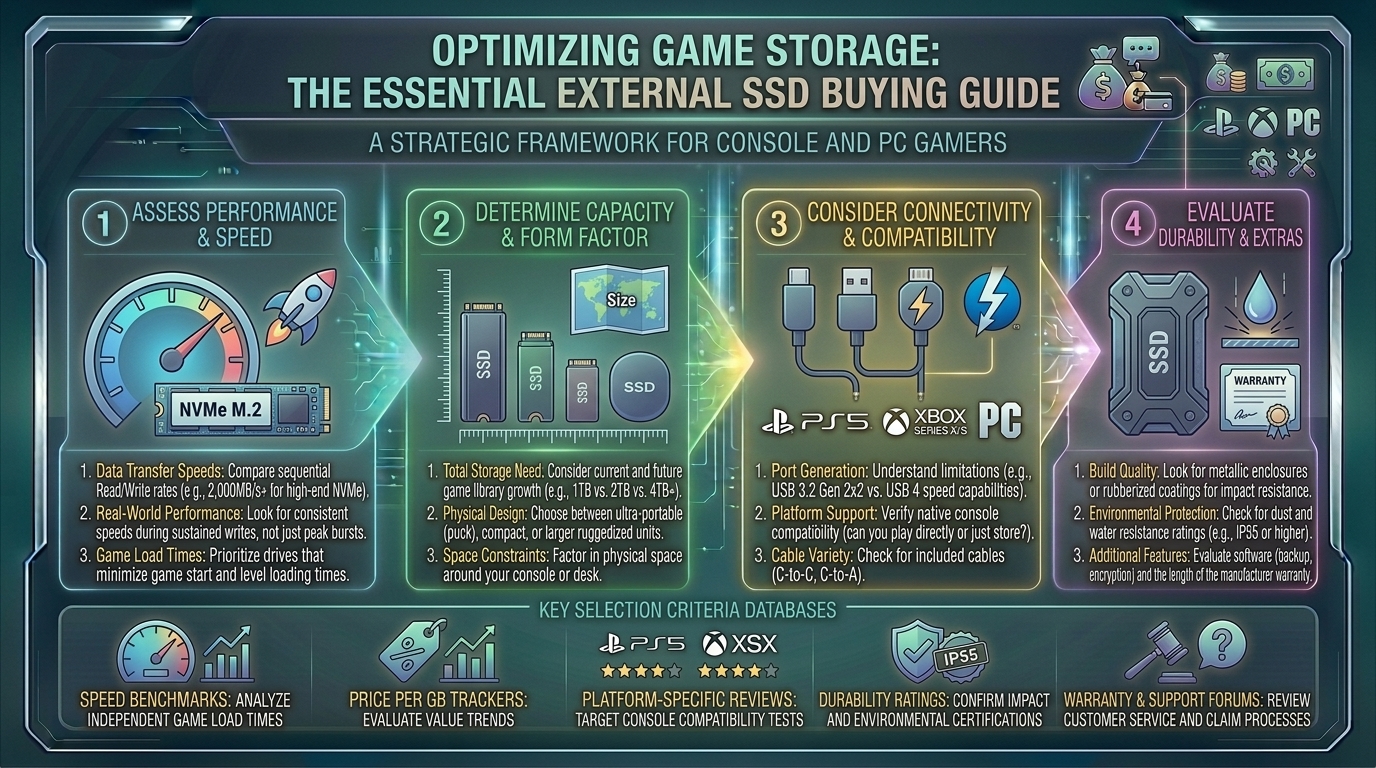
Welcome to thegamerbuzz, your definitive authority on high-performance storage hardware, digital library management, and platform expansion strategies. Whether you are managing hundreds of gigabytes of modern game installs late at night in a New York high-rise, benchmarking load times in San Francisco, optimizing data pipelines across Texas and Washington, or clearing space for massive open-world titles from sunny California, we know one universal truth: modern video games are enormous, and your internal console or PC storage is filling up faster than ever.
With AAA game installs routinely crossing the 150GB to 200GB threshold, running out of hard drive space has become a universal frustration for gamers. Gone are the days when a standard spinning mechanical external hard drive (HDD) sufficed. To handle modern asset streaming, quick loading screens, and demanding open-world textures, external Solid State Drives (SSDs) are mandatory.
If you are looking to expand your PC, PlayStation, or Xbox game library without opening up your chassis or tearing down your console, this comprehensive master buying guide breaks down speeds, connection protocols, platform rules, and top external SSD choices for every budget.
1. Why You Need an External SSD (And Why HDDs Are Dead for Gaming)
Before looking at specific models, it is crucial to understand why traditional mechanical hard drives should no longer be used for modern gaming.
- The Mechanical Bottleneck: Traditional HDDs rely on a physical spinning magnetic disk and a moving read/write head. They max out at around 140 MB/s, causing agonizing load times and severe texture pop-in in modern games.
- The Solid-State Revolution: External SSDs use flash memory with zero moving parts. Standard portable SSDs push anywhere from 1,050 MB/s to 2,000+ MB/s, while high-end USB4 and Thunderbolt drives can skyrocket past 3,800 MB/s. They launch games instantly and allow seamless data transfers between devices.
2. Platform Rules: What Works Where?
You cannot simply plug any external drive into any machine and expect games to run. Each platform has strict rules regarding external storage:
1. For PC and Laptop Gamers
- Total Freedom: You can store and launch any PC game directly from an external SSD. Whether it’s Steam, Epic Games Store, or Xbox PC App, Windows treats external USB SSDs almost identically to internal drives.
2. For PlayStation 5 (PS5) Owners
- The Catch with PS5 Native Games: You cannot launch native PS5 games directly from an external USB drive due to Sony’s strict internal architecture requirements.
- The Solution: You can use an external SSD as a cold storage vault. Store your massive PS5 games on the external drive and quickly transfer them back to your internal M.2 NVMe slot when you want to play. Alternatively, you can run PS4 backwards-compatible games directly off the external SSD with zero performance loss.
3. For Xbox Series X/S Owners
- Similar to PlayStation, optimized Xbox Series X/S games require the proprietary internal storage expansion card slot. However, external USB SSDs work brilliantly for storing Series X/S titles in cold storage or playing backward-compatible Xbox One, Xbox 360, and original Xbox games directly off the drive.
3. Decoding USB Generations and Speed Tiers
When shopping for an external SSD, matching the drive’s USB protocol to your computer or console’s port capability is essential to avoid wasting money on speed you cannot utilize.
- USB 3.2 Gen 2 (10 Gbps): Delivers speeds around 1,050 MB/s (such as the Crucial X9 or Samsung T7). Perfect for everyday game storage, budget builds, and general PC use.
- USB 3.2 Gen 2×2 / USB4 (20 to 40 Gbps): Delivers blistering speeds from 2,000 MB/s to nearly 4,000 MB/s (such as the ADATA SD810 or SanDisk Extreme Pro). Ideal for hardcore PC gamers who want lightning-fast file transfers and massive game installations.
4. Top External SSD Recommendations for Gamers
These standout portable drives represent the absolute best performance, reliability, and value on the market:
- Best Overall Gaming External SSD: ADATA SD810. Offering blazing speeds up to 2,000 MB/s, excellent sustained write performance, and rugged IP68 dust and water resistance, it is a stellar all-rounder for PC and console users.
- Best Budget Value Pick: Crucial X9. Compact, lightweight, and highly reliable, it delivers stable 1,050 MB/s performance at a fraction of the cost of premium enthusiast drives.
- Best High-Performance Pro Pick: Samsung T9 or Crucial X10 Pro. Built for heavy workloads and rapid asset transfers, maintaining rapid speeds and staying cool during extended gaming sessions.
- Best Rugged & Durable Option: Samsung T9 Shield or LaCie Rugged Series. Enclosed in heavy rubberized dampening shells designed to survive accidental drops, knocks, and travel.
5. Frequently Asked Questions (FAQ)
1. Can I run modern PC games directly from an external SSD?
Yes! As long as your external SSD is plugged into a high-speed USB-C port (USB 3.2 Gen 2 or higher), modern PC games will load and run smoothly with minimal difference compared to an internal drive.
2. Why won’t my PS5 let me play PS5 games directly from my external USB SSD?
Sony’s proprietary Tempest 3D AudioTech and high-speed custom I/O controller require ultra-fast internal M.2 NVMe PCIe 4.0 speeds (minimum 5,500 MB/s). Standard external USB drives cannot match this bandwidth, so native PS5 games must live on internal storage.
3. What capacity external SSD should I buy for gaming?
Given that modern AAA titles range from 70GB to over 200GB each, 1TB is the bare minimum, but a 2TB or 4TB drive is strongly recommended so you can build a massive, permanent game library without constantly deleting files.
4. Do external SSDs get hot during long gaming sessions?
Yes, high-performance solid-state drives transfer heat through their metal chassis enclosures. It is normal for an external SSD to feel warm to the touch during heavy data transfers or game loading.
5. Do I need to format an external SSD before using it on my console?
Yes. When you plug a new external SSD into a PlayStation or Xbox, the console will prompt you to format the drive specifically for game storage, erasing any existing files on it.
6. Can I use the same external SSD interchangeably between my PC and my console?
Consoles format external drives using proprietary file systems. If you format a drive for your PS5 or Xbox, your PC will no longer recognize it for file storage unless you reformat it back to NTFS/exFAT (which erases your console games).
7. What is the difference between an SSD and an external HDD?
An SSD (Solid State Drive) uses flash memory with zero moving parts, making it up to 15 times faster and completely silent compared to an old-school HDD (Hard Disk Drive), which relies on physical spinning platters.
8. Are external SSDs vulnerable to shock and drops?
Because SSDs contain no delicate mechanical read heads or spinning disks, they are highly resistant to drops and bumps, making them exceptionally travel-friendly for gamers on the go.
9. What cables should I use to connect my external SSD?
Always use the high-speed USB-C cable included directly in the box with your SSD. Using cheap, generic charging cables can throttle your data speeds down to outdated USB 2.0 limitations.
10. How long do portable external SSDs typically last?
Quality external SSDs feature high write endurance ratings (TBW – Terabytes Written) and typically last for many years of heavy game loading and file transfers, backed by 3- to 5-year manufacturer warranties.
6. Conclusion
Expanding your gaming library with an external SSD is the smartest, most cost-effective way to cure storage anxiety on your PC or console. By choosing drives with high read/write speeds, matching your hardware to your platform’s specific architecture rules, and picking a capacity that leaves room for future expansions, you keep your entire game collection ready to play at a moment’s notice.
Clear out your backlog, speed up your loading screens, and level up your digital storage right here with thegamerbuzz!
Leave a Reply