How to Navigate Video Game Digital Refund Policies on Steam, Epic Games, Xbox, and PlayStation Stores
Welcome to thegamerbuzz.com! Whether you are building a pristine game library in a fast-paced tech hub like San Francisco or New York, checking out weekend releases across Washington and Texas, or managing your digital purchases in California, buying video games digitally has become the default way to play.
However, the convenience of digital storefronts comes with a major catch: buying a game digitally doesn’t always guarantee you’ll love it. Whether an anticipated AAA release runs at an abysmal 15 frames per second, turns out to be completely misadvertised, or accidentally gets purchased twice by a misclick, knowing how to recover your hard-earned money is essential.
Every major digital storefront—Steam, Epic Games, Xbox, and PlayStation—operates under its own distinct set of rules, timeframes, and fine print. This master guide breaks down everything you need to know to successfully navigate digital refund policies across all major gaming platforms.
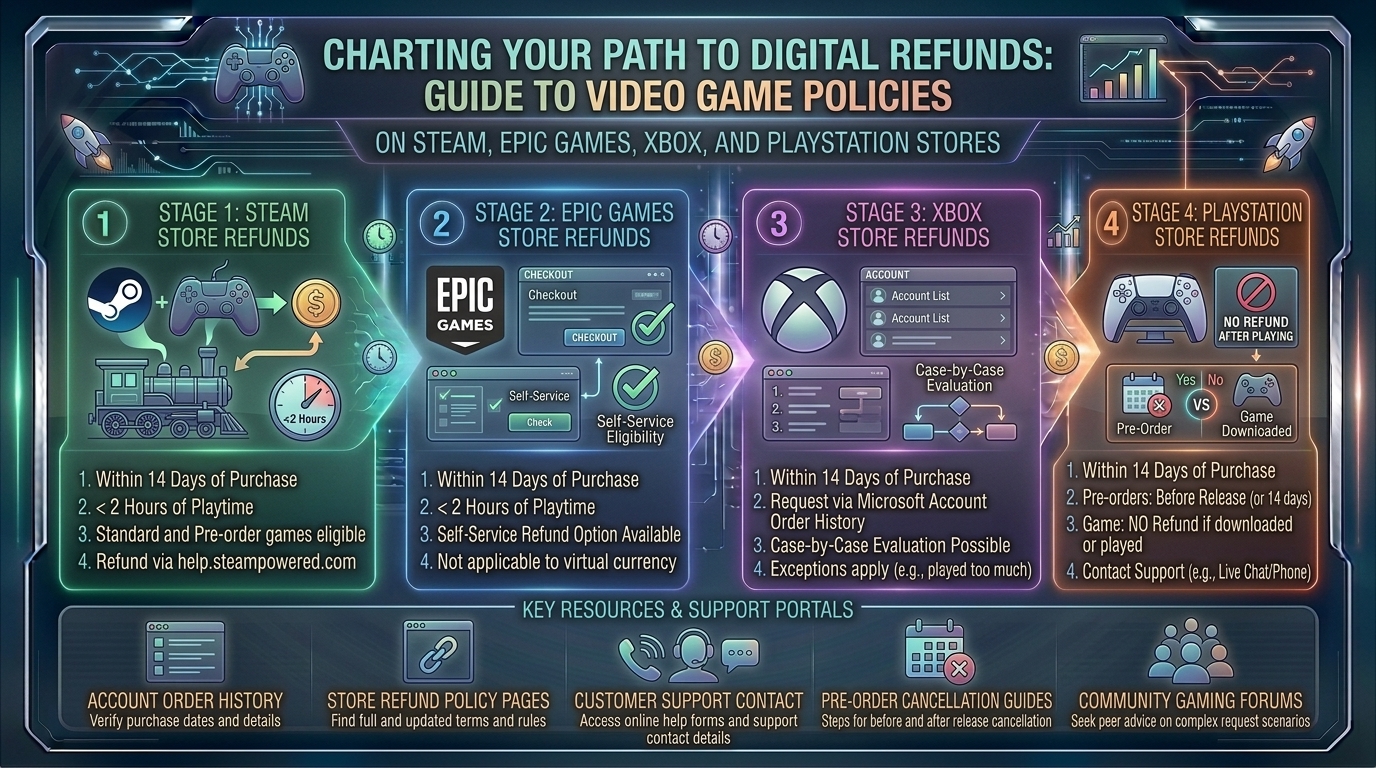
1. Steam: The Gold Standard of Flexible Refunds
Valve’s digital storefront has long maintained the most transparent and consumer-friendly refund policy in the industry, largely thanks to strict consumer protection laws in regions like the European Union.
The Core Rules
- The Time Window: You must request a refund within 14 days of purchase.
- The Playtime Limit: You must have played the game for less than 2 hours (including online, offline, and Family Sharing playtime).
- No Reason Required: Under the automated system, you do not need to justify your request. “I didn’t like it” or “Purchased by accident” are fully valid grounds for an automatic approval.
Nuances & Edge Cases
- Pre-Orders: You can refund any pre-ordered game at any time before its official release date for a full refund. Once released, the standard 14-day/2-hour window kicks in.
- DLC and Bundles: Downloadable Content (DLC) is generally refundable within 14 days if the base game has less than 2 hours of playtime and the DLC has not been consumed or modified. Bundles calculate playtime across the entire package combined.
- Manual Reviews: If you fall outside the 2-hour or 14-day window (e.g., a game is completely broken on launch day or riddled with fatal bugs), you can still submit a manual ticket. Valve reviews these on a case-by-case basis.
2. Epic Games Store: Simple, Clean, and Match-Style
Following in Steam’s footsteps, the Epic Games Store features a straightforward automated refund policy for its PC platform.
The Core Rules
- The Time Window: Requests must be made within 14 days of purchase.
- The Playtime Limit: You must have logged less than 2 hours of total playtime.
- Self-Refundable Tag: The game or product must be designated as “self-refundable” in your account profile.
Nuances & Edge Cases
- Pre-Orders: Unreleased pre-orders can be cancelled and refunded at any time prior to launch.
- In-Game Purchases: Virtual currency, microtransactions, and third-party add-ons purchased outside of specific titles may carry separate restrictions or be entirely non-refundable unless explicitly stated.
3. Xbox / Microsoft Store: Generous Windows with Discretionary Limits
Microsoft provides a generalized automated framework for its digital Xbox and PC Windows storefront, balancing structured timelines with human review.
The Core Rules
- The General Window: Generally, requests should be submitted within 14 days of purchase.
- The Playtime Limit: Unlike Steam’s strict 2-hour hard limit, Xbox evaluates requests based on “cumulative playtime,” looking for minimal usage.
- Digital Code Redemptions: Games or add-ons bought via third-party retail keys generally cannot be refunded directly through Microsoft; you must contact the original retailer.
Nuances & Edge Cases
- Pre-Orders: Charged up to 10 days before release, pre-orders can be cancelled at any time before launch through your Microsoft account management page without penalty.
- Abuse Prevention: Microsoft explicitly notes that its refund system is designed for occasional consumer protection. Habitual purchasing and refunding patterns will trigger automated blocks on your account.
4. PlayStation Store (Sony): The Most Rigid Policy in Console Gaming
Sony’s PlayStation Network (PSN) enforces the strictest rules among major publishers, requiring extreme caution before hitting the “Buy” button on a PS5 or PS4.
The Core Rules
- The Time Window: You have 14 days from the date of purchase to request a refund.
- The Catch (No Downloading): You must not have started downloading or streaming the game. The moment game data begins downloading to your console, you forfeit your right to a standard automated refund.
Nuances & Edge Cases
- Faulty or Defective Games: If a game is demonstrably broken, corrupted, or unplayable due to server failures or critical bugs, Sony will often grant an exception upon manual review via customer support live chat, even if downloaded.
- Subscriptions: PlayStation Plus or other recurring subscriptions can be refunded within 14 days of purchase, though Sony may prorate the refund based on how much you have already utilized the service.
+-------------------------------------------------------------------------+
                  PLATFORM REFUND COMPARISON QUICK-SHEET
+-------------------------------------------------------------------------+
  Platform     | Time Limit | Playtime Limit  | Download Rule
+--------------+------------+-----------------+---------------------------+
  Steam        | 14 Days    | Under 2 Hours   | N/A (Playtime-based)
  Epic Games   | 14 Days    | Under 2 Hours   | N/A (Playtime-based)
  Xbox Store   | 14 Days    | Minimal Usage   | Varies by use
  PlayStation  | 14 Days    | N/A             | MUST NOT DOWNLOAD/STREAM
+-------------------------------------------------------------------------+
5. Pro Tips for Maximizing Your Refund Success Rate
- Never Download Right Away on PlayStation: If you are buying a risky or unverified game on PS5, do not queue the download if there’s even a slight chance you might want your money back.
- Be Direct and Concise in Support Tickets: If you are filing a manual ticket outside standard guidelines (e.g., technical failure past the 2-hour Steam mark), write a clear description of the technical error rather than venting about the game’s quality.
- Opt for Store Credit for Faster Turnarounds: When given the choice of refunding back to a credit card or receiving platform wallet funds (Steam Wallet, PSN Wallet), choosing store credit usually results in funds hitting your account within 24 to 48 hours, whereas credit card reversals can take up to 7–10 business days.
- Watch Out for Sale Timing Exploits: Bought a game full price 2 days before a massive seasonal sale? Platforms like Steam explicitly allow you to refund the full-price game (provided you meet criteria) and immediately repurchase it at the discounted sale price.
10 Frequently Asked Questions (FAQs)
1. Can I get banned from Steam for requesting too many refunds?
You will not be banned for using the system as intended, but Valve reserves the right to revoke refund privileges if it detects clear pattern abuse—such as buying and finishing short games within two hours repeatedly.
2. What happens to my trophies or achievements if I refund a game?
On platforms like Steam and PlayStation, any achievements or trophies unlocked during your brief playtime typically remain logged on your public profile history, even after the refund is processed.
3. Can I refund a game on PlayStation after I have downloaded it?
Generally, no. Sony’s strict terms state that starting a download voids standard automated refunds, unless the product is proven to be faulty or defective.
4. How long do digital refunds take to appear in my bank account?
Once approved, store wallet funds return within 24–48 hours. Credit card and PayPal refunds typically take between 3 to 10 business days depending on your financial institution.
5. Can I refund in-game microtransactions or virtual currency?
On most platforms (like PlayStation and Xbox), microtransactions, V-Bucks, and currency packs are entirely non-refundable once applied to your account. Steam allows in-game item refunds within 48 hours only if unconsumed.
6. Are pre-orders refundable?
Yes. Across Steam, Epic Games, Xbox, and PlayStation, you can cancel and fully refund any pre-ordered game at any time prior to its official release date.
7. What if my PC specifications didn’t meet the game’s requirements?
If you bought the game on Steam or Epic Games and discovered it wouldn’t run, as long as you have less than 2 hours of runtime and bought it within 14 days, your refund will be automatically approved regardless of hardware specs.
8. Can I refund a game bought as a gift for a friend?
On Steam, the original purchaser initiates the refund. If the gift has already been redeemed, the recipient must first initiate a consent waiver through their support interface before the funds go back to the buyer.
9. What should I do if my automated refund request is denied?
You can submit a secondary manual ticket or reach out via customer support live chat (available on platforms like Xbox and PlayStation), explaining your situation politely to a human representative.
10. Do digital storefronts refund taxes?
Yes. When a refund is approved, the total transaction value—including state or local digital sales taxes applied at checkout—is fully returned to your original payment method or wallet.
Conclusion
Navigating digital refund policies doesn’t have to be a headache. While platforms like Steam and Epic offer generous automated safety nets for accidental purchases or buyer’s remorse, console ecosystems like PlayStation require strict adherence to pre-download rules. By understanding these guidelines before you buy, you can shop with absolute confidence across PC and console storefronts alike.
Leave a Reply