How to Check Game Server Status and Maintenance Schedules for Popular Online Multiplayer Games Instantly
Introduction: The Frustration of the Unexpected Connection Error
Picture this: You have wrapped up a long workday or a heavy study session in New York, San Francisco, Seattle, Austin, or Los Angeles. You fire up your high-end gaming PC or console, queue up with your squad, and get hit with a cold, unforgiving error screen: “Connection to server failed. Please try again later.”
Is it your home internet acting up? Did your router crash? Or are the game’s developers performing routine weekly maintenance?
For millions of competitive and casual gamers across tech hubs like Texas, New York, California, and Washington, knowing how to instantly verify game server status and track scheduled maintenance windows saves hours of wasted troubleshooting time. At thegamerbuzz.com, we cut through the guesswork. This comprehensive guide walks you through the exact tools, official dashboards, and real-time community trackers you need to diagnose server outages instantly.
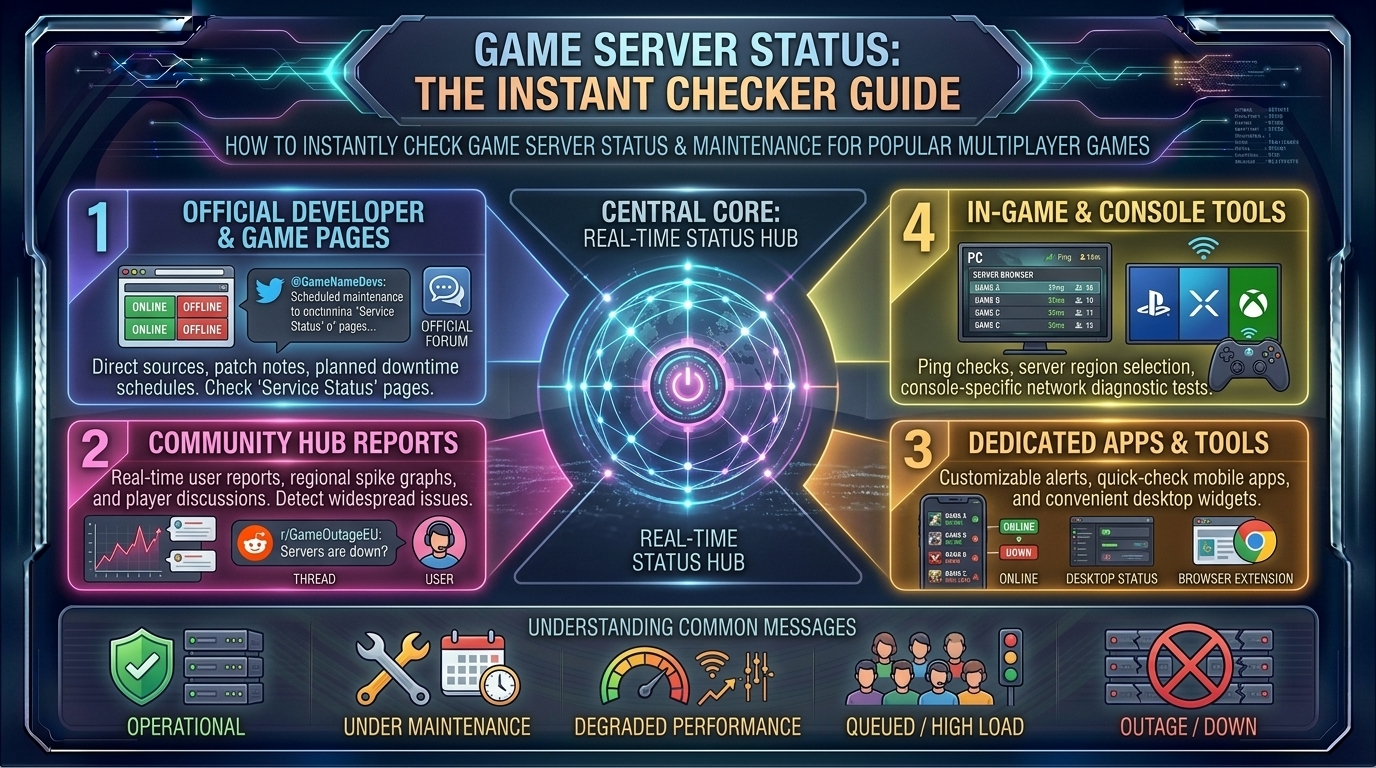
Part 1: Official Developer Status Dashboards (The Gold Standard)
When a massive multiplayer game goes down, the most accurate place to look is always the publisher’s official server status monitor. These pages pull live telemetry directly from backend database nodes and game clusters.
+--------------------------+-----------------------------------+-----------------------------------+
| Publisher / Studio       | Official Status Page URL / Hub    | Primary Games Covered             |
+--------------------------+-----------------------------------+-----------------------------------+
| Epic Games               | status.epicgames.com            | Fortnite, Rocket League, Fall Guys|
| Riot Games               | status.riotgames.com            | Valorant, League of Legends       |
| Electronic Arts (EA)     | help.ea.com/en/server-status/   | Apex Legends, EA Sports FC, Madden|
| Valve / Steam            | steamstat.us                    | Counter-Strike 2, Dota 2, TF2     |
| Blizzard Entertainment   | blizzard.com/support              | World of Warcraft, Overwatch 2    |
+--------------------------+-----------------------------------+-----------------------------------+
Why Official Dashboards Matter
- Granular Service Breakdown: Advanced status sites (like Epic Games or Riot) don’t just say “Online” or “Offline.” They break functionality down into specific modules: Login Services, Matchmaking, Party & Voice Chat, and In-Game Store. You might be able to log into the game client, even if matchmaking is temporarily disabled.
- Precise UTC / Local Timestamps: Maintenance windows are almost always posted in Coordinated Universal Time (UTC) or Pacific/Eastern time zones. Learning to convert these instantly prevents you from trying to log in mid-patch.
Part 2: Third-Party Aggregators and Crowd-Sourced Trackers
What happens when a game drops offline suddenly, but the official developer page still insists “All Systems Operational”? Corporate PR teams can sometimes lag behind unexpected server crashes. That is where crowd-sourced trackers step in.
1. DownDetector and Outage Heatmaps
Websites like DownDetector monitor millions of user connection complaints and social media spikes in real-time.
- How to Read It: If you search for a game like Call of Duty or Destiny 2 and see a massive spike chart paired with a regional map showing red outage reports concentrated across major cities like New York, Dallas, or San Francisco, you know instantly that it is a widespread server outage, not a glitch on your end.
2. SteamStat.us (The PC Gamer’s Lifeline)
For PC enthusiasts utilizing Valve’s ecosystem, SteamStat.us is an indispensable open-source dashboard. It tracks the real-time health of Steam Connection Managers, CS2 matchmaking schedulers, inventory services, and community web APIs globally, letting you know if a matchmaking hiccup is localized or global.
Part 3: Social Media and Community Pulse Checks
When servers crash unexpectedly, the gaming community reacts instantly on social media. Knowing who to follow can give you answers seconds after an outage occurs.
- X (formerly Twitter) Handles to Follow:
- Look for dedicated support handles rather than main marketing accounts (e.g.,
@AskPlayStation,@XboxSupport,@SteamSupport, or game-specific handles like@CODUpdatesor@FortniteStatus).
- Look for dedicated support handles rather than main marketing accounts (e.g.,
- Reddit Communities:
- Subreddits like r/GlobalOffensive, r/ApexOutreach, or specific game subreddits almost always pin a mega-thread titled “Megathread: Servers Down / Update Discussion” the moment an outage hits.
Part 4: Regional Outages vs. Global Maintenance
Living in regions like Texas, California, or Washington means you are connected to massive server clusters (typically split into US East, US West, or Central routing nodes). Sometimes, a maintenance window affects only one specific geographic zone.
- US East vs. US West Routing: If players in New York are getting dropped from a match while players in San Francisco report flawless connections, it indicates a regional cloud provider hiccup (such as AWS or Google Cloud localized data center issues) rather than a global developer patch.
Part 5: Troubleshooting Checklist – Is It Really the Server?
Before you close your game in frustration, run through this quick 4-step diagnostic checklist to make sure the problem isn’t sitting in your own living room:
+-------+-----------------------------------+-----------------------------------+
| Step  | Action Item                       | What It Tests                     |
+-------+-----------------------------------+-----------------------------------+
| 1     | Check official status page        | Confirms global developer outage  |
| 2     | Restart your router / modem       | Clears local DNS cache & routing  |
| 3     | Test hardwired vs. Wi-Fi connection| Isolates local packet loss        |
| 4     | Verify platform login (PSN/Xbox)  | Checks account-level authenticators|
+-------+-----------------------------------+-----------------------------------+
- Check DNS and Network Settings: Sometimes a corrupted local DNS cache prevents your console or PC from resolving the game server’s IP address. Flushing your DNS or restarting your hardware resolves this instantly.
- Platform Network Outages: Remember that playing a multiplayer game on PlayStation or Xbox requires both the game server and PSN/Xbox Live to be fully operational. A failure in Microsoft or Sony’s authentication servers will lock you out of third-party games entirely.
Frequently Asked Questions (FAQ)
1. How do I know if scheduled maintenance is about to start?
Developers usually post maintenance notices 24 to 48 hours in advance inside the game’s main menu news feed, on their official X support handles, or via their Discord community announcement channels.
2. Why does my game say “Server Offline” when official status pages say “Operational”?
This is usually caused by an outdated game client version. If a developer pushes a hotfix patch and your PC or console hasn’t downloaded the update yet, the game server will reject your connection due to version mismatch. Restart your platform to force the update.
3. Can bad home internet mimic a server outage?
Yes. Severe packet loss, high latency spikes, or a dropped connection to your local ISP can cause game servers to drop you or display “Connection Lost” errors, even when the servers themselves are running perfectly for everyone else.
4. Are console servers maintained separately from PC servers?
Often, yes. While cross-play games share common match servers, authentication and login servers are managed independently by platform holders (Sony, Microsoft, Nintendo, Valve/Steam). A PlayStation network outage will lock out PS5 players while PC players continue gaming normally.
5. What is the fastest way to check if Steam is down?
Visit SteamStat.us or check the unofficial DownDetector page for Steam to see real-time connection status graphs for store and matchmaking services.
6. Do game developers refund playtime lost during unexpected server crashes?
In standard live-service games, no. However, in subscription-based MMORPGs like World of Warcraft, extended unexpected maintenance windows sometimes prompt developers to credit extra time back to player subscription clocks.
7. Why do major updates happen on Tuesdays?
Tuesday has become the traditional “patch day” across the tech and gaming industries because it follows the weekend traffic peak and gives engineering teams Wednesday through Friday to hotfix any critical bugs introduced by the patch.
8. How do I check private game server statuses (like Minecraft or Rust)?
For community-hosted servers (such as Minecraft Realms, Rust, or ARK), use dedicated server query tools like ismygameserver.online or GameMonitoring to ping the specific server IP address directly.
9. What should I do if my game keeps rolling back progress after a server crash?
Server crashes can occasionally cause data desynchronization. If progress or items earned right before a crash disappear, submit a ticket to the game’s official player support portal with timestamps and evidence; customer service can often restore missing items.
10. Where can I find instant alerts for future game outages?
Keep your browser locked to thegamerbuzz.com for breaking gaming news, patch breakdowns, and instant server status alerts tailored for players across the United States!
Conclusion
Waiting out a game server outage can test any gamer’s patience, but knowing where to look instantly eliminates the guessing game. By bookmarking official developer status dashboards, utilizing community trackers like SteamStat.us and DownDetector, and running a quick network diagnostic, you can instantly tell whether you need to grab a snack and wait for a patch or troubleshoot your own hardware.
At thegamerbuzz.com, we keep you informed so you spend less time troubleshooting error codes and more time winning matches. Check your status dashboards, keep your clients updated, and see you in the lobby!
Leave a Reply