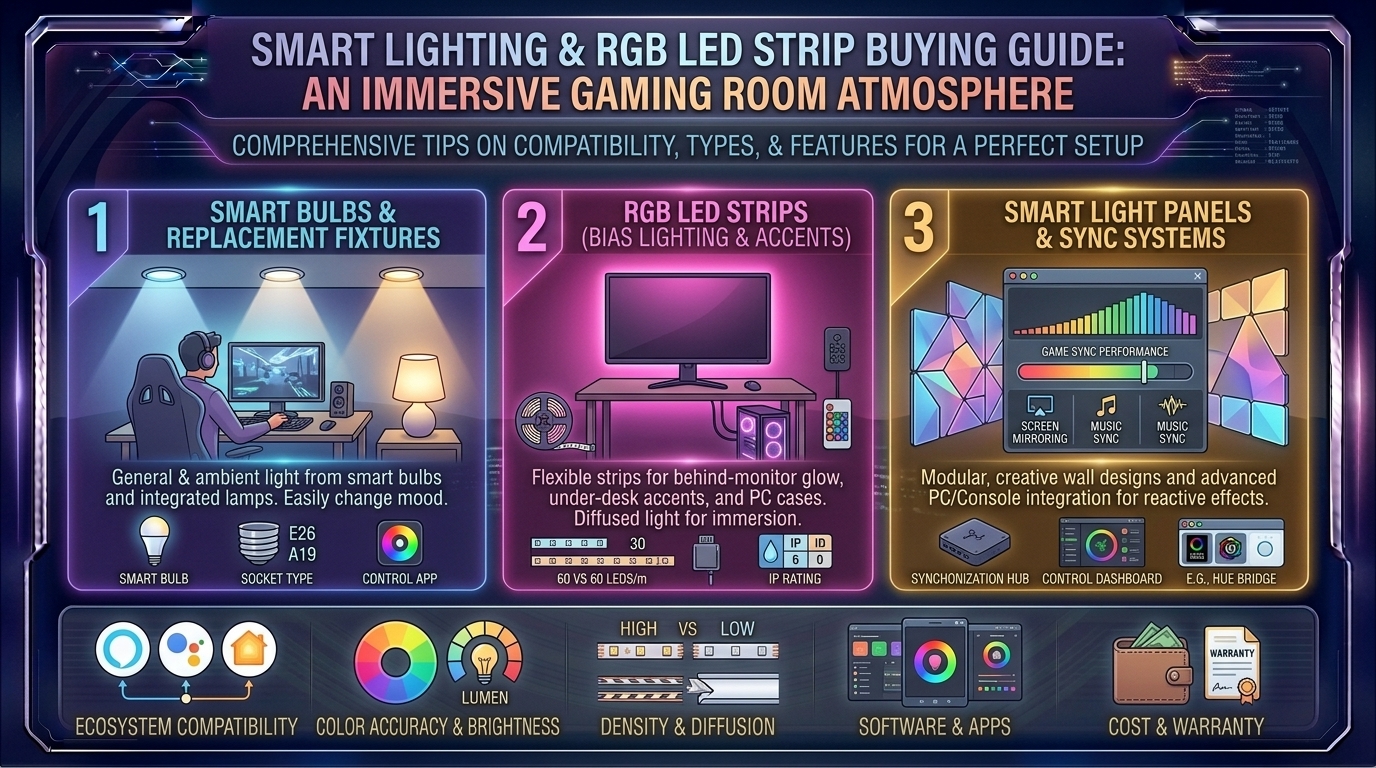
What Are the Best Smart Lighting and RGB LED Strip Buying Guides for Immersive Gaming Room Atmosphere
Introduction: Transforming Your Room into a Living Canvas
For modern gamers, content creators, and streaming enthusiasts scattered across major tech and design epicenters like Texas, New York, California, Washington, and San Francisco, a gaming setup is much more than just a desk and a computer. It is an immersive sanctuary.
Yet, even a multi-thousand-dollar rig featuring a custom liquid-cooled PC, high-end mechanical keyboards, and 4K displays can feel sterile and flat if illuminated by harsh overhead room lights or played in a pitch-black cave. The secret weapon of every top-tier battle station is smart lighting and RGB LED strip integration. Dynamic lighting changes the geometry of a room, minimizes digital eye strain, mimics on-screen explosions or neon streetscapes, and elevates a standard room into a cinematic environment.
At thegamerbuzz.com, we look past cheap aesthetic gimmicks to bring you engineering-grade clarity. This comprehensive buying guide details the best smart lighting systems, RGB LED strips, architectural layout tips, and ecosystem choices to craft the ultimate immersive gaming atmosphere.
Part 1: Decoding the Technology – RGB vs. RGBIC vs. Smart Addressable Strips
Before choosing a product, you must understand how modern LED strips differ fundamentally under the hood. Buying the wrong type can mean the difference between smooth, rainbow-chasing color gradients and a single flat color plastered across your entire desk.
+--------------------+---------------------------------------+---------------------------------------+
| LED Strip Type     | Technical Mechanism                   | Best Used For                         |
+--------------------+---------------------------------------+---------------------------------------+
| Standard RGB       | All LEDs change to the exact same color| Basic backlighting, under-cabinet use |
| RGBIC / Addressable| Micro-chips control segments independently| Gradient color waves, gaming syncs    |
| Smart Ecosystem    | Hub-integrated (Hue, Matter, Wi-Fi)   | Whole-room automation, smart home sync|
+--------------------+---------------------------------------+---------------------------------------+
1. Traditional RGB Strips
- How They Work: Every single diode on the strip shares a single circuit. If you set the strip to blue, every inch of the strip turns blue simultaneously.
- Best For: Simple, budget-friendly desk edge backlighting where dynamic chasing animations aren’t required.
2. RGBIC (Independent Control) Strips
- How They Work: Integrated driver chips embedded along the strip allow different segments of the same physical strip to display multiple distinct colors at the exact same time.
- Best For: Modern gaming setups. They allow stunning rainbow gradients, flowing neon animations, and responsive music visualization. Note: Because circuits are individually addressed, RGBIC strips generally cannot be cut or trimmed.
Part 2: The Best Smart LED Strips and Lighting Ecosystems
To help you build your dream battle station, here are the top-tier smart lighting options currently dominating the market:
1. Govee RGBIC Pro / Govee M1 (Best Overall for Gaming and Screen Sync)
- The Experience: Govee leads the pack in raw entertainment immersion. Utilizing advanced RGBIC technology, their strips support over 65+ preset scene modes, music reactivity, and camera-based or HDMI-box screen-matching technology that mirrors your monitor’s exact pixel colors in real-time.
- Why Buy It: Unrivaled color vibrancy, seamless app controls, and incredible visual impact for a mid-tier price point.
2. Philips Hue Lightstrip Plus V4 (The Premium Ecosystem Standard)
- The Experience: If you are building a smart home ecosystem that integrates with Apple HomeKit, Alexa, or Razer Chroma RGB, Philips Hue is the gold standard. Unlike cheaper strips that approximate white light via mixed RGB diodes, Hue features dedicated white LEDs capable of crisp, clean, clinical task lighting or warm relaxing tones.
- Why Buy It: Rock-solid reliability, premium brightness, trimmable extension points, and zero lag during synchronization.
3. Nanoleaf Essentials Matter Lightstrip (Best Future-Proof Smart Lighting)
- The Experience: Nanoleaf delivers some of the brightest color outputs on the market backed by the universal Matter smart home standard. This ensures your lights connect locally across iOS, Android, and PC ecosystems without dropping connection or relying heavily on clunky cloud servers.
- Why Buy It: Exceptional brightness, crisp color accuracy, and universal multi-platform compatibility.
Part 3: Engineering the Lighting Layout – The Three-Layer Rule
Professional lighting design relies on layering multiple light sources rather than relying on a single bright bulb. Apply this three-layer rule to your gaming room:
+---------------------------+-----------------------------------+-----------------------------------+
| Lighting Layer            | Placement Strategy                | Primary Benefit                   |
+---------------------------+-----------------------------------+-----------------------------------+
| 1. Bias Backlighting      | Mounted directly behind monitors  | Eliminates eye strain        |
| 2. Accent & Strip Lighting| Under desk edges, behind shelves  | Sets custom thematic room mood    |
| 3. Ambient / Task Lighting| Dimmable desk lamps or wall panels| Functional visibility for work    |
+---------------------------+-----------------------------------+-----------------------------------+
Layer 1: Monitor Bias Backlighting (The Eye Health Saver)
Playing a bright computer monitor in a pitch-black room forces your iris to contract violently, causing rapid digital eye strain and headaches. Running a soft, warm-to-neutral white bias light behind your monitor softens the contrast ratio between the screen and the dark wall behind it, protecting your vision during long-haul gaming marathons.
Layer 2: Under-Desk and Wall Accent Glow
Mounting an RGBIC strip along the rear underside of your desk casting light downward against the wall creates a stunning “floating desk” visual effect. Similarly, framing bookshelves or perimeter ceiling lines expands the perceived size of compact urban rooms.
Part 4: Regional Space Management Realities
Where you live shapes how you approach room lighting design:
- San Francisco & New York Apartments: Urban spaces often feature compact square footage and rental restrictions (meaning no drilling holes for heavy fixtures). Flexible, adhesive-backed LED strips and damage-free mounting channels let you build an expansive sci-fi atmosphere without damaging drywall.
- Texas & Washington Homes: Larger room sizes and dedicated office spaces allow for more complex multi-zone ecosystems, combining smart wall panels (like Nanoleaf Shapes or Cololight Hexagons) with floor lamps and perimeter strip channels.
Part 5: Advanced Tips for Pro-Level Immersion
- Diffuse Your Light Sources: Never let bare LED diodes point directly at your eyes or reflect in your glass monitor screen. Use aluminum LED channels equipped with milky-white diffusion covers to transform harsh pinpoint dots into a smooth, seamless neon glow.
- Match Lighting to Game Genres: Use psychological color theory to boost immersion. Cool blues and purples work wonders for atmospheric sci-fi RPGs, deep reds elevate adrenaline during competitive shooters, and warm amber tones provide a cozy feel for open-world exploration.
- Automate with Routines: Set up automation triggers via apps like Apple Home, Google Home, or Alexa so your battle station lighting shifts automatically into a relaxed, dim mode when it’s time to unwind.
Frequently Asked Questions (FAQ)
1. What is bias lighting, and why do I need it behind my monitor?
Bias lighting is a soft light source placed directly behind a display screen. It reduces the harsh contrast between a glowing monitor and a dark room, drastically minimizing eye fatigue, headaches, and visual strain during extended gaming sessions.
2. Can I cut RGB LED strips to fit my exact desk length?
Standard RGB and basic analog strips can be cut at designated copper solder points. However, advanced RGBIC (addressable) strips generally cannot be cut, because cutting them severs the data circuit controlling independent LED segments. Always measure your desk before buying.
3. What is the difference between standard RGB and RGBIC strips?
Standard RGB strips show only one color across the entire length of the strip at any given time. RGBIC strips contain micro-chips that allow different segments of the same strip to display multiple colors simultaneously, enabling rainbow gradients and flowing movement effects.
4. Do smart LED strips sync with PC games automatically?
Yes. Premium ecosystems like Philips Hue (via Razer Chroma integration), Corsair iCUE, and Govee support desktop software that captures your gameplay colors or audio output, syncing your room lighting directly with in-game actions.
5. Why are my adhesive LED strips falling off the back of my desk?
Factory adhesive tape on cheap LED strips often fails due to dust, wood oils, or heat. Clean your mounting surface thoroughly with isopropyl alcohol before applying, or reinforce the strip using mounting brackets or aluminum channels.
6. Will smart lighting increase my monthly electricity bill?
Not noticeably. High-end LED strips consume very little power (typically between 15 to 45 watts total), making them remarkably energy-efficient compared to incandescent or halogen lighting.
7. Do I need a smart home hub to run Philips Hue light strips?
Yes, standard Philips Hue setups require a Hue Bridge hub to connect reliably to your Wi-Fi router, though newer versions feature Bluetooth for basic app control within close range.
8. What color temperature is best for general gaming and studying?
For general dual-purpose spaces, look for strips that support tunable white light. Use a cool daylight white (around 5000K–6500K) for focus and work, and a warm white (2700K–3000K) for evening relaxation.
9. Can I control my gaming lights with my voice?
Yes. Virtually all major smart lighting brands integrate seamlessly with Amazon Alexa, Google Assistant, and Apple Siri, allowing you to switch scenes or turn off your entire room hands-free.
10. Where can I find more smart home and lighting reviews?
For ongoing hardware deep-dives, aesthetic setup guides, and peripheral benchmarks, keep your browser locked right here to thegamerbuzz.com!
Conclusion
Upgrading your gaming room with smart lighting and RGB LED strips is the ultimate way to transform a standard desk setup into a breathtaking, cinematic command center. By investing in quality addressable RGBIC strips, layering your light sources with monitor bias backlighting, and cleaning up your installation with aluminum diffusers, you create a space that looks professional, protects your eyes, and supercharges your immersion.
At thegamerbuzz.com, we want your battle station to shine brighter than ever. Plan your lighting layers, dial in those color schemes, and elevate your gaming atmosphere today!
Leave a Reply