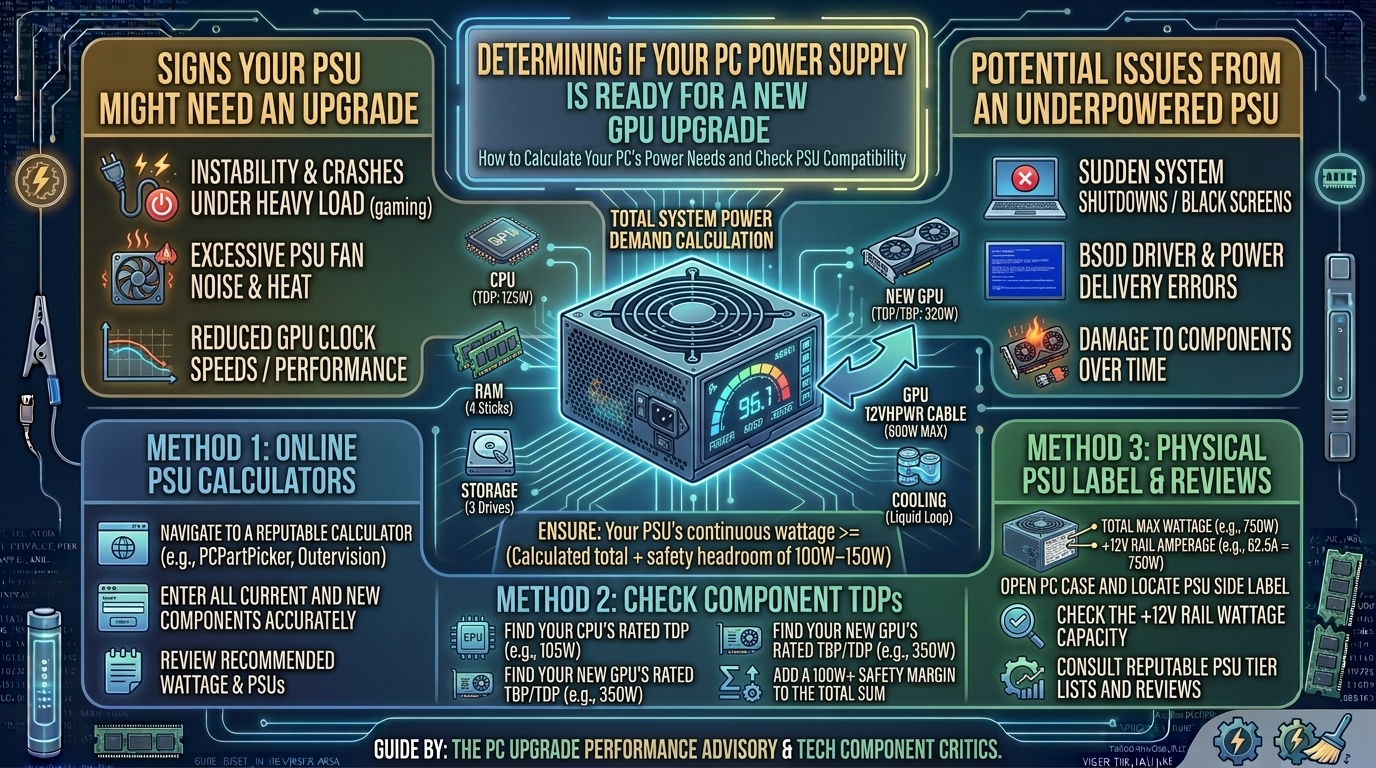
How to Check If Your Computer Power Supply Has Enough Wattage for a New Graphics Card Upgrade
Upgrading your graphics card (GPU) is the single most effective way to boost gaming frame rates, enable ray tracing, and improve video rendering performance. However, installing a power-hungry modern GPU without verifying your Power Supply Unit (PSU) capacity can lead to sudden system shutoffs mid-game, system boot failures, or permanent hardware damage caused by over-current trips.
A power supply does not just need to meet the nominal Thermal Design Power (TDP) rating of your new graphics card; it must also account for CPU power spikes, secondary components (SSDs, fans, liquid cooling pumps), 80 Plus efficiency curves, and transient power spikes.
This technical guide walks you through finding your current PSU specs, calculating system power draw, checking PCIe power cable configurations, and evaluating PSU quality.
GPU Upgrade Power Assessment Matrix
| Target GPU Tier | Typical GPU TDP | Recommended Min. PSU | PCIe Power Cable Requirements | Recommended PSU Standard |
| Budget (e.g., RTX 4060 / RX 7600) | 115W – 165W | 550W | 1x 8-Pin PCIe Cable | ATX 2.4 / ATX 3.0 (Bronze/Gold) |
| Mid-Range (e.g., RTX 4070 / RX 7700 XT) | 200W – 245W | 650W – 750W | 2x 8-Pin PCIe or 1x 12V-2×6 / 12VHPWR | ATX 3.0 Gold Certified |
| High-End (e.g., RTX 4080 Super / RX 7900 XT) | 300W – 335W | 750W – 850W | 3x 8-Pin PCIe or 1x 12V-2×6 (450W rated) | ATX 3.0 / PCIe 5.0 Gold |
| Enthusiast (e.g., RTX 4090 / RX 7900 XTX) | 355W – 450W+ | 850W – 1000W+ | 1x 12V-2×6 (600W rated) or 4x 8-Pin PCIe | ATX 3.0 Platinum / Titanium |
1. How to Find Your Current PSU Wattage & Specs
Unlike RAM, CPUs, or storage drives, Windows Device Manager cannot report your PSU wattage. The power supply communicates only raw DC voltage over physical rails (+12V, +5V, +3.3V) without sending data back to the operating system.
1.Inspect the PSU Side Label:Disconnect wall power before opening your case.
Power off your PC, switch off the rocker on the back of the PSU, and remove the side panel of your PC case. Look at the specification sticker on the side of the power supply. Note the total output wattage (e.g., 650W) and the continuous power output rating on the +12V rail.
2.Cross-Reference Pre-Built System Specs:Required for pre-built desktop systems.
If your PC is a pre-built from vendors like Dell, HP, or Lenovo, the PSU sticker might list proprietary part numbers instead of a standard wattage. Look up your exact PC model manual online to locate the rated PSU output capacity.
3.Verify Physical Dimensions & Clearance:Avoid basic physical space bottlenecks.
Ensure your PSU form factor is standard ATX (typically 140mm–160mm depth). Small Form Factor (SFX) cases require compact power supplies, and larger GPU upgrades may block modular cable routes if the case power basement is cramped.
2. How to Calculate Total System Power Consumption
To determine if your PSU can handle an upgraded graphics card, calculate the total power consumption of your system using the baseline component formula:
$$\text{Total System Wattage} = (\text{CPU TDP} + \text{GPU TDP} + \text{Other Components}) \times 1.25$$
COMPONENT CONSUMPTION BREAKDOWN EXAMPLE:
[ Intel Core i7-14700K (253W Max Turbo) ]
+ [ NVIDIA RTX 4070 Ti Super (285W TDP) ]
+ [ Motherboard, DDR5 RAM, 2x NVMe SSDs, 6x ARGB Fans, AIO Cooler (~75W) ]
-------------------------------------------------------------------------
= 613W Peak Draw  x 1.25 Headroom Multiplier = 766W ---> Recommend 750W-850W PSU
Why Headroom Matters: Transient Power Spikes
Modern GPUs experience transient power spikes—microsecond-long bursts where the graphics card demands up to 2x its rated TDP during abrupt rendering changes. An ATX 3.0 compliant power supply can absorb transient spikes without triggering Over Current Protection (OCP) or Over Power Protection (OPP) shutoffs.
3. Checking Physical PCIe & 12V-2×6 Power Cables
Having enough wattage is useless if your power supply lacks the physical power cables required by your new GPU.
PCIe CABLE TYPES:
- 6+2 Pin PCIe Connector : Supplies up to 150W per cable.
- 12V-2x6 / 12VHPWR Cable  : Supplies up to 450W - 600W via a single 16-pin connector.

CRITICAL RULE (Daisy-Chaining vs Dedicated Cables):
[ DO NOT USE ]  ---> Single Cable + Pigtail Daisy-Chain (Risk of cable melting under >225W loads)
[ RECOMMENDED ] ---> Separate, Dedicated PCIe Cables from PSU to each GPU port
4. 80 Plus Efficiency Ratings & PSU Quality Tier
Power supplies are rated under the 80 Plus standard based on how efficiently they convert AC wall power to DC PC power at 20%, 50%, and 100% load:
Efficiency Hierarchy: 80+ White < Bronze < Silver < Gold < Platinum < Titanium
A Gold-certified 750W PSU operates at peak efficiency (~90%) when your system draws around 50% to 70% of its rated capacity during active gaming sessions. Operating your PSU near its maximum thermal capacity continuously generates excess heat, causes high fan noise, and shortens component lifespan.
Frequently Asked Questions (FAQ)
Q1: What happens if I install a graphics card that exceeds my PSU wattage?
A: Under heavy gaming loads, the system will trigger its built-in Over Power Protection (OPP), resulting in an immediate thermal reboot or hard shutoff without warning.
Q2: Can a cheap power supply ruin my new graphics card?
A: Yes. Low-quality, unrated power supplies lack essential protective circuits (OCP, OVP, UVP, SCP). If an unrated unit fails under heavy load, it can send raw voltage spikes down the +12V rail, permanently destroying your GPU and motherboard.
Q3: Is a 500W power supply enough for an RTX 4060?
A: Yes. The RTX 4060 has a low TDP of approximately 115W. Paired with a mainstream 65W–100W CPU, a quality 500W Bronze or Gold PSU provides adequate power headroom.
Q4: What is the difference between ATX 2.4 and ATX 3.0 power supplies?
A: ATX 3.0 PSUs are designed specifically for modern GPUs. They can handle transient power spikes up to 200% of their rated capacity for short intervals and include native 12V-2×6 / 12VHPWR 16-pin cables.
Q5: Can I use pigtail (daisy-chained) PCIe cables on a high-power GPU?
A: It is strongly advised against for cards drawing over 225W. Always use separate, dedicated PCIe cables running directly from your modular PSU ports to each power connector on high-end graphics cards.
Q6: Does a higher wattage PSU use more electricity from the wall?
A: No. A 1000W PSU only draws the exact amount of power your system components demand at any given moment. A higher-rated unit often runs cooler and quieter because it operates well below its maximum capacity.
Q7: How can I test if my power supply is failing?
A: Signs of a failing PSU include random reboots during heavy gaming, audible coil whine or clicking sounds from the PSU casing, or failure to power on after a system crash.
Q8: What is a modular power supply?
A: A Full Modular PSU allows you to plug in only the power cables your build requires, reducing cable clutter inside the PC case. Non-Modular PSUs have all cables permanently attached to the housing.
Q9: Do I need a new PSU if I switch from NVIDIA to AMD?
A: Not necessarily. Power requirements depend on individual card TDPs rather than the manufacturer brand. Check the nominal wattage draw of the specific AMD card relative to your current unit’s +12V rail output.
Q10: How long do computer power supplies usually last?
A: High-quality Gold or Platinum rated power supplies from reputable brands typically last 7 to 10+ years and often come backed by 10-year manufacturer warranties.
Conclusion
Before purchasing a new graphics card, open your PC case to verify your PSU wattage label, count your available PCIe power connectors, and calculate total system power draw. Ensuring your power supply has at least 20% to 25% overhead capacity protects your investment, keeps your gaming system quiet, and provides a stable foundation for high-frame-rate performance.
Leave a Reply