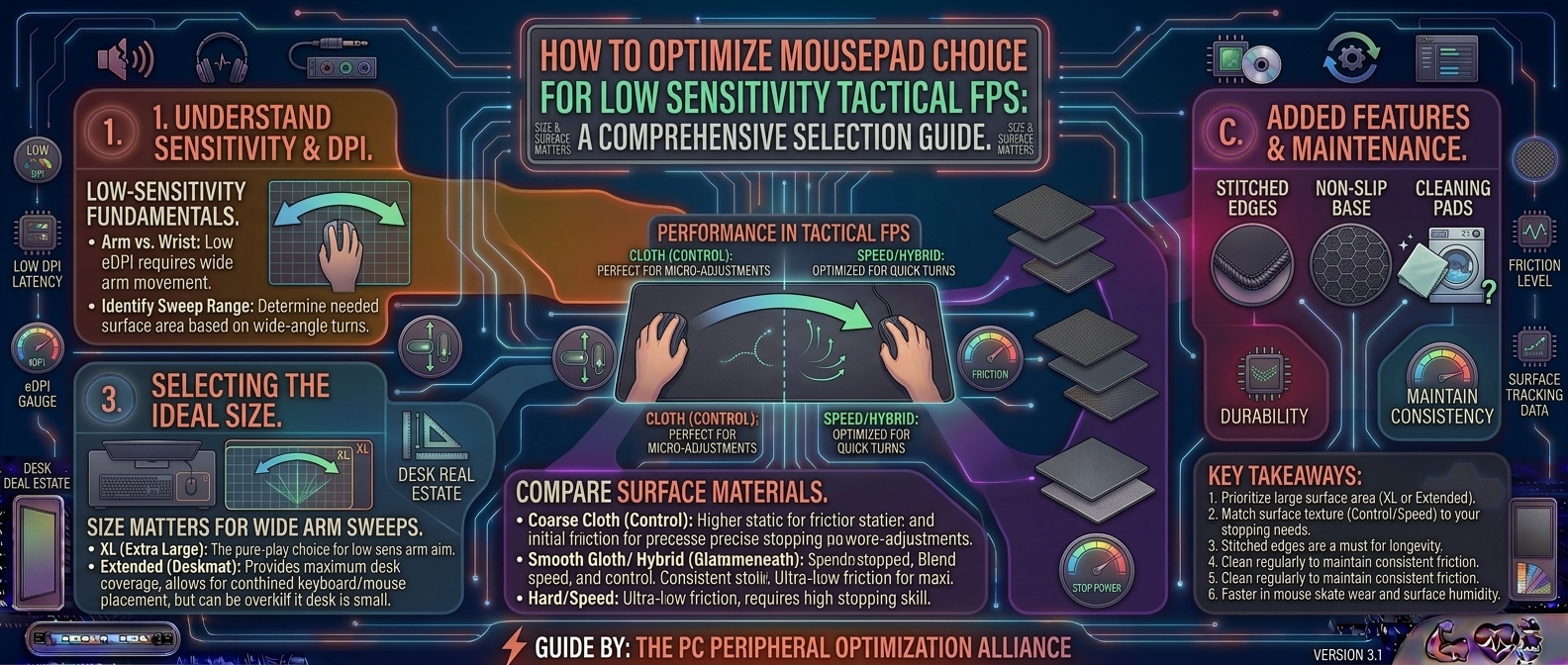
In tactical first-person shooters like Counter-Strike 2, Valorant, and Rainbow Six Siege, split-second crosshair placement and absolute pixel-level tracking consistency dictate whether you clutch the round or get sent back to the spectator screen. Unlike casual gaming, where high sensitivity allows you to spin around with a flick of your wrist, tactical FPS players overwhelmingly favor low sensitivity.
Running an ultra-low effective DPI (eDPI) means you must sweep your entire forearm across the desk to execute a 180-degree turn or track a peeking adversary.
Because your entire arm movement relies on your mousepad, choosing the correct size and surface material is just as critical as selecting a high-end mouse or a 360Hz monitor. A subpar pad will introduce friction drag, inconsistent glide, or run out of physical tracking space during intense multi-enemy gunfights.
This exhaustive guide covers everything you need to know about sizing formats, surface physics (speed vs. control), weaving materials, and maintenance to help you optimize your low-sensitivity competitive setup.
1. The Physics of Low-Sensitivity Aiming in Tactical Shooters
To understand why mousepad dimensions matter so much, you have to look at how low-sensitivity players move their mice.
+-------------------------------------------------------------------------+
|                  THE LOW-SENSITIVITY MOVEMENT DYNAMICS                  |
+-------------------------------------------------------------------------+
| High Sensitivity (Wrist-Aiming)                                         |
|   └─► Tiny 4-inch square space; high wrist fatigue and jitter           |
|                                                                         |
| Low Sensitivity (Arm-Aiming / Low eDPI)                                 |
|   └─► Massive sweeps (12 to 18 inches per 360° turn)                    |
|   └─► Requires an extended desk-mat footprint to prevent edge run-outs   |
+-------------------------------------------------------------------------+
*Note: Low sensitivity shifts the pivot point from your wrist to your elbow, providing superior micro-adjustment precision for headshot alignment.*
- The eDPI Equation: Effective DPI (Mouse DPI $\times$ In-Game Sensitivity) for tactical players often ranges between 400 eDPI and 800 eDPI. At these levels, turning around requires sweeping your mouse 12 to 18 inches across your desk.
- The “Falling Off the Edge” Problem: On a standard office mousepad (e.g., 9×10 inches), a low-sensitivity player will literally slide their mouse off the edge of the pad during a frantic recoil-control spray or wide corner check. A massive surface area is non-negotiable.
2. Choosing the Right Mousepad Size
Mousepad sizing scales from compact office units to massive surface coverings that anchor your entire peripheral ecosystem.
+-------------------------------------------------------------------------+
|                    MOUSEPAD SIZE CLASSIFICATION                         |
+-------------------------------------------------------------------------+
| [X] Standard / Medium (300 x 250 mm)  ──► Unusable for low-sens FPS     |
| [X] Large (450 x 400 mm)              ──► Minimum threshold for solo use|
| [X] Extra Large / XL (500 x 400 mm)   ──► Excellent vertical room       |
| [X] Extended Desk Mats (900 x 400 mm) ──► Industry Gold Standard        |
+-------------------------------------------------------------------------+
1. Extended Desk Mats (900mm x 400mm / ~35.5 x 15.7 inches)
This is the gold standard for competitive tactical FPS players. An extended desk mat spans nearly a meter wide, sitting underneath both your mechanical keyboard and your mouse.
- Why it wins: It creates a seamless, level surface across your entire desk. Your keyboard rests securely on the left side, while your mouse has an unobstructed canvas of 500mm+ of lateral glide room on the right side. It also dampens keyboard acoustic clatter and prevents your desk edge from digging into your forearm during long sessions.
2. Large Square / XL Pads (500mm x 400mm or 480mm x 400mm)
If your desk space is compact or you prefer a traditional standalone mousepad footprint, standalone XL pads offer maximum vertical depth. Tactical shooters require vertical movement for crosshair adjustments during stair pushes and vertical elevation peeks. A square 500x500mm pad (such as the Artisan Zero or Wuque Studio pads) ensures you never run out of vertical tracking space.
3. Surface Materials: Control vs. Speed vs. Hybrid
The surface weave of your mousepad dictates its friction coefficient—how easily your mouse skates across the fabric.
+-------------------------------------------------------------------------+
|                  SURFACE FRICTION SPECTRUM                              |
+-------------------------------------------------------------------------+
| [Control Pads] ──► Textured weave, higher initial friction (Stopping power)|
| [Speed Pads]   ──► Slick, ultra-smooth surface, low glide resistance   |
| [Hybrid Pads]  ──► Balanced micro-texture combining fast glide & stopping|
+-------------------------------------------------------------------------+
1. Control Surfaces (The Tactical FPS Choice)
Control pads feature a tighter, textured fabric weave that creates moderate friction.
- Why tactical players love them: In games like Valorant and Counter-Strike 2, stopping your crosshair precisely on an enemy’s head is more important than fast initial movement. Control pads provide built-in “braking” power, allowing you to arrest your mouse movement instantly without overshooting your target.
- Popular Examples: Artisan Zero, Zowie G-SR-SE, SteelSeries QcK Heavy.
2. Speed Surfaces
Speed pads are manufactured using slippery synthetic fibers (often coated cloth or hard plastic polymers) designed to minimize friction.
- The Trade-off: While speed pads make tracking moving targets fluid, they make micro-adjustments difficult because there is very little stopping resistance. You run a high risk of overflicking past your target’s head.
3. Hybrid Surfaces
Hybrid pads combine a weather-resistant Cordura or dense multi-layer polyester weave with a rubberized base. They offer a fast initial glide when you start moving your mouse, but retain enough stopping friction to lock onto targets reliably.
4. Base Construction and Edge Stitching
Beyond the top surface, two structural elements determine a mousepad’s durability and performance stability:
- Natural Rubber Base (Anti-Slip): Never buy a mousepad with a cheap foam or plastic backing. A high-performance pad must feature a 100% natural rubber waffle-grip base that locks onto wooden, glass, or metal desks, preventing the pad from sliding around during aggressive low-sens arm sweeps.
- Stitched Edges vs. Raw Edges:
- Raw edges fray over time and can irritate the side of your wrist as it brushes against the border.
- Low-profile stitched edges (where the thread sits flush with or slightly below the surface plane) prevent fraying and ensure your mouse cable or forearm never snags on a raised ridge.
5. Summary Table: Mousepad Selection Matrix
| Property | Control Pads | Speed Pads | Extended Desk Mats (900×400) |
| Stopping Power | Maximum | Low | Varies by weave |
| Glide Friction | Moderate to High | Ultra-Low | Balanced |
| Best For | Tactical FPS (CS2, Valorant) | Tracking-heavy arena shooters | All-in-one desk aesthetics & space |
| Wrist Comfort | High (Soft fabric) | Moderate | High (Dampens desk edge) |
6. Maintenance Tips to Keep Your Surface Consistent
A high-end mousepad will degrade in performance if neglected. Sweat, dead skin cells, and atmospheric dust clog the microscopic valleys of the fabric weave, turning a smooth control pad into an inconsistent mud-patch.
- Wash Every 3 to 6 Months: Submerge your mousepad in a bathtub filled with lukewarm water and a tiny drop of gentle dish soap or baby shampoo. Use a soft microfiber cloth to gently scrub the surface in circular motions.
- Rinse and Air Dry: Rinse all soap residue thoroughly with clean water. Never use a hair dryer or clothes dryer, as high heat will melt or warp the rubber backing. Lay the pad flat on a towel to air dry for 24 hours.
- Avoid Wrist Sweat Accumulation: Keep a small desk towel nearby or wear a gaming sleeve if you experience heavy arm sweat during sweaty ranked matches, as skin oils degrade fabric performance quickly.
7. Frequently Asked Questions (FAQ)
1. Why do tactical FPS players prefer large mousepads over small ones?
Tactical FPS games require low sensitivity (low eDPI) to maximize aiming precision. Low sensitivity means moving your mouse 12 to 18 inches across your desk to perform a 180-degree turn. Small mousepads force you to lift and reset your mouse constantly, leading to missed shots.
2. What is the difference between a control pad and a speed pad?
A control pad features a textured weave that creates higher friction, giving you better “stopping power” to halt your crosshair precisely on an enemy’s head. A speed pad is slick and smooth, prioritizing fast movement over braking control.
3. Are glass mousepads good for tactical first-person shooters?
Tempered glass mousepads (like the Skypad / Wallhack series) offer absolute frictionless speed and zero wear over time. However, they require specialized PTFE mouse skates and demand exceptional mouse control, making them polarizing for traditional low-sens tactical players who rely on stopping friction.
4. Do extended desk mats affect keyboard acoustics?
Yes! Placing a thick 4mm rubber-backed desk mat underneath your mechanical keyboard absorbs high-frequency pinging and resonance, giving your keyboard a deeper, more satisfying “thock” sound profile.
5. Why does my mouse cursor skip or feel sticky in one specific spot on my pad?
That “sticky spot” is usually caused by an accumulation of dead skin oils, sweat, or a spilled drop of soda that dried into the fabric weave. Washing your mousepad with warm water and dish soap will restore a uniform glide.
6. How thick should a gaming mousepad be?
Standard mousepads range from 3mm to 4mm thick. 4mm is the sweet spot because the extra cushion absorbs minor imperfections on your desk surface and feels comfortable against your forearm during long gaming sessions.
7. Does mousepad color affect optical sensor tracking?
Modern high-end optical sensors (like the PixArt PAW3395) track flawlessly on almost any color, including complex multi-color anime or geometric desk mat designs. However, solid jet-black pads remain the traditional tournament standard for zero sensor confusion.
8. Should I buy a stitched-edge mousepad or a non-stitched one?
Always buy a stitched-edge mousepad. Stitched borders prevent the fabric top from peeling away from the rubber base over time, significantly increasing the lifespan of your gear.
9. Can I iron a warped or creased mousepad?
If your mousepad arrived folded with deep creases, never apply a hot iron directly to the surface, as it will melt the synthetic fabric. Instead, lay it flat under heavy books for a few days, or use a steamer on low heat held safely at a distance.
10. How long does a cloth gaming mousepad last before needing replacement?
With regular cleaning every few months, a premium cloth mousepad can last anywhere from 2 to 4 years. Over time, however, heavy friction wears down the micro-texture, turning a control pad into an overly slick surface, signaling time for a replacement.
Choosing the right desk mousepad size and surface material transforms your low-sensitivity tactical FPS setup from an awkward struggle into a precise, fluid extension of your hand. By investing in an extended 900x400mm desk mat with a control-oriented fabric weave, a 100% natural rubber base, and low-profile stitched edges, you ensure your crosshair placement remains razor-sharp through every clutch situation.
Leave a Reply