What Are the Best Mouse Sensitivity and DPI Settings for Consistent Muscle Memory Development in FPS Games
Welcome to The Gamer Buzz, your ultimate competitive hardware and performance authority. Whether you are climbing the ranked ladders from the high-tech hubs of San Francisco, New York, and Seattle, or tuning your setup across Texas, California, and Washington, mastering your input settings is the absolute foundation of elite aim.
In first-person shooter (FPS) games, consistency is the holy grail. You can spend hundreds of hours in aim trainers, but if your physical mouse settings fluctuate, your brain can never successfully map out reliable, repeatable muscle memory. Marketing campaigns love to push astronomical numbers—like 25,000 or 30,000 DPI—as symbols of performance. In reality, competitive FPS dominance relies on a much lower, more precise physics-based sweet spot.
In this exhaustive, master-level guide, we break down how DPI, in-game sensitivity, eDPI, and polling rates interact, revealing the exact settings used by esports professionals to cement mechanical consistency.
1. Demystifying DPI and In-Game Sensitivity: The Core Equation
To find settings that build lasting muscle memory, you first need to understand what your hardware is actually doing.
What is DPI?
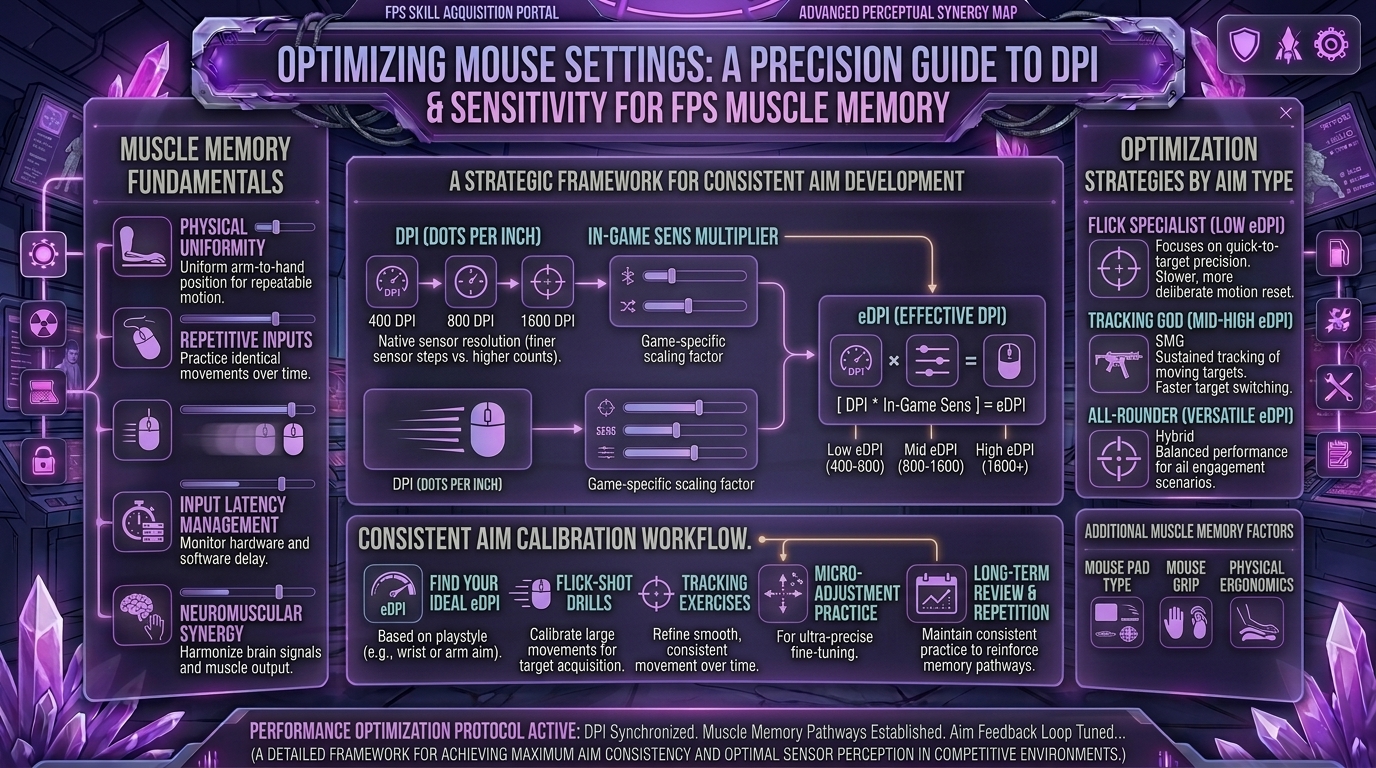
DPI stands for Dots Per Inch (sometimes referred to as CPI). It measures how many digital pixels your cursor travels on screen for every physical inch you move your mouse across your pad.
- A setting of 400 DPI moves your cursor a shorter physical distance than 1600 DPI when moving the mouse the exact same distance.
- DPI only controls your sensor’s hardware scaling baseline; it does not inherently make your aim better or more accurate.
The Magic Metric: eDPI (Effective DPI)
Because every game handles sensitivity sliders differently, professional communities rely on eDPI to compare settings universally:
$$\text{eDPI} = \text{Mouse DPI} \times \text{In-Game Sensitivity}$$
For example, a player using 400 DPI with a 2.0 in-game sensitivity and a player using 800 DPI with a 1.0 in-game sensitivity both possess an identical 800 eDPI. Their physical hand movement required to execute a 360-degree rotation is completely identical.
2. What Do the Pros Use? The Modern Hardware Standard
Data compiled across top-tier competitive esports titles (Counter-Strike 2, Valorant, Apex Legends) shows an overwhelming consensus among elite players:
| Mouse DPI Setting | Percentage of FPS Pros | Why They Choose It |
| 800 DPI | ~59% (Dominant Standard) | Strikes a flawless balance between smooth desktop navigation at 1440p/4K and granular in-game slider adjustments. |
| 400 DPI | ~21% (Veteran Choice) | Traditional standard heavily favored by legacy tactical rifle competitors who locked in their profiles years ago. |
| 1600 DPI | ~17% (High-Speed Sensor) | Modern choice for ultra-low sensitivity players who want the cleanest high-frequency sensor reporting signal. |
The Sweet Spot eDPI Ranges by Game Genre
When combining your DPI and in-game sensitivity, your target effective range should generally fall into these game-specific brackets to ensure precision micro-adjustments:
- Tactical Shooters (CS2 / Valorant): 180 to 350 eDPI (Requires large arm sweeps for turns, micro-wrist adjustments for headshots).
- Tracking-Heavy Battle Royales (Apex Legends / The Finals): 800 to 1,200 eDPI (Requires faster rotational arcs to track hyper-mobile targets).
3. The cm/360 Rule: Measuring Your Physical Movement
If you switch from one game to another, relying on in-game sensitivity numbers will ruin your muscle memory because different game engines render fields of view and yaw angles differently. The only universal metric for muscle memory is cm/360—the exact physical centimeters your hand must move across your mousepad to perform a complete 360-degree rotation.
- Elite Tactical Standard: Most tactical FPS competitors use a cm/360 range between 34 cm and 50 cm.
- This means a full pivot of your arm moves your character around completely, while micro-adjustments across a 5-to-10 centimeter window handle everyday tracking and target acquisition.
4. Step-by-Step Guide to Locking In Your Permanent Sensitivity
If your aim feels inconsistent, jittery, or muddy, reset your configuration using this methodical process:
[Phase 1: Clear Software Bloat] ➔ [Phase 2: Set 800 DPI Baseline] ➔ [Phase 3: The Wall Test] ➔ [Phase 4: Lock and Commit]
- Disable Windows Acceleration: Go to Windows Mouse Settings, open Additional Mouse Options, navigate to Pointer Options, and uncheck “Enhance pointer precision”. This raw input setting is the #1 enemy of muscle memory.
- Lock Your DPI: Set your mouse hardware profile permanently to 800 DPI. Stop changing your DPI via side buttons on the fly; consistency is built through repetition.
- Choose a Baseline eDPI: Start right in the middle of the pro average (e.g., matching a standard 240 eDPI in Valorant or 800 eDPI in CS2).
- The Strafe-Tracking Test: Stand in front of a static wall in a practice range, place your crosshair on a bullet hole, and strafe left and right continuously. If your crosshair easily stays locked on that single point without drifting or forcing your wrist to cramp, your baseline is correct.
5. Hardware Checklist: Polling Rates and Mousepads
Your sensitivity settings are only as good as the surface and sensor translating your hand movements:
- Polling Rate (1000Hz Standard): Set your mouse polling rate to 1000Hz (or 1-1ms response time). While 4000Hz and 8000Hz options exist, 1000Hz provides rock-solid stability without wasting CPU overhead or introducing weird jitter.
- The Mousepad Requirement: Low-to-medium sensitivities require physical estate. If you run a low eDPI, you need a large control or hybrid mousepad (at least 450mm wide) so your mouse never runs off the edge during a critical flick.
10 Frequently Asked Questions (FAQ)
1. Is higher DPI better for competitive aiming?
No. Higher DPI simply increases cursor velocity. For precision aiming, running an extremely high DPI makes your mouse overly sensitive to natural hand micro-shakes, harming consistency.
2. Should I use different sensitivities for different games?
Ideally, no. Try to match your cm/360 distance across all FPS titles using third-party calculator tools so your muscle memory carries over seamlessly.
3. Why do some pros use 400 DPI while others use 800?
Both output identical precision on modern sensors. 400 DPI is a legacy holdout habit from old CS:GO veterans, while 800 DPI has become the modern default because it provides smoother desktop navigation.
4. How long does it take for muscle memory to adapt to a new sensitivity?
If you make a major adjustment, expect a 1-to-2 week transition period where your brain recalibrates its spatial awareness. Avoid constantly tweaking your slider during this adjustment phase.
5. Does monitor resolution affect my mouse sensitivity?
Your physical mouse movement maps to angles in 3D game engines, not screen pixels, meaning your in-game cm/360 remains constant regardless of whether you play on 1080p, 1440p, or 4K.
6. What causes my crosshair to feel “floaty” or delayed?
Floaty aim is usually caused by V-Sync enabled in your graphics settings, Windows pointer acceleration turned on, or a low polling rate. Turn V-Sync off and ensure raw input is active.
7. Should I use arm aiming or wrist aiming?
A healthy blend of both is ideal. Use your arm and elbow for large camera rotations and sweeping turns, and reserve your wrist and fingers for precise micro-adjustments.
8. How can I test if my current sensitivity is too high?
If you routinely overshoot targets, miss micro-adjustments, or feel like your hand is shaking uncontrollably during high-stress gunfights, your sensitivity is likely too high. Lower it by 10% increments.
9. Do lightweight mice change how sensitivity feels?
Yes. A lighter mouse (under 60 grams) requires less initial physical force to move, which can make a medium sensitivity feel faster initially until your hand adjusts to stopping it.
10. Where can I find more pro settings and hardware guides?
Bookmark The Gamer Buzz and check back regularly for our deep-dive configuration breakdowns, gear reviews, and competitive optimization tips!
Conclusion
Developing elite, consistent muscle memory in FPS games isn’t about chasing viral settings or maxed-out DPI specs—it is about discipline and mathematical consistency. By locking your mouse hardware to 800 DPI, disabling Windows pointer acceleration, grounding your setup in a proven eDPI bracket, and committing to a uniform cm/360 rotation, you give your brain the stable foundation it needs to perform. Set your baseline, trust the process, and watch your accuracy skyrocket!
Leave a Reply