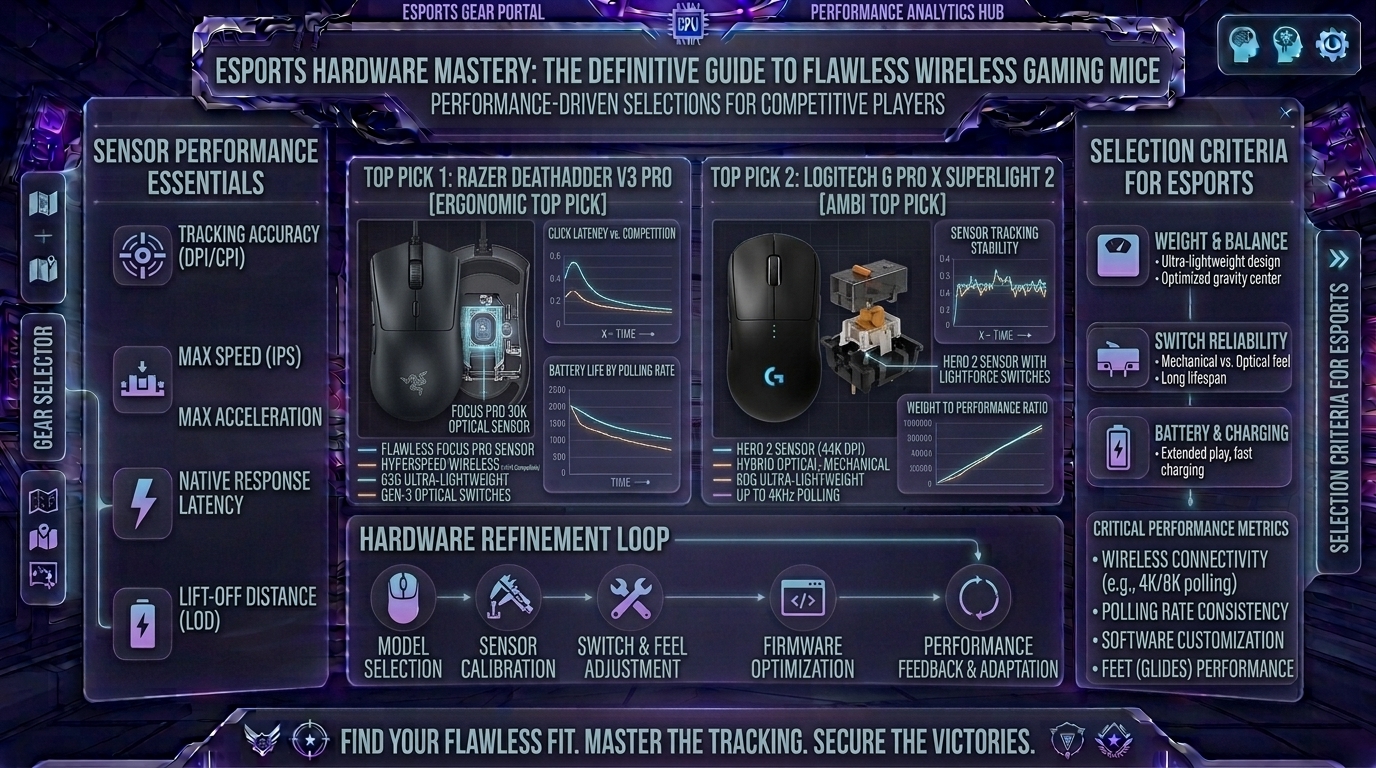
Welcome to The Gamer Buzz, your premier competitive hardware and performance authority. Whether you are grinding ranked matches from high-performance gaming rigs in San Francisco, New York, and Seattle, or dialing in your peripherals across Texas, California, and Washington, one reality remains crystal clear: your connection to the digital world depends entirely on your mouse sensor.
Gone are the days when wireless gaming mice suffered from input lag, connection drops, or heavy battery packs. Today, elite wireless gaming mice match or exceed the latency, tracking fidelity, and stability of traditional wired mice while giving you total freedom of movement.
In competitive multiplayer titles (such as Counter-Strike 2, Valorant, Apex Legends, and Overwatch 2), a single pixel can mean the difference between winning a clutch and watching the defeat screen. In this exhaustive, master-level guide, we break down what makes a sensor “flawless,” analyze polling rates, weight metrics, ergonomics, and present the absolute best wireless gaming mice on the market.
1. The Anatomy of a Flawless Sensor: What Makes an Esports Mouse Tick?
To the untrained eye, any optical mouse tracking movement across a desk looks identical. Under the hood, however, engineering a top-tier competitive sensor requires immense precision.
Key Metrics of Modern Flagship Sensors:
- Zero Hardware Acceleration: A flawless sensor features a 1:1 translation ratio. If you move your hand exactly 2 inches across your mousepad, the cursor moves the exact same distance regardless of how fast or slow you performed the sweep.
- High Maximum IPS (Inches Per Second) & Acceleration: Modern flagship sensors track movements exceeding 650+ IPS and 50g+ of acceleration. This ensures that even during lightning-fast flick shots, the sensor never “spins out” or loses tracking.
- Ultra-Low Lift-Off Distance (LOD): When you lift your mouse to reposition it back to the center of your pad, a low LOD (typically 1mm to 2mm) cuts off tracking instantly, preventing unwanted crosshair jitter.
2. The Elite Contenders: Best Wireless Gaming Mice
1. Logitech G PRO X Superlight 2 — The Gold Standard
- Sensor: HERO 2 (Up to 32,000 DPI, 888 IPS, 88g acceleration capability)
- Weight: ~60g
- Battery Life: Up to 95 Hours
- Connectivity: LIGHTSPEED 2.4GHz Wireless
- Why it dominates: The Superlight 2 is the ubiquitous choice across professional esports stages. Weighing a featherlight 60 grams, it pairs Logitech’s bulletproof LIGHTSPEED wireless protocol with hybrid optical-mechanical switches. It delivers crisp tactile feedback without double-clicking issues, making it the benchmark weapon for tactical FPS players.
2. Razer Viper V4 Pro / V3 Pro — Ultimate Symmetry & Precision
- Sensor: Razer Focus Pro (Optical Gen-2 / Gen-3 35K/40K)
- Weight: ~54g – 63g
- Battery Life: Up to 90+ Hours
- Connectivity: HyperSpeed 2.4GHz (Supports native 4000Hz/8000Hz polling)
- Why it dominates: Built for pure speed and symmetrical handling, the Viper series offers an ultra-low profile shape ideal for fingertip and claw grip styles. Razer’s HyperPolling wireless dongle unlocks native multi-thousand hertz polling rates, shaving milliseconds of input latency off every click and movement.
3. Razer DeathAdder V3 HyperSpeed / V4 Pro — Ergonomic Excellence
- Sensor: Razer Focus X / Focus Pro Optical
- Weight: ~55g – 81g
- Battery Life: Up to 100+ Hours
- Connectivity: HyperSpeed Wireless
- Why it dominates: If your hand cramps using flat, symmetrical mice, the DeathAdder series provides a legendary right-handed ergonomic contour. It fills out your palm naturally while keeping the weight down to ultra-light tiers, blending all-day comfort with flawless sensor accuracy.
4. ASUS ROG Harpe Ace Aim Lab Edition — The Precision Tool
- Sensor: ROG AimPoint (36,000 DPI)
- Weight: 54g
- Battery Life: Up to 100 Hours
- Connectivity: Tri-mode (2.4GHz RF, Bluetooth, Wired)
- Why it dominates: Developed in direct collaboration with Aim Lab software developers, the Harpe Ace is engineered explicitly for target-switching accuracy. Its lightweight eco-nylon frame and pro-tested symmetrical shape make it a favorite for players who treat aim training like a discipline.
3. Comprehensive Matrix: Choosing Your Esports Mouse
| Mouse Model | Primary Shape / Grip Style | Weight | Polling Rate Support | Best Suited For |
| Logitech G PRO X Superlight 2 | Ambidextrous / Universal Claw & Palm | 60g | Up to 4,000Hz | All-around competitive FPS dominance. |
| Razer Viper V4 Pro / V3 Pro | Low-Profile Symmetrical / Fingertip | 54g – 63g | Native 8,000Hz | Fast twitch-aiming and micro-adjustments. |
| Razer DeathAdder V3 HyperSpeed | Right-Handed Ergonomic / Palm | 55g – 81g | Up to 8,000Hz | Comfort-focused players and larger hand sizes. |
| ASUS ROG Harpe Ace Aim Lab | Balanced Symmetrical / Claw | 54g | Up to 1,000Hz+ | Structured training and data-driven aimers. |
4. Understanding Polling Rate: Is 8000Hz Worth It?
A common question among modern hardware enthusiasts is whether upgrading from a standard 1,000Hz polling rate (reporting mouse position 1,000 times per second, or every 1ms) to 4,000Hz or 8,000Hz provides a competitive edge.
- The Physics: An 8,000Hz dongle reports your mouse position every 0.125 milliseconds, smoothing out cursor trajectories on high-refresh-rate monitors (360Hz+).
- The Tradeoff: Higher polling rates consume significantly more CPU resources and drain your mouse battery much faster. While elite players with high-end gaming rigs can feel the micro-smoothness, casual players will find a rock-solid 1,000Hz or 2,000Hz setting more than sufficient.
10 Frequently Asked Questions (FAQ)
1. Is wireless mouse technology truly lag-free compared to wired mice?
Yes. Modern 2.4GHz wireless protocols (like Logitech LIGHTSPEED and Razer HyperSpeed) feature response times under 1 millisecond, outperforming legacy wired connections and eliminating input lag entirely.
2. Does a higher DPI make a mouse sensor more accurate?
No. DPI (Dots Per Inch) measures cursor sensitivity scaling, not tracking precision. Most professional esports players compete at a native 400 to 800 DPI, relying on physical hand movement rather than ultra-high cursor speeds.
3. How often do I need to charge a competitive wireless gaming mouse?
Flagship wireless mice feature energy-efficient sensors lasting anywhere from 80 to 100+ hours of continuous gaming on a single charge. With normal usage, you only need to plug it in via USB-C once every couple of weeks.
4. What is mouse spin-out and how do flawless sensors prevent it?
Spin-out occurs when rapid physical movements exceed a cheap sensor’s maximum tracking speed, causing the cursor to freeze or shoot randomly into the sky. Flagship sensors eliminate this entirely with massive 600+ IPS thresholds.
5. Does mouse weight really impact my aim performance?
Lighter mice (under 65 grams) reduce wrist fatigue and lower the physical inertia required to start and stop your crosshair movement, making micro-flicks faster and less straining over long sessions.
6. Can I use a wireless gaming mouse on a Bluetooth connection for competitive games?
Never. Bluetooth introduces noticeable input latency (often 8ms to 15ms+) and potential packet drops. Always use the dedicated 2.4GHz USB dongle plugged in close to your mousepad.
7. What is lift-off distance (LOD) and why does it matter?
LOD is the height at which your mouse stops tracking when lifted off the desk. A low LOD prevents your crosshair from stuttering or shifting when you pick up your mouse to recenter it on your pad.
8. Are glass mousepads compatible with optical gaming sensors?
Yes, but specialized glass pads require modern optical sensors that can handle reflective surfaces without losing tracking. Always check sensor compatibility if you plan to switch to a glass surface.
9. How do I clean my mouse sensor to maintain peak performance?
Use a dry, clean cotton-tip swab (Q-tip) to gently clear dust, hair, or debris out from inside the small optical sensor recess on the bottom of your mouse. Avoid using liquids or harsh chemicals.
10. Where can I find more hardware reviews and peripheral setup guides?
Bookmark The Gamer Buzz and check back regularly for our comprehensive database of professional hardware reviews, sensor tests, and competitive optimization guides!
Conclusion
Upgrading to a wireless gaming mouse with a flawless sensor removes the last remaining mechanical barrier between your hand movements and your on-screen crosshair. Whether you prefer the featherlight symmetry of the Logitech G PRO X Superlight 2, the razor-sharp precision of the Razer Viper, or the ergonomic palm comfort of the DeathAdder series, investing in elite peripheral hardware instantly elevates your competitive potential. Choose your weapon, optimize your setup, and dominate your next ranked lobby!
Leave a Reply