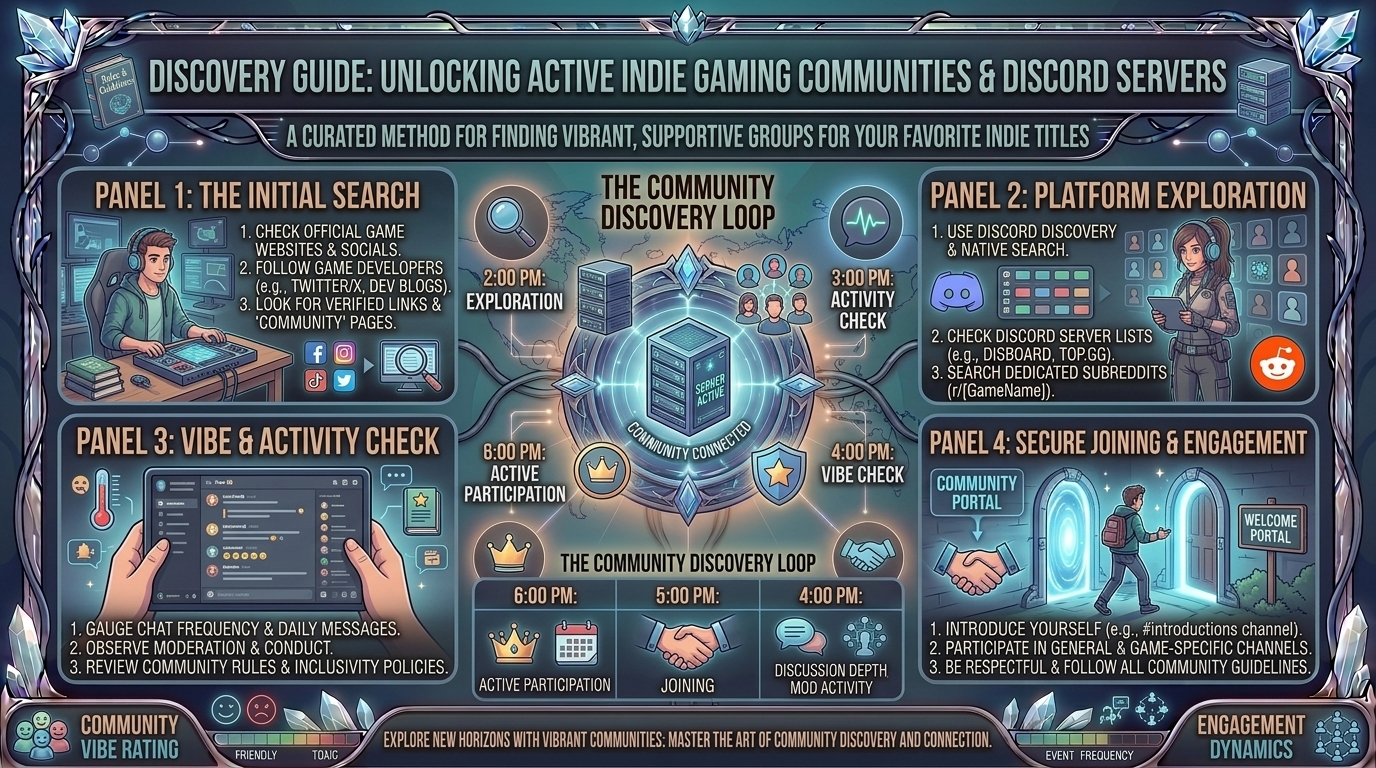
How to Find Active Gaming Communities and Discord Servers Dedicated to Your Favorite Indie Game Titles
Unlike major AAA blockbusters backed by multi-million-dollar marketing budgets and global esports leagues, indie games thrive on grassroots community engagement. For smaller titles—whether it is a cozy cozy-crafting simulator, a niche deck-building roguelite, or an experimental narrative RPG—finding an active player base can transform a solo gaming session into a rich social experience.
Active indie gaming communities offer far more than just a place to chat. They serve as hubs for discovering hidden game mechanics, finding co-op partners, accessing custom mods, reporting bugs directly to developers, and participating in exclusive beta playtests.
This comprehensive guide breaks down step-by-step strategies to track down, evaluate, and engage with active gaming communities and dedicated Discord servers for your favorite indie titles.
Why Indie Game Communities Live on Discord
[ Centralized Hubs ] ──> [ Direct Developer Access ] ──> [ Real-Time LFG & Voice ]
                                                                   │
                                                                   ▼
[ Custom Mods & Guides ] <── [ Active Playtesting & Feedback ] ────┘
Discord has become the primary infrastructure for indie gaming communities. Unlike static forums or social media feeds, dedicated Discord servers offer:
- Direct Communication with Developers: Indie studios regularly hang out in their official Discord channels, answering questions, hosting live Q&A sessions, and taking feature requests.
- Real-Time Matchmaking (LFG): Looking-for-Group (LFG) voice and text channels allow you to instantly find co-op or multiplayer teammates.
- Modding and Custom Content: Active modding communities share custom skins, fan translations, quality-of-life scripts, and community maps.
- Early Access & Beta Testing: Developers often distribute exclusive steam keys, testing builds, and experimental patches exclusively through Discord roles.
5 Proven Methods to Find Dedicated Indie Discord Servers
1. Check the Official Steam Store Page & In-Game Menus
Developer-verified Discord links are often placed directly on the game’s official Steam store page.
- Look at the right-hand sidebar under Link to External Website or scan the main description for a official Discord badge.
- Many modern indie titles feature a direct “Join Our Discord” button on their main menu screen or pause interface.
2. Utilize Discord Server Directories
Public server search engines index thousands of gaming communities categorized by specific tags.
[ Search Directory (Disboard / top.gg) ] ──> [ Filter by Game Title Tag ] ──> [ Verify Activity & Join ]
- Disboard.org: Search by the exact title of the game. Filter results by member count, bump frequency, and language.
- Top.gg: Excellent for finding official developer hubs and community-managed fan servers.
- Discord Discovery: Click the Explore Discoverable Servers compass icon at the bottom of your Discord app server list and search for the game title.
3. Tap Into Dedicated Subreddits
Reddit is one of the richest pipelines for indie gaming communities.
- Visit the official subreddit for the game (e.g.,
r/CassetteBeasts,r/SlayTheSpire,r/HadesTheGame). - Check the Subreddit Sidebar, Pinned Posts, or Menu Links. Moderators almost always pin an invite link to the official or primary community Discord server.
4. Follow Developers on X (Twitter), Bluesky, and itch.io
Indie developers frequently promote their community links across social media.
- Check the developer’s bio on X or Bluesky for a
discord.ggshortened link or Linktree page. - If the game originated as a game jam project on itch.io, the developer’s project page will feature direct links to their community server.
5. Search Developer Wikis and Community Databases
Community-maintained wikis (hosted on Fandom or independent Wiki.gg sites) often contain direct links to official fan communities, speedrunning hubs, and competitive leagues in their navigation bars.
How to Evaluate if a Community Is Truly “Active”
Joining a server with 10,000 members doesn’t guarantee a great experience if the chat has been dead for months. Look for these key activity metrics before diving in:
| Activity Indicator | Healthy / Active Server | Inactive / Dead Server |
| Daily Message Volume | Multiple active text threads across general and game-discussion channels daily. | No messages posted for days or weeks at a time. |
| Developer / Mod Presence | Community managers or devs regularly post updates, devlogs, or patch notes. | Last announcement was over 6 months ago. |
| LFG Voice Channels | Users actively occupying Looking-For-Group voice channels during peak hours. | Voice channels remain permanently empty. |
| Rules & Moderation | Clear reaction-role onboarding, anti-spam bots, and clear rules. | Unmoderated spam, dead links, or toxic chat environments. |
Step-by-Step Guide: Joining and Onboarding Safely
1.Verify the Invite Link Authenticity:
Always attempt to join via official developer sources (Steam, official website, or verified Reddit sidebars) to avoid scam or phishing servers.
2.Complete Onboarding & Reaction Roles:
Upon joining, navigate to the #rules or #roles channel. Select roles corresponding to your gaming platform (PC, Switch, Console) and notification preferences.
3.Introduce Yourself in the Community Channel:
Head to #general or #introductions. Share your current progress in the game, your favorite mechanics, or ask for beginner-friendly tips.
4.Utilize Specific Channels for Spoilers and Help:
Respect community etiquette by keeping story discussions inside designated #spoilers channels and technical issues inside #bug-reports or #help.
Top 5 Tips for Engaging with Indie Game Communities
- Use the Search Bar Before Asking Basic Questions: Discord’s built-in search bar allows you to search past discussions for specific item locations, boss strategies, or bug fixes.
- Report Bugs Professionally: When reporting glitches, use the designated
#bug-reportschannel. Include your platform, OS version, steps to reproduce the bug, and screenshots or video clips. - Respect Developer Boundaries: Avoid tagging lead developers directly for casual questions. Let community managers or experienced players assist you first.
- Check Out the Modding and Speedrunning Sub-Communities: Niche indie games often have dedicated sub-channels or sister servers specifically for speedrunning leaderboards and custom mod development.
- Participate in Community Events: Join fan-art contests, community playtests, and developer Q&A streams to build lasting connections within the player base.
Frequently Asked Questions (FAQ)
1. How do I find Discord servers for extremely small or obscure indie games?
If a game doesn’t have a standalone server, look for broader publisher hubs (such as Devolver Digital, Team17, Raw Fury, or Annapurna Interactive). These publisher servers host dedicated channels for every indie title under their banner.
2. Is it safe to click Discord invite links on social media?
Yes, provided the link uses the official discord.gg/ or [discord.com/invite/](https://discord.com/invite/) domain. Never log in with your account credentials on third-party websites claiming to grant server access.
3. What should I do if the official Discord invite link on Steam is expired?
Check the game’s official subreddit or developer social accounts. You can also leave a polite post on the Steam Community Discussions board letting the developers know their store link needs updating.
4. What is the difference between an official server and a fan-made server?
Official servers are created and managed directly by the game’s developers or publisher, offering official announcements and direct dev interactions. Fan-made servers are community-run and often focus on specific topics like speedrunning, modding, or competitive play.
5. How can I join beta tests for upcoming indie games?
Join the developer’s official Discord server early. Studios frequently announce closed alpha/beta sign-up forms or distribute Steam playtest keys directly through dedicated announcements channels.
6. What does “Disboard” do?
Disboard is a public online directory where server owners list their Discord communities. You can search by keywords, tags, and languages to find active servers matching your favorite games.
7. How do I mute notifications on large gaming servers?
Right-click the server icon, select Notification Settings, and change it to Only @mentions or mute specific high-volume channels like #general.
8. Are there communities for indie game modding?
Yes! Many indie titles have specialized modding Discord hubs linked within their main server or hosted on platforms like Nexus Mods and Thunderstore.io.
9. Can I find co-op partners in indie Discord servers?
Absolutely. Almost every multiplayer or co-op indie server features dedicated #lfg (Looking For Group) channels where you can ping roles or join open voice channels.
10. Where can I read more indie game guides and community news?
Find curated indie lists, game reviews, developer spotlights, and hardware walkthroughs directly on TheGamerBuzz!
Conclusion
Indie gaming is at its best when shared with a passionate community. By leveraging Steam store links, community directories like Disboard, dedicated subreddits, and publisher hubs, you can easily connect with fellow players, discover hidden secrets, and chat directly with the creators behind your favorite titles. Join the conversation, support indie creators, and explore more gaming breakdowns on TheGamerBuzz!
Leave a Reply