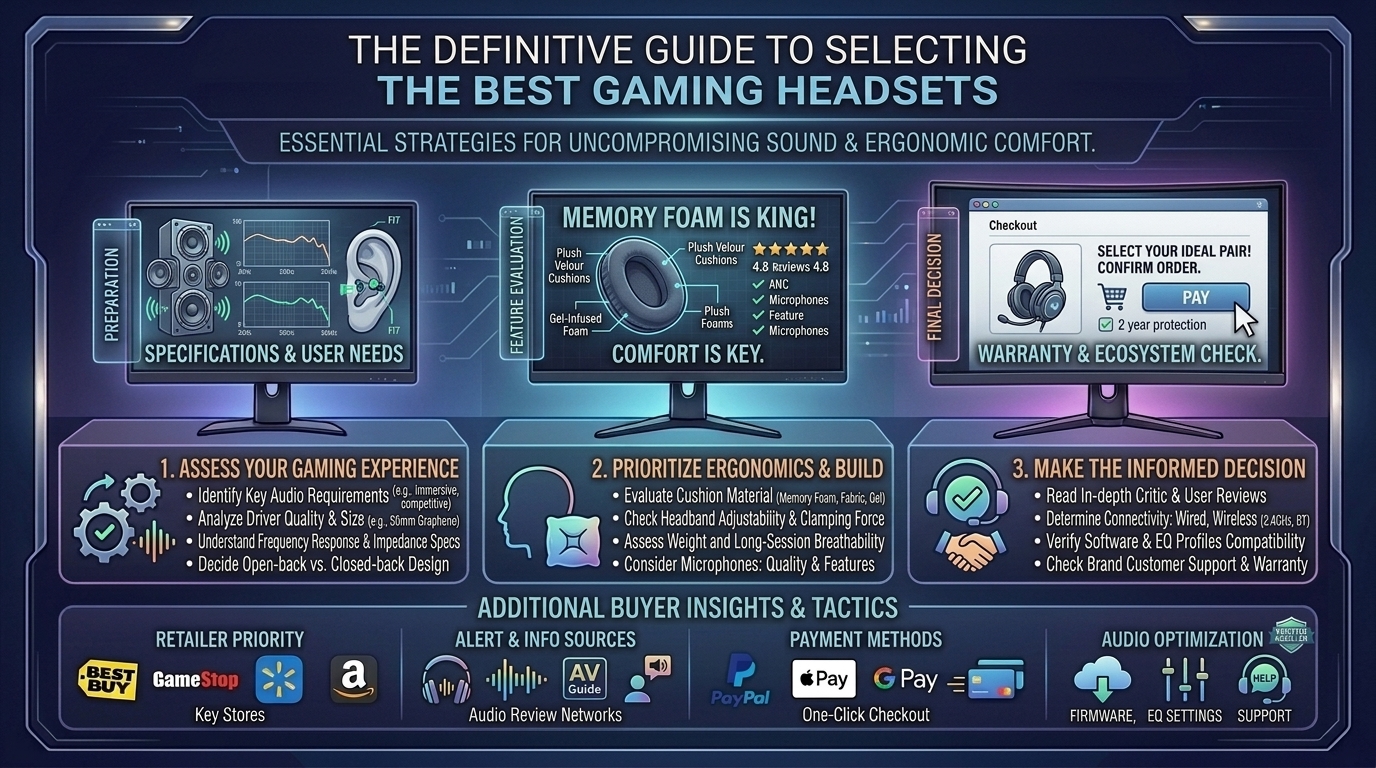
This complete buyer’s guide covers driver mechanics, earcup materials, spatial audio technologies, and top headset recommendations across all budget tiers.
What Defines High-Fidelity Audio & Extreme Comfort?
To make an informed purchase, it helps to understand what separates basic gaming headsets from audiophile-grade gear.
[ High-Fidelity Drivers (Planar / Graphene) ] ──► Wide Soundstage & Low Distortion
                                                                  │
[ Ergonomic Cushioning (Velour / Cooling Gel) ] ──► Zero Pressure & Thermal Relief
                                                                  │
                                                                  ▼
[ Immersive Spatial Audio ] ──► Precise 3D Footstep Positioning
Key Audio Features
- Driver Architecture: Standard headsets use 40mm or 50mm dynamic drivers. High-fidelity models feature Planar Magnetic drivers (e.g., Audeze Maxwell) or Graphene diaphragms that drastically reduce harmonic distortion.
- Frequency Response: While human hearing spans 20 Hz to 20,000 Hz, Hi-Res certified headsets reach frequencies up to 40,000 Hz or higher, ensuring cleaner high frequencies and tighter bass extension.
- Acoustic Design (Closed-Back vs. Open-Back):
- Closed-Back: Isolates outside room noise and prevents audio bleed; ideal for noisy environments.
- Open-Back: Provides a natural, wide soundstage with passive airflow, though it leaks sound into the room.
Key Comfort Factors
- Ear Cushion Materials:
- Memory Foam + Leatherette: Superior passive noise isolation and deep bass response, but can trap heat over time.
- Breathable Sports Fabric / Mesh: Maximum ventilation to prevent sweat buildup, highly recommended for warm climates.
- Cooling Gel Hybrid: Combines the seal of leatherette with heat-dissipating gel layers against your skin.
- Clamping Force & Weight: A heavy headset (>400g) requires an elastic suspension headband to distribute weight evenly across your skull and prevent top-head pressure points.
Top Headset Recommendations by Category
| Model | Primary Focus | Driver Type | Cushion Material | Connectivity |
| Audeze Maxwell | Audiophile Fidelity | 90mm Planar Magnetic | Reinforced Memory Foam | 2.4GHz Wireless / BT / AUX |
| SteelSeries Arctis Nova Pro Wireless | Premium Feature-Set | 40mm Custom Neodymium | Leatherette / Suspension Strap | Multi-System USB / BT / Dual Battery |
| Razer BlackShark V3 Pro | Esports Competition | 50mm TriForce Titanium | Ultra-soft Breathable Memory Foam | HyperSpeed 2.4GHz / Bluetooth |
| HyperX Cloud III | All-Day Comfort & Value | 53mm Angled Drivers | Signature HyperX Memory Foam | Wired (3.5mm / USB) |
| Turtle Beach Atlas Air | Lightweight Open-Back | 40mm Dynamic | Mesh Fabric / Floating Headband | 2.4GHz Wireless / Bluetooth |
Step-by-Step: Fine-Tuning Your Headset for Peak Performance
1.Select and Install the Right Eartips or Cushions:
If your headset includes swappable ear pads, install breathable fabric pads for long summer sessions or leatherette cushions if you need passive noise isolation in a noisy room.
2.Download Companion Desktop Software:
Install the manufacturer’s software suite (e.g., SteelSeries Sonar, Razer Synapse, or Corsair iCUE). Update firmware to ensure low-latency performance and stable wireless handshakes.
3.Configure Parametric EQ Profiles:
Flat EQ presets can sound thin. Boost the sub-bass slightly for cinematic immersion, or lift the mid-range (1 kHz to 4 kHz) to accentuate footstep audio in tactical shooters.
4.Enable System-Level Spatial Audio:
Turn on Dolby Atmos for Headphones, DTS Headphone:X, or Windows Sonic in your operating system’s sound settings to unlock 360-degree positional audio tracking.
Frequently Asked Questions (FAQ)
1. Are planar magnetic gaming headsets worth the higher price?
Yes, for audiophiles and players seeking maximum clarity. Planar magnetic drivers use ultra-thin diaphragms driven by magnetic arrays, delivering near-zero distortion and accurate instrument and sound effect separation.
2. Should I buy a wired or wireless gaming headset?
Modern 2.4GHz USB dongle wireless connections offer sub-1ms latency, making them visually identical in speed to wired setups. Choose wired if you want an affordable headset without battery management, or wireless for a cleaner, cable-free desk.
3. How do I stop my ears from getting hot during long gaming sessions?
Choose headsets featuring breathable velour or hybrid mesh fabric cushions. Alternatively, purchase aftermarket cooling-gel replacement ear pads compatible with your headset model.
4. What is the difference between active noise cancellation (ANC) and passive noise isolation?
Passive isolation uses thick physical padding to block ambient sound naturally. ANC uses exterior microphones to generate counter-noise waves, actively muting background sounds like air conditioners or PC fan noise.
5. Can I use a PC gaming headset on PS5 or Xbox Series X?
3.5mm wired headsets work across almost all platforms. For wireless models, check compatibility badges—Xbox requires specific internal security chips, whereas PS5 and PC share standard USB audio formats.
6. Does virtual 7.1 surround sound actually help in competitive games?
Virtual 7.1 surround processes stereo signals to create spatial depth. While cinematic for single-player RPGs, competitive players often prefer clean 2-channel stereo with precise HRTF spatial tuning (like Dolby Atmos) to avoid audio reverb artifacting.
7. How long do gaming headset batteries typically last?
Entry-level wireless models last 20 to 30 hours, while modern high-end headsets deliver between 50 and 80+ hours on a single charge. Some premium models include hot-swappable dual battery systems.
8. Are open-back headsets good for gaming?
Open-back headsets offer a wide, natural soundstage and keep your ears cool. However, they allow external ambient noise in and leak game audio out, making them best suited for quiet, private rooms.
9. Why is clamping force important?
Excessive clamping force causes headaches and jaw soreness, especially for gamers who wear glasses. Insufficient clamping force causes the headset to slip off when you tilt your head.
10. Where can I read more gaming audio reviews and hardware breakdowns?
Find updated headset reviews, DAC comparisons, and PC gear guides directly on TheGamerBuzz!
Conclusion
Finding the best gaming headset comes down to balancing acoustic clarity with long-term ergonomics. Investing in high-fidelity drivers, soft memory foam or cooling fabric cushions, and robust spatial audio software ensures you stay comfortable and fully immersed through every match. Evaluate your desk setup, choose the right acoustic design for your room, and stay locked onto TheGamerBuzz for launch reviews and gear breakdowns!
Leave a Reply