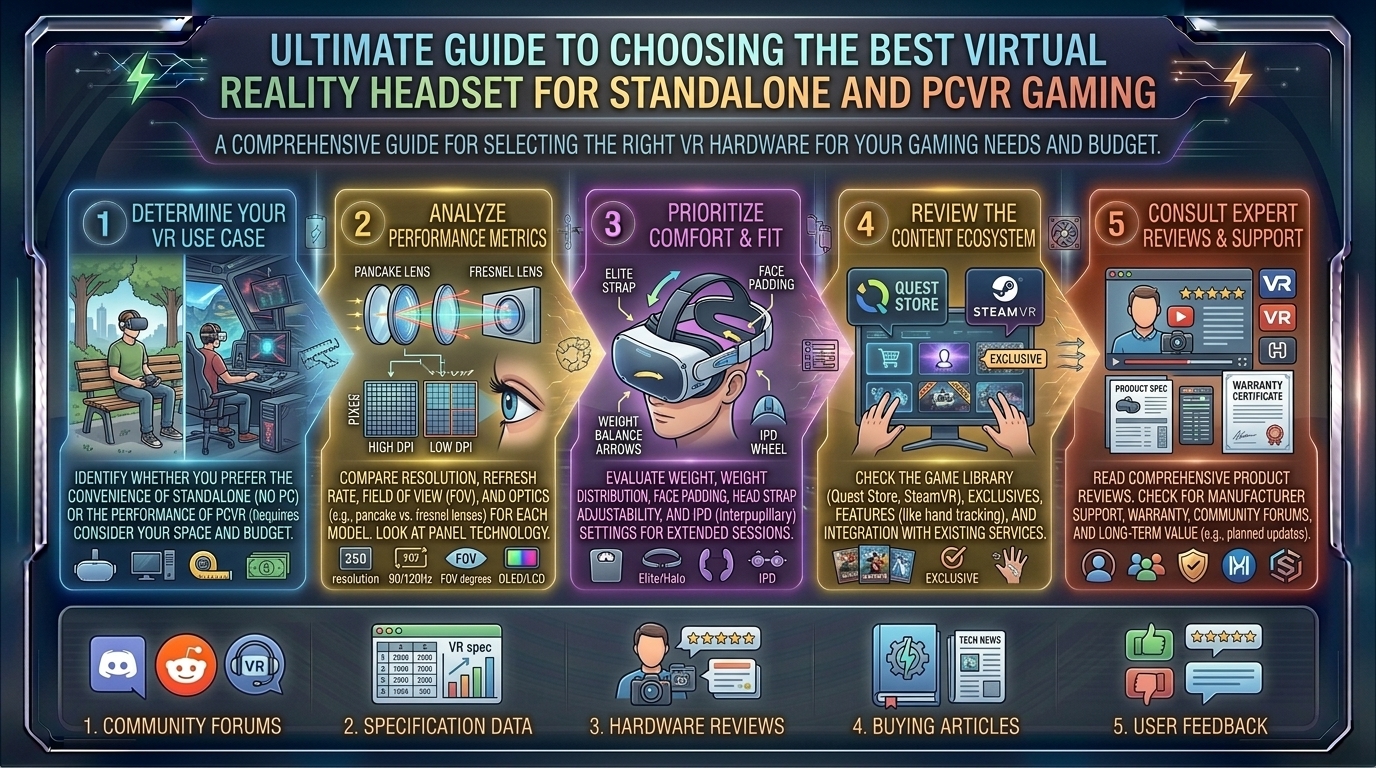
What Are the Best Virtual Reality Headset Buying Guides for Standalone and PCVR Gaming Experiences
Introduction: Entering the Next Generation of Virtual Reality
Virtual reality has evolved from a niche tech hobby into a mainstream gaming powerhouse. Whether you are setting up a wireless room-scale play space in a spacious Texas home, optimizing a high-end PC rig in a modern Seattle high-rise, or hunting for compact gear in a San Francisco apartment, choosing the right VR headset can feel overwhelming.
The market is sharply divided into two distinct ecosystems: Standalone headsets (which feature built-in mobile processors, untethered freedom, and optional PC connectivity) and dedicated PCVR (PC Virtual Reality) headsets (which hook directly into powerhouse graphic cards for jaw-dropping visual fidelity).
At thegamerbuzz.com, we cut through the marketing noise to give you the ultimate buying guide. This comprehensive breakdown covers top-tier hardware, deep architectural comparisons, performance metrics, and tips to help you select the ideal VR headset for your gaming lifestyle.
Part 1: Standalone VR Headsets – Total Freedom and Versatility
Standalone headsets are self-contained computing units. Powered by advanced mobile chipsets (like Qualcomm’s Snapdragon XR2 Gen 2), they require no external PC, no sensor base stations, and zero complex cable management to jump into a game.
1. Meta Quest 3 (The Best Overall Standalone Ecosystem)
- Key Specs: Snapdragon XR2 Gen 2 chip, 8 GB RAM, ~2064 x 2208 resolution per eye, 90–120Hz refresh rate, pancake optics.
- The Experience: The gold standard for modern consumer VR. Thanks to its slim pancake lenses, the physical bulk of the headset is drastically reduced compared to older generations. It features full-color passthrough cameras for mixed reality, allowing virtual objects to interact with your real-world living room.
- Why Buy It: It boasts the largest game library in the industry, excellent native performance, and the ability to switch seamlessly into a PCVR headset via a high-speed Wi-Fi 6E network (Air Link) or a physical USB-C link cable.
2. Meta Quest 3S (The Best Budget-Friendly Entry Point)
- Key Specs: Snapdragon XR2 Gen 2 chip, 8 GB RAM, Fresnel-style lenses, ~1832 x 1920 resolution per eye.
- The Experience: Built to replace older budget models, the Quest 3S packs the exact same high-end processing power as its more expensive sibling, meaning it runs every exclusive standalone game smoothly.
- Why Buy It: Priced aggressively for first-time buyers and families, it delivers mixed-reality capabilities and modern gaming performance without breaking the bank.
Part 2: PCVR and Enthusiast Headsets – Maximum Fidelity and Simplicity
If you own a high-end gaming PC loaded with an enthusiast-grade GPU and want to experience flight simulators, racing sims, or graphically dense modded games (like Skyrim VR or Cyberpunk VR mods) at maximum settings, you need pure PCVR muscle.
+--------------------------+-----------------------------------+-----------------------------------+
| Headset Model            | Primary Focus / Strength          | Display / Panel Technology        |
+--------------------------+-----------------------------------+-----------------------------------+
| Meta Quest 3             | Best Hybrid (Standalone & PCVR)   | LCD with Pancake Lenses           |
| Pimax Crystal Light      | Best Value for Sim Racers & Pilots| QLED LCD (Ultra-Sharp Resolution) |
| PlayStation VR2          | Best Plug-and-Play Console VR     | Vibrant OLED Panels               |
| Bigscreen Beyond         | Ultra-Compact Custom Comfort      | Micro-OLED                        |
+--------------------------+-----------------------------------+-----------------------------------+
1. Pimax Crystal Light (The Sim-Racer and Flight-Sim Favorite)
- Key Specs: Dual QLED panels (approx. 2880 x 2880 per eye), native PC connection, glass aspheric lenses.
- The Experience: Designed strictly for PC enthusiasts who demand crystal-clear text readability inside cockpit simulators (like MSFS 2024 or iRacing). By dropping standalone battery hardware, it cuts weight and cost compared to the original Pimax Crystal while keeping mind-boggling visual clarity.
- Why Buy It: Unrivaled edge-to-edge sharpness for users tethered to a powerful desktop rig.
2. PlayStation VR2 (The Console Powerhouse)
- Key Specs: Single OLED panel (2000 x 2040 per eye), HDR support, headset haptics, eye-tracking.
- The Experience: Originally built exclusively for the PlayStation 5 console, modern driver support has increasingly opened pathways for PC usage. Its vibrant OLED screens provide deep, inky blacks and striking contrast that LCD panels simply cannot match.
- Why Buy It: If you game on both a PS5 and a PC, the PSVR2 serves as a brilliant multi-platform hybrid option.
Part 3: Standalone vs. PCVR – Which Path Is Right for You?
Choosing between these two paradigms depends entirely on your hardware availability, tolerance for tinkering, and gaming preferences.
+-----------------------+-----------------------------------+-----------------------------------+
| Feature               | Standalone VR                     | PCVR (Dedicated Rig)              |
+-----------------------+-----------------------------------+-----------------------------------+
| Setup Complexity      | Instant (Turn on and play)        | Moderate (Drivers, cables, Steam) |
| Portability           | High (Play anywhere wirelessly)   | Low (Tethered to a stationary PC) |
| Visual Fidelity       | Mobile graphics architecture      | Uncapped GPU-driven rendering     |
| Cost                  | Lower to Moderate                 | High (Requires a costly gaming PC)|
+-----------------------+-----------------------------------+-----------------------------------+
- Go Standalone If: You want quick gaming sessions without fussing over Windows drivers, value wire-free room-scale movement, or want mixed-reality apps alongside games.
- Go PCVR If: You already own an enthusiast-class graphics card, want the absolute highest-resolution textures, play deep simulation games, and care deeply about immersive lighting and ray tracing.
Part 4: Regional Gaming Hub Considerations
Where you live can impact how you enjoy VR:
- San Francisco & New York: Urban apartments often feature limited spatial footprints. Standalone headsets with built-in boundary tracking (Guardian systems) excel here, letting you scale play areas dynamically to tight room sizes.
- Texas & Washington: Spacious homes in Texas or Washington often allow dedicated game rooms where permanent base stations or large, wire-free open floor spaces can be utilized safely without knocking over furniture.
Frequently Asked Questions (FAQ)
1. Can a standalone headset like the Meta Quest 3 play PCVR games?
Yes! You can connect a Meta Quest 3 to a gaming PC using a high-speed USB-C cable (Link) or wirelessly over a robust 5GHz/6G Wi-Fi network (Air Link or Virtual Desktop) to play heavy SteamVR titles.
2. Do I need a powerful PC to use a standalone headset in standalone mode?
No. When used in standalone mode, the headset processes everything internally via its built-in mobile chip. A PC is only required if you want to stream high-end PCVR games to the headset.
3. What is the “screen-door effect,” and do modern headsets still have it?
The screen-door effect is the visual artifact where you can perceive the fine black grid lines separating individual pixels. Thanks to high-resolution micro-OLED and high-density LCD panels paired with pancake lenses, this effect is virtually eliminated on modern headsets like the Quest 3 and Apple Vision Pro.
4. Are VR headsets safe for my eyes during long gaming sessions?
Yes, though eye strain can occur just like staring at a computer monitor. Most headsets use lenses that project focal planes a few feet away to reduce eye fatigue. It is recommended to take a 15-minute break every hour.
5. Why do some VR games cause motion sickness?
Motion sickness happens when your eyes tell your brain you are moving through a virtual world, but your inner ear feels your body sitting still on a couch. Choosing games with teleportation movement options or building up your “VR legs” gradually helps eliminate this over time.
6. Do I need base stations (lighthouses) mounted on my walls?
Most modern consumer headsets (like Meta Quest and Pimax Light) use inside-out tracking, meaning cameras on the headset track the controllers automatically. Only ultra-enthusiast setups (like Valve Index or specific enterprise rigs) require external wall-mounted lighthouses.
7. How long does the battery last on a standalone VR headset?
Most standalone headsets provide between 2 to 3 hours of continuous gaming battery life. Many users invest in elite straps with built-in auxiliary batteries to extend play sessions to 5+ hours.
8. Can I wear my prescription glasses inside a VR headset?
Yes, most headsets accommodate glasses if frames are narrow, but custom magnetic prescription lens inserts (sold by third-party manufacturers) are strongly recommended to avoid scratching the headset’s internal lenses.
9. What is refresh rate, and why does it matter in VR?
Refresh rate measures how many times per second the screen updates (e.g., 90Hz to 120Hz). Higher refresh rates are critical in virtual reality to maintain smooth motion and drastically minimize the risk of motion sickness.
10. Where can I find more hardware reviews and VR gaming lists?
For ongoing hardware deep dives, software optimization tips, and curated lists of the best titles to play in virtual reality, keep your browser locked to thegamerbuzz.com!
Conclusion
The virtual reality landscape has never been more vibrant or accessible. Whether you choose the untethered, versatile freedom of the standalone Meta Quest ecosystem or lean into the hyper-realistic graphics of a dedicated PCVR setup, stepping into a virtual world offers an unmatched level of gaming immersion.
At thegamerbuzz.com, we want to help you build the ultimate rig for your gaming space. Evaluate your budget, check your PC hardware specs, pick your platform, and dive headfirst into the future of gaming!
Leave a Reply