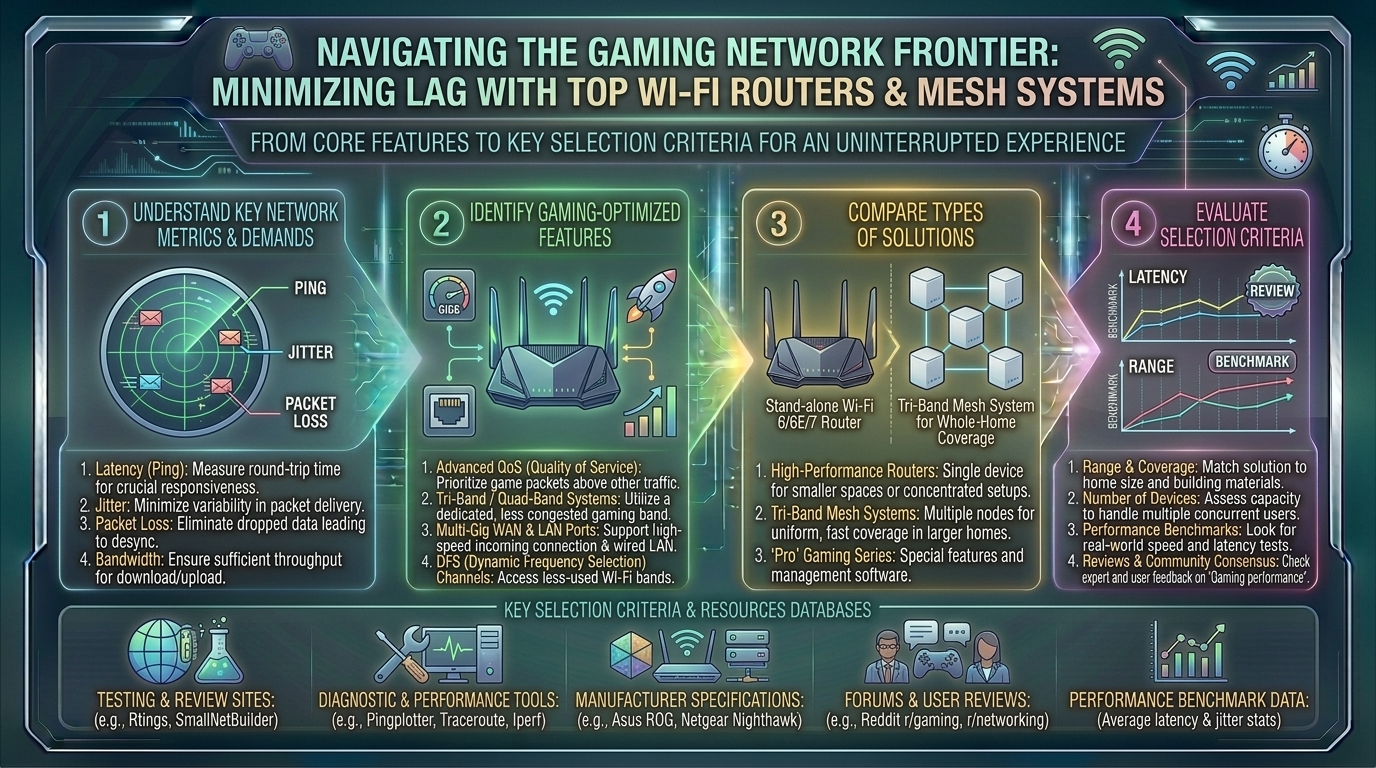
What Are the Best Wi-Fi Routers and Mesh Network Systems Designed Specifically for Minimizing Gaming Lag
Welcome to thegamerbuzz.com! Whether you are setting up a competitive command center in a bustling apartment in San Francisco or New York, sprawling across a multi-story home in Texas or Washington, or optimizing a modern suburban build in California, network stability is everything.
Few things are more frustrating than rubberbanding across the map, suffering unexpected packet loss, or experiencing sudden latency spikes right in the middle of a clutch 1v4 match. While internet service providers (ISPs) and game servers play a role, your home network hardware is often the ultimate bottleneck.
This comprehensive, highly informative guide explores the best Wi-Fi routers and mesh network systems designed specifically to eliminate gaming lag, breaks down core technologies like Wi-Fi 7 and QoS, and helps you pick the right hardware for your setup.
1. Understanding the Culprits of Gaming Lag
Before choosing a router, it helps to understand what causes lag in a wireless environment.
- Latency (Ping): Measured in milliseconds (ms), this is the time it takes for data to travel from your gaming rig to the server and back. High latency results in delayed reactions.
- Jitter: The variability in your ping over time. Even if your ping is 30ms, high jitter causes erratic fluctuations that disrupt smooth gameplay.
- Packet Loss: Occurs when data packets fail to reach their destination, causing characters to teleport or actions to drop entirely.
- Bufferbloat: Occurs when your router’s queue gets overloaded with too much data (e.g., someone else streaming 4K video or downloading a large update), causing massive ping spikes for everything else.
2. Standalone Routers vs. Mesh Systems: Which Do You Need?
Choosing between a traditional high-end gaming router and a mesh network system depends entirely on your living space and structural obstacles.
+-------------------------------------------------------------------------+
                      ROUTER VS. MESH FOR GAMING
+-------------------------------------------------------------------------+
  Option A: Standalone Gaming Router (e.g., TP-Link Archer GE800)
  -> Best for: Single rooms, apartments, direct line-of-sight wired setups.
  -> Pros: Maximum raw throughput, dedicated hardware acceleration ports.

  Option B: Gaming Mesh Network (e.g., ASUS ROG Rapture GT6)
  -> Best for: Multi-story homes, thick concrete/brick walls, sprawling layouts.
  -> Pros: Seamless roaming, uniform blanket coverage, zero dead zones.
+-------------------------------------------------------------------------+
3. Top Wi-Fi Routers and Mesh Systems for Minimizing Lag
The market features specialized hardware equipped with multi-gig ports, custom game dashboards, and multi-link operation (MLO) to keep your connection laser-stable.
A. Best Overall Dedicated Gaming Router: TP-Link Archer GE800 (Wi-Fi 7)
- Why it wins: The Archer GE800 is a powerhouse built from the ground up for competitive gaming. Featuring Wi-Fi 7 capabilities, dual 10Gbps ports, and four 2.5Gbps ports, it offers blistering speeds and hardware-level game prioritization.
- Key Feature: A dedicated game control panel that identifies and accelerates gaming traffic, ensuring your session takes absolute priority over background network traffic.
B. Best High-End Performance Mesh System: ASUS ROG Rapture GT6 (Wi-Fi 6E)
- Why it wins: Most mesh systems focus entirely on streaming movies, but the ROG Rapture GT6 is engineered for gamers. It is a multi-node mesh system that delivers low-latency device roaming across large floor plans.
- Key Feature: Triple-level game acceleration that boosts game traffic all the way from your device to the game server, coupled with built-in lifetime commercial-grade security software.
C. Best Cutting-Edge Flagship Mesh: Netgear Orbi 770 / TP-Link Deco BE68 (Wi-Fi 7)
- Why it wins: If your home requires a multi-node mesh layout and you want next-gen Wi-Fi 7 speeds to combat interference, these systems utilize dedicated wireless backhauls or multi-gig wired backhauls.
- Key Feature: Multi-Link Operation (MLO) allows devices to transmit and receive data across multiple bands simultaneously, radically cutting down latency and packet loss in congested wireless environments.
4. Pro Tips for Optimizing Your Network to Eliminate Lag
Investing in premium hardware is only half the battle. Use these expert configurations to bulletproof your setup:
- Prioritize Quality of Service (QoS): Enable adaptive QoS or Game-Boost settings in your router’s firmware. This ensures that bandwidth-heavy tasks (like cloud backups or family streaming) never starve your gaming session of data.
- Utilize Ethernet Backhaul for Mesh Satellites: If your mesh nodes communicate over Wi-Fi, you lose a fraction of speed on every hop. Connecting your mesh nodes via physical Ethernet cables (wired backhaul) drops wireless jitter to near-zero.
- Harness the 6GHz Band: If you must play over Wi-Fi, connect your modern devices (PC, PS5, Xbox Series X) to the 6GHz band (available on Wi-Fi 6E and Wi-Fi 7 routers). It features significantly less congestion and interference than traditional 2.4GHz or 5GHz bands.
- Lock Down Port Forwarding / UPnP: Ensure your gaming console or PC has an open NAT type by configuring port forwarding or Universal Plug and Play (UPnP) safely, avoiding matchmaking bottlenecks.
10 Frequently Asked Questions (FAQs)
1. Do gaming routers actually reduce ping?
A gaming router cannot change the physical distance between your house and the game servers, but it can eliminate local network congestion, prioritize game packets, and prevent bufferbloat, keeping your ping stable and low.
2. Is a mesh system better than a traditional router for gaming?
Not necessarily for raw speed. A traditional standalone gaming router usually wins on pure throughput and lower latency if you are close to it. However, a mesh system is better if you game far away from the main modem and need seamless whole-home coverage.
3. What is Wi-Fi 7 and why does it matter for gaming?
Wi-Fi 7 introduces features like Multi-Link Operation (MLO) and 320MHz channels, drastically reducing latency, increasing throughput, and handling interference infinitely better than older generations.
4. What is “Bufferbloat” and how do gaming routers fix it?
Bufferbloat happens when data queues up in your router’s memory buffer, causing massive latency spikes. Gaming routers use advanced Smart Queue Management (SQM) algorithms to keep queues short and prevent lag spikes.
5. Should I connect my gaming PC via Wi-Fi 7 or Ethernet?
Hardwiring via an Ethernet cable (Cat6a or better) is always superior to any wireless connection, completely eliminating wireless interference and packet jitter.
6. Can I mix different brands of mesh routers together?
Generally, no. Mesh systems rely on proprietary node-to-node communication protocols. To ensure seamless roaming, stick to nodes from the exact same manufacturer and model family.
7. What is a “Dedicated Backhaul” in mesh networks?
It is a separate, dedicated radio frequency channel or wired connection used exclusively for communication between mesh nodes, freeing up the other bands for your actual devices.
8. Does QoS slow down my overall internet speed?
No. QoS intelligently manages existing bandwidth distribution in real-time, ensuring time-sensitive tasks like gaming and video calls get priority over passive downloads.
9. Why does my ping spike when someone else streams video?
This is classic bufferbloat. High-bandwidth streaming saturates your upload/download pipeline. Enabling QoS or SQM on your router solves this instantly.
10. How often should I reboot my gaming router?
Even high-end routers benefit from a system reboot once every month or two to clear out cache memory, apply background security patches, and refresh local IP leases.
Conclusion
Eliminating gaming lag is a science that starts right at your internet gateway. Whether you choose an aggressive, port-heavy standalone beast like the TP-Link Archer GE800 or a high-performance multi-node system like the ASUS ROG Rapture GT6, upgrading your networking hardware changes your entire competitive experience. By pairing top-tier gear with proper QoS configurations and wired connections where possible, you can wave goodbye to lag spikes forever.
Ultimate Gaming Router Setup Guide
This video provides a practical visual walkthrough of how to configure router QoS settings, open NAT types, and optimize wireless bands for competitive gaming performance.
Leave a Reply