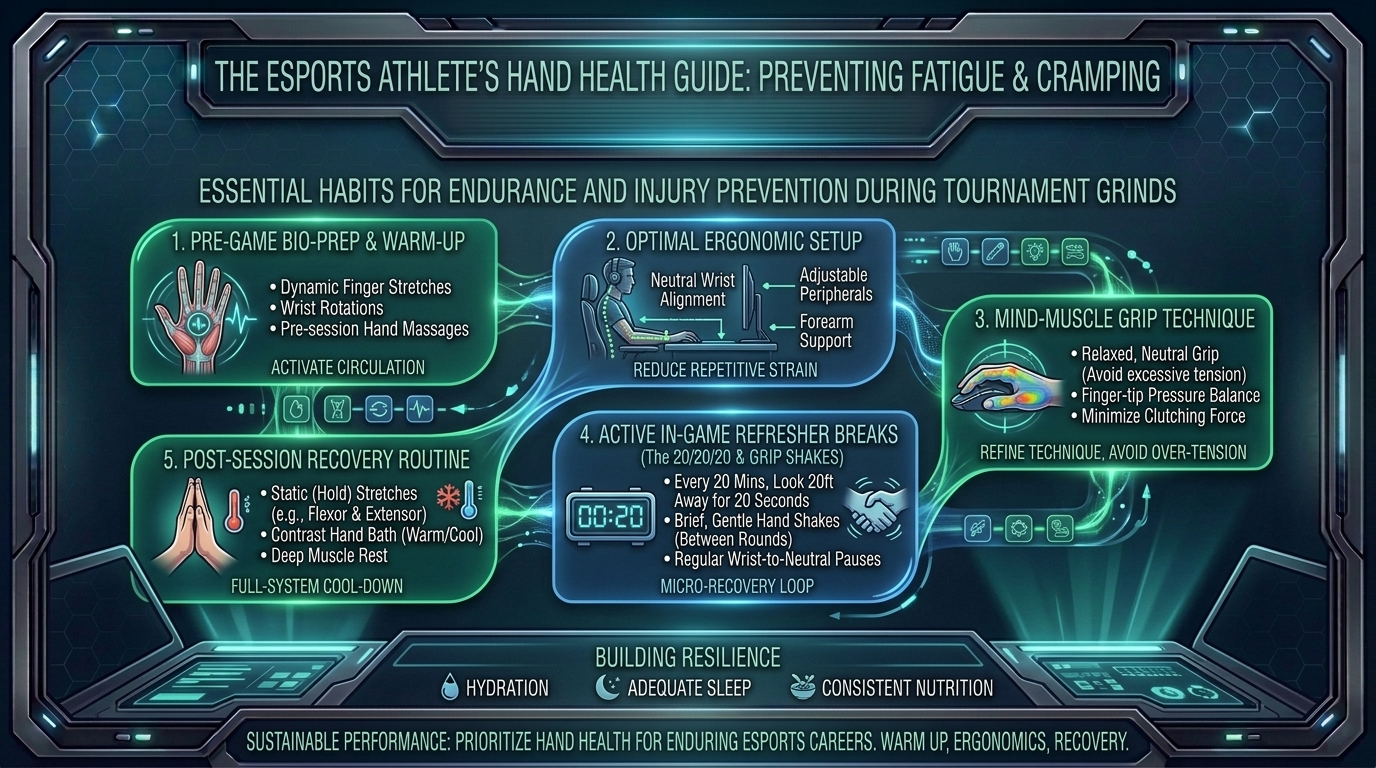
Whether you are pushing through an all-day VALORANT tournament bracket, grinding 12 hours of ranked Apex Legends, or competing in grueling Street Fighter 6 open pools, hand fatigue, finger cramping, and wrist stiffness are major obstacles for competitive esports athletes. Mechanical precision, reaction speed, and micro-tracking degrade rapidly when small intrinsic hand muscles fatigue or undergo repetitive strain.
Beyond immediate performance drops, ignoring severe hand fatigue risks long-term mechanical injuries, such as Carpal Tunnel Syndrome (CTS), De Quervain’s Tenosynovitis, and wrist tendinitis.
At The Gamer Buzz, we focus on competitive esports performance, physical training, peripheral optimization, and player health. This comprehensive guide breaks down the physiology of gaming-induced hand strain, ergonomic setup standards, active physical warm-up protocols, peripheral optimizations, and daily recovery habits designed to eliminate hand cramping during long tournament sessions.
Whether competing in LAN arenas across Texas, streaming from gaming setups in California and San Francisco, leading collegiate gaming rosters in Washington, or grinding ranked ladders from New York, implementing proper hand-care protocols protects your physical health and prolongs your competitive edge.
1. The Anatomy of Gaming Strain: Why Hand Fatigue and Cramping Occur
Understanding the biomechanics of your hands and wrists helps you prevent pain before it limits your gameplay.
Muscle Overuse, Static Tension, and Ischemia
- Static Grip Tension: When holding a gaming mouse or controller continuously for hours, your hand muscles sustain static isometric contraction. This restricts blood flow (ischemia) to localized tissues, depleting oxygen and causing lactic acid accumulation that results in acute muscle cramping.
- Repetitive Micro-Trauma: High-APM (Actions Per Minute) titles—such as StarCraft II, League of Legends, and fast-paced FPS games—require thousands of micro-clicks per hour. This repetitive flexor and extensor tendon friction can cause micro-inflammation in the wrist’s carpal tunnel.
- Ulnar and Median Nerve Compression: Resting heavy forearm weight directly on sharp desk edges compresses the median and ulnar nerves, leading to tingling, numbness, and sudden finger weakness during high-stakes clutches.
| Strain Factor | Physiological Impact | Symptoms During Gameplay | Preventive Fix |
| High Grip Tension | Reduced localized blood flow & muscle hypoxia | Acute palm cramping, stiff fingers | Lower grip pressure to 3–4/10 scale |
| Sharp Desk Compression | Median/Ulnar nerve compression | Numbness in pinky/ring finger or thumb | Padded forearm sleeves or rounded desk edges |
| Cold Ambient Temp | Reduced joint fluid lubrication & stiffness | Slow reaction times, sluggish clicks | Hand warmers, heated sleeves, physical warm-ups |
| Dehydration & Electrolyte Loss | Involuntary muscle nerve misfiring | Sudden thumb and palm muscle spasms | Electrolyte intake (Sodium, Potassium, Magnesium) |
2. Dynamic Physical Warm-Ups & Physical Therapy Stretches
Never start an intense tournament session cold. Performing a 5-minute dynamic warm-up increases synovial fluid lubrication in wrist joints and boosts blood flow to intrinsic hand muscles.
1.Phase 1: Active Blood Flow Activation:Increases blood circulation and prepares tendons for load.
Rub your hands together vigorously for 20 seconds, then open and close your fists rapidly 30 times. This elevates local skin temperature and pumps oxygenated blood into the forearm flexor and extensor muscles.
2.Phase 2: Wrist Flexor & Extensor Dynamic Stretches:Stretches wrist flexors and reduces Carpal Tunnel pressure.
Extend one arm straight out with your palm facing up. Use your opposite hand to gently pull your fingers downward toward the floor, holding for 15 seconds. Flip your hand (palm down) and gently pull your fingers back toward your body for 15 seconds. Repeat on both arms.
3.Phase 3: Thumb & Tendon Glides:Mobilizes thumb thenar muscles used for side-buttons and controller sticks.
Touch the tip of your thumb to the tip of each finger individually (Index, Middle, Ring, Pinky), making an “O” shape with maximum extension between each touch. Perform 10 cycles per hand to prevent thumb pad cramping.
4.Phase 4: Nerve Flossing & Upper Body Relief:Relieves tension in upper neck and shoulder nerve pathways.
Tilt your head slowly toward your left shoulder while extending your right arm outward with your palm flexed up, then reverse. This “flosses” the brachial plexus nerve pathway that travels from your neck down to your fingertips.
3. Ergonomic Setup Standards & Peripheral Tuning
Your desk setup and peripheral choices directly influence how much physical strain your hands endure during long tournament sessions.
1. Desk and Armrest Height Optimization
Set your desk and chair height so your elbows form a 90 to 100-degree angle, allowing your forearms to rest flat without lifting your shoulders or letting your wrists sag downward.
2. Mouse Weight, Shape, and Grip Force
- Lightweight Mice (Sub-60 Grams): Switching to an ultra-lightweight gaming mouse significantly reduces the inertia required to stop and start camera movements, decreasing strain on your wrist flexors.
- Ergonomic Mouse Shells: Ensure your mouse shape matches your hand size and grip style (Palm, Claw, or Fingertip). Forcing a large hand onto a tiny mouse causes severe palm cramping over extended sessions.
- Grip Tape Integration: Applying high-friction grip tape to your mouse shell prevents your fingers from slipping, allowing you to maintain full control using minimal grip pressure.
4. In-Game Habit Adjustments During Grind Sessions
Developing healthy habits during tournament matches preserves hand stamina over long gaming sessions:
- Enforce the “Micro-Pause” Protocol: During loading screens, agent selection, or round breaks, completely release your grip on your mouse or controller. Let your arms hang loosely by your sides for 10–15 seconds to restore blood flow.
- Monitor Your “Tension Scale”: Periodically check your grip force during gameplay. Aim for a tension rating of 3 or 4 out of 10. Tenser grips do not improve aim precision; they only accelerate physical fatigue.
- Use Hand Warmers at LAN Events: Cold tournament venues restrict blood flow to peripheral blood vessels. Keep air-activated or electric hand warmers near your desk to warm your hands between matches.
- Hydration & Electrolyte Management: Muscle cramps are often triggered by mild dehydration and electrolyte imbalances. Drink water mixed with essential electrolytes (magnesium, potassium, sodium) during long tournament sessions.
10 Frequently Asked Questions (FAQ)
1. Why do my hands cramp more during tournament matches than casual games?
In high-stakes tournament matches, adrenaline elevates subconscious muscle tension. Players grip their mouse or controller tighter without realizing it, restricting blood flow and triggering rapid muscle cramping.
2. Is it bad to crack my knuckles or wrists before gaming?
Cracking your knuckles releases gas bubbles (cavitation) from joint synovial fluid and is generally harmless. However, avoid forcefully twisting your wrist joints, which can strain supporting ligaments.
3. Should I use compression gloves while gaming?
Compression gloves can improve local circulation and keep your hands warm. However, make sure they fit comfortably—gloves that are too tight can restrict joint mobility or increase nerve pressure.
4. What is the difference between normal muscle fatigue and Carpal Tunnel Syndrome?
Normal muscle fatigue subsides after rest and hydration. Carpal Tunnel Syndrome involves persistent numbness, tingling, or burning sensations in the thumb, index, and middle fingers that can linger long after gaming sessions end.
5. How does mouse weight affect long-term hand fatigue?
Lighter mice (under 60 grams) require less kinetic force to accelerate and decelerate. Lowering physical inertia reduces repetitive strain on the wrist and forearm muscles during high-APM gaming.
6. What should I do if I experience sudden shooting pain in my wrist during a tournament match?
Stop playing immediately during the next available pause or break. Apply ice to reduce acute inflammation, gently stretch the forearm, and avoid forcing movement through sharp pain.
7. Does mouse pad friction influence hand strain?
Yes. Mouse pads with high static friction force you to push harder to initiate movement, increasing hand strain. Hybrid or fast-cloth pads reduce initial sliding resistance, making micro-adjustments smoother and less taxing.
8. How can controller players prevent thumb pad cramping?
Controller players should use thumbstick extenders (such as KontrolFrees) to increase lever distance, reducing the physical thumb force needed to make micro-adjustments on the sticks.
9. Can changing my in-game mouse sensitivity reduce arm and wrist strain?
Switching from an ultra-low sensitivity to a moderate sensitivity balance reduces extreme forearm swiping, while moving away from an ultra-high sensitivity prevents excessive wrist micro-strain.
10. When should I see a medical professional for gaming-related hand pain?
If you experience persistent pain, burning, loss of grip strength, or numbness that lasts more than 24 hours after a gaming session, consult a physical therapist or medical specialist immediately.
Conclusion
Preventing hand fatigue and cramping during multi-hour esports tournament grind sessions comes down to maintaining healthy physical habits. By understanding gaming biomechanics, warming up with dynamic wrist stretches, optimizing your desk ergonomics, reducing peripheral grip tension, and keeping your hands warm and hydrated, you can protect your physical health and play at your peak for hours on end.
For more competitive gaming health tips, hardware optimizations, and mechanical performance guides across Texas, California, San Francisco, Washington, and New York, stay tuned to The Gamer Buzz.
Leave a Reply