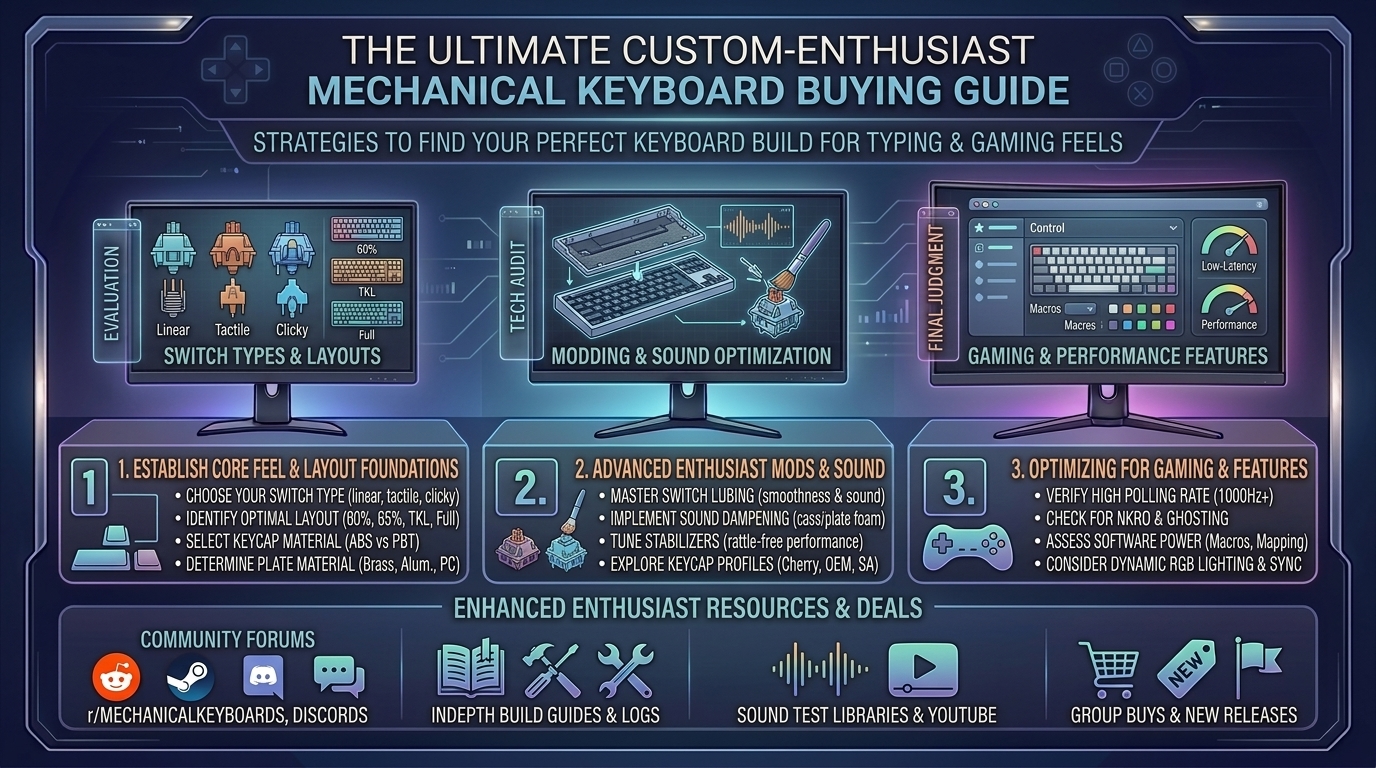
Welcome to thegamerbuzz, your premier authority on high-end hardware, custom peripherals, and optimization guides. Whether you are tuning your setup late at night in New York, optimizing your workspace in San Francisco, building custom rigs in Texas and Washington, or curating aesthetic layouts from sunny California, we understand one absolute truth: your keyboard is the most intimate connection between you and your digital world.
Gone are the days when gamers and typists accepted mushy membrane boards or generic, pingy pre-builts straight out of the box. Today, the mechanical keyboard landscape is a booming enthusiast culture. Achieving that elusive “marbly, creamy” sound profile, butter-smooth keystroke feel, and lightning-fast gaming response requires navigating a massive sea of switches, mounting styles, and layouts.
If you are looking for the ultimate mechanical keyboard buying guide tailored for custom enthusiast feel and high-performance gaming, this comprehensive resource breaks down everything you need to know.
1. The Anatomy of Custom Typing and Gaming Feels
To build or buy the ultimate keyboard, you first need to understand the structural pillars that dictate how a board sounds, feels, and performs. Custom enthusiast boards are engineered like fine acoustic instruments.
Core Architectural Layers:
- The Case Material: CNC-machined aluminum cases provide heavy, rigid stability, a premium tactile weight, and deep acoustic resonance. Polycarbonate or high-grade plastic cases offer a softer, more flexible typing bounce.
- Mounting Styles (Gasket vs. Top vs. Tray): Modern enthusiast boards favor gasket mounting, where the plate holding the switches floats inside the case suspended by rubber or silicone gaskets. This eliminates harsh vibrations and delivers a cushioned, uniform feel across every key.
- Acoustic Damping Layers: Multi-layer foam (Poron, IXPE, and silicone pad layers) absorbs unwanted pinging and hollow echoes, turning a clacky plastic sound into a deep, satisfying “thock.”
- Keycap Profiles and Materials: Double-shot PBT keycaps resist grease shine and offer a textured, durable surface. Profiles like Cherry, OEM, or spherical profiles (like MT3 or XDA) change the wrist angle and acoustic pitch of your typing.
2. Choosing Your Weapon: Switches (Linear, Tactile, and Magnetic HE)
Switches are the heart of any mechanical keyboard. Your choice dictates whether your board is optimized for twitch-reflex competitive gaming or long-form, rhythmic typing comfort.
1. Linear Switches (The Gamer’s Choice)
- Feel: Smooth, uninterrupted travel from top to bottom with no physical bump or click.
- Best For: Fast-paced competitive shooters and action games where rapid double-tapping is essential.
- Fan Favorites: Gateron Milky Yellow Pro, Keygeek Y2, or factory-lubed high-tier smooth linears.
2. Tactile Switches (The Typist’s Delight)
- Feel: Features a distinct physical “bump” midway through the keypress, letting your finger feel precisely when the actuation registers without needing a loud click.
- Best For: Programmers, writers, and hybrid gamers who want crisp feedback.
- Fan Favorites: Gateron Baby Kangaroo V2, Sillyworks x Gateron Type R, or Boba U4T.
3. Hall Effect (HE) & Magnetic Switches (The Modern Esports Meta)
- Feel: Contactless magnetic sensors that allow adjustable actuation points and Rapid Trigger technology (resetting the key instantly the moment you lift your finger).
- Best For: Hardcore competitive gamers chasing zero latency and maximum mechanical advantage.
3. Selecting the Right Layout for Your Desk Space
Size matters when designing your desk ecosystem. Keyboard layouts are categorized by physical footprint:
- Full-Size (100%): Includes a dedicated number pad and navigation cluster. Great for data entry, but forces your mouse further away, straining your shoulder.
- 96% / Compact 1800: Keeps the number pad tightly integrated into a space-saving footprint.
- Tenkeyless (TKL / 80%): Drops the number pad entirely, giving your mouse arm more clearance while keeping arrow keys and the function row intact.
- 75% Layout: The absolute sweet spot for most enthusiasts. It retains function keys and arrows in a compressed, ultra-clean block without wasting desk space.
- 65% / 60% Minimalist: Strips away function rows or arrow keys for maximum desk freedom, relying on programmable firmware layers for secondary key functions.
4. Top Mechanical Keyboard Recommendations for Enthusiasts & Gamers
Whether you want a plug-and-play custom beast or an entry-level platform to mod yourself, these standout categories represent the gold standard:
- The Best Pre-Built Custom Enthusiast Board: Keychron Q Max Series (such as the Q1 Max 75% or Q5 Max 96%). Featuring CNC aluminum chassis, double-gasket mounts, hot-swappable sockets, tri-mode wireless (2.4GHz, Bluetooth, USB-C), and full QMK/VIA programmability.
- The Best Entry Custom Barebones Kit: QwertyKeys Neo65 Core Plus. A masterpiece of accessible custom design offering incredible acoustics, flexible mounting options, and high-end feel at a friendly price point.
- The Ultimate Esports Gaming Board: Wooting 80HE or Razer Huntsman V3 Pro. Equipped with advanced magnetic Hall-effect switches and Rapid Trigger capabilities for elite competitive gaming performance.
5. Frequently Asked Questions (FAQ)
1. What does “hot-swappable” mean on a mechanical keyboard?
Hot-swappable PCBs feature specialized sockets that let you push mechanical switches in and pull them out by hand using a switch puller—zero soldering required. This lets you test dozens of different switches until you find your favorite feel.
2. Are PBT keycaps really that much better than ABS keycaps?
Yes. Cheap ABS keycaps develop an ugly, slippery shine from finger oils within weeks of use. PBT plastic is denser, matte-textured, heat-resistant, and maintains its premium dry feel for years.
3. What keyboard layout is best for everyday productivity and gaming?
The 75% layout is widely considered the best all-rounder. It preserves your arrow keys and function row for daily work shortcuts while keeping your mouse close for comfortable gaming posture.
4. Do I need to lubricate my mechanical switches manually?
While early enthusiast culture required hand-luting every single switch, modern high-end pre-builts and enthusiast switches feature excellent factory lubrication, meaning they feel smooth and sound great right out of the box.
5. What is “Rapid Trigger” and do I need it for gaming?
Rapid Trigger dynamically resets a key the exact microsecond your finger begins lifting up, rather than waiting for the key to cross a static physical release point. It is a massive competitive advantage for movement-heavy games like Valorant or Counter-Strike.
6. Are wireless mechanical keyboards laggy for competitive gaming?
Not anymore. Modern 2.4GHz wireless dongles utilize proprietary polling protocols that match or exceed the ultra-low latency of wired connections, while Bluetooth is best reserved for office typing and multi-device pairing.
7. Why do some keyboards sound “thocky” while others sound “clacky”?
Sound profiles are dictated by case materials, switch housing plastics, mounting flexibility, and internal foam. Aluminum cases and thick keycaps produce deep, low-pitched “thocks,” while thin plastic cases and clicky switches produce high-pitched “clacks.”
8. What is QMK/VIA software?
QMK/VIA is open-source firmware and web-based configuration software that lets you remap keys, build custom multi-layer macros, and control RGB backlighting directly on your keyboard’s onboard memory without running bloated background apps.
9. Can I use Mac and Windows on the same custom mechanical keyboard?
Yes! Most enthusiast boards include a physical hardware toggle switch (or software profile swap) that instantly maps modifier keys between macOS and Windows layouts.
10. Where is the best place to buy custom enthusiast keyboard parts?
Reputable community vendors (such as NovelKeys, KBDFans, Mechanical Keyboards, and direct manufacturer storefronts like Keychron or QwertyKeys) are the safest places to source authentic kits, switches, and keycap sets.
6. Conclusion
Investing in a high-end mechanical keyboard transforms computing from a mundane chore into an absolute tactile joy. By carefully choosing your layout, matching your switches to your gaming or typing style, and prioritizing quality acoustic engineering and build materials, you will craft a setup that serves you reliably for years to come.
Upgrade your desk ecosystem, dial in your acoustics, and type like a master right here with thegamerbuzz!
What is your current dream keyboard switch and keycap combination?
Leave a Reply