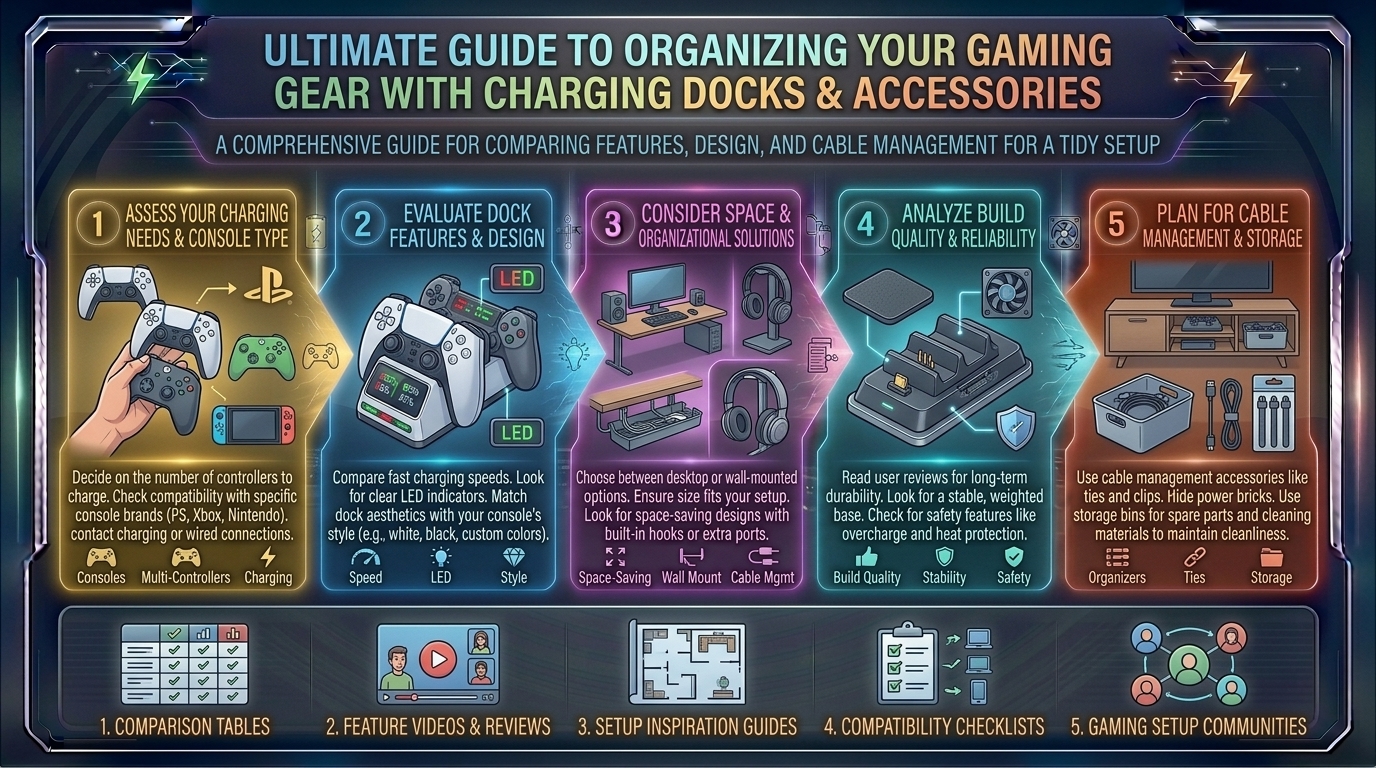
What Are the Best Controller Charging Dock and Accessory Buying Guides for Keeping Your Gaming Gear Organized
Introduction: Banishing the Wire Monster from Your Battle Station
For modern gamers, streamers, and tech enthusiasts across dynamic hubs like Texas, New York, California, Washington, and San Francisco, the modern gaming setup is an impressive marvel of engineering. Yet, even the most powerful PC rig or next-gen console setup can instantly look like an unmitigated disaster if plagued by a common enemy: cable clutter and loose gear.
There is nothing quite as frustrating as sitting down for an intense gaming session, only to find your controller blinking a low-battery red because it was left uncharged, its cord buried beneath a tangle of headphones and mouse wires. Investing in a quality controller charging dock and desktop accessory management system isn’t just about aesthetics—it’s about workflow efficiency, equipment preservation, and maintaining a clean, professional studio environment.
At thegamerbuzz.com, we champion hardware optimization from every angle. This comprehensive buyer’s guide explores the best controller charging docks, organization accessories, and tactical design choices to keep your gaming space immaculate.
Part 1: Why Controller Charging Docks Are Essential
Gone are the days of plugging a messy micro-USB or Type-C cable directly into the front of your console or PC every time your gamepad dies. Dedicated charging docks have revolutionized how we store and power our gear.
+-----------------------------------+-----------------------------------+
| Traditional Cable Charging        | Dedicated Charging Docks          |
+-----------------------------------+-----------------------------------+
| Messy cords strewn across desks   | Clean, click-in vertical display  |
| Wear and tear on internal ports   | Drop-and-charge contact pins      |
| Controllers left loose on chairs  | Secure, designated storage home   |
| Slow or unmonitored power supply  | Smart overcharge protection chips |
+-----------------------------------+-----------------------------------+
1. Protection for Internal Ports
Constantly jamming a charging cable into a controller port wears down the fragile internal USB pins over time. Drop-in charging docks utilize external expansion contact points or custom magnetic adapters, preserving the lifespan of your expensive gamepads.
2. Built-In Battery Longevity
Quality charging docks feature smart-chip microprocessors that automatically cut off power flow the exact moment your controller battery hits 100%. This prevents the micro-current degradation that shortens lithium-ion battery life.
—## Part 2: Categorizing the Best Charging Docks by Ecosystem
Different controllers require tailored physical form factors. Here is how top charging solutions break down across platforms:
1. PlayStation 5 (DualSense & DualSense Edge)
- The Gold Standard: The official Sony DualSense Charging Station remains a favorite because it uses the controller’s custom bottom-extension charging terminals, leaving the top USB-C port entirely free. Third-party alternatives (like Oivo or PowerA) offer multi-functional stands that incorporate cooling fans and headset holders.
2. Xbox Series X|S & Custom Pads
- The Ecosystem Advantage: Xbox controllers rely on AA batteries by default. Premium charging docks (such as those from 8BitDo or Razer) bundle custom rechargeable battery packs outfitted with specialized replacement battery doors that match the dock’s magnetic drop-in contacts seamlessly.
3. Nintendo Switch & Universal PC Gamepads
- Flexibility: Universal desktop docks (supporting Pro Controllers, 8BitDo pads, and mobile gamepads) use weighted bases and multi-head magnetic tips, allowing you to charge mismatched controllers side-by-side on a single footprint.
Part 3: Essential Accessory Ecosystems for Ultimate Gear Organization
A charging dock is only the first step. To achieve a truly professional, zero-clutter studio space, you need to integrate supplementary organization hardware.
+-------------------------------+-----------------------------------+-----------------------------------+
| Accessory Type                | Primary Purpose                   | Setup Impact                      |
+-------------------------------+-----------------------------------+-----------------------------------+
| Headphone Under-Desk Mounts   | Safely stores gaming audio gear   | Clears massive surface area       |
| Desktop Pegboard Systems      | Vertical organization for cables  | Endless customization             |
| Magnetic Cable Anchors        | Keeps loose charging cords ready  | Stops wires from slipping away    |
| Multi-Device Charging Towers  | Powers phones, earbuds, tablets   | Eliminates wall-wart chaos        |
+-------------------------------+-----------------------------------+-----------------------------------+
1. Under-Desk and Wall-Mounted Headphone Hangers
Bulky gaming headsets take up vital desk real estate. Installing a sturdy aluminum headphone hanger underneath your desk or attaching one magnetically to the side of a PC case keeps your audio setup safe, off the floor, and instantly accessible.
2. Desktop Pegboards (IKEA Skadis & Ecosystem Clones)
Popularized by creators in tech hubs like San Francisco and New York where space is at a premium, modular wall pegboards let you mount gamepads, keyboards, VR headsets, and cables vertically onto the wall, turning your gaming gear into functional wall art.
3. Weighted Desktop Cable Catchers
If you use wired mice or need a loose USB-C cable nearby for quick phone charging, a weighted silicone desktop anchor keeps the cord right where you left it instead of sliding off the edge of the desk every time you unplug your device.
Part 4: Regional Space Management Realities
Where you live dictates how you approach space optimization:
- Compact Urban Apartments (New York & San Francisco): Verticality is everything. Rely on wall-mounted pegboards, under-desk charging trays, and multi-functional stands that combine headset storage, controller charging, and USB hubs into a single footprint.
- Spacious Home Offices (Texas & Washington): Larger square footage allows for expansive desk layouts, standalone multi-console charging stations, and dedicated streaming hardware display shelves without feeling cramped.
Frequently Asked Questions (FAQ)
1. Do third-party charging docks damage controller batteries?
Reputable third-party charging docks equipped with built-in safety features, overcharge protection, and regulated power outputs are completely safe. Always look for safety certifications (like CE, FCC, or RoHS) to ensure quality manufacturing.
2. Can I leave my controllers on the charging dock overnight?
Yes. Modern charging docks and gamepads feature smart regulation chips that automatically halt electrical current once the battery reaches full capacity, preventing overcharging.
3. What is the advantage of magnetic drop-in charging docks?
Magnetic docks use small adapters that stay plugged into your controller’s port permanently. You simply drop the controller near the dock, and the magnets snap it into exact alignment instantly, minimizing physical wear and tear.
4. How do I manage charging cables that run from the dock to the outlet?
Route your charging dock’s power cord through a J-channel raceway attached to the back leg of your desk or feed it directly down a desktop grommet hole into an under-desk power strip.
5. Are multi-console charging stations worth buying?
If you own both a PlayStation and an Xbox (or Nintendo Switch), a multi-console or universal charging tower helps consolidate multiple wires into a single power source, keeping your entertainment center organized.
6. Do controller grips or silicone skins interfere with charging docks?
Often, yes. Most drop-in molded charging docks are engineered to fit naked, stock-sized controllers. If you use thick rubber grip skins or silicone cases, you may need to peel them back or choose a dock with universal cable slots instead of molded slots.
7. Why is my controller not charging properly on its dock?
This is usually caused by dust or skin oils blocking the tiny metal contact points on the bottom of the controller or the dock. Wipe the contacts gently with a dry microfiber cloth or an isopropyl alcohol swab.
8. How can I power a charging dock without occupying precious wall outlets?
Many modern charging docks draw power via standard USB-C connections. You can plug them directly into a high-amperage multi-port USB hub or a powered desktop power strip rather than running separate cords to wall sockets.
9. What is the best material for desk organization accessories?
Anodized aluminum, reinforced steel, and high-grade ABS plastics offer the best durability and weight capacity for supporting heavy headsets and controllers safely over years of use.
10. Where can I find more setup inspiration and accessory reviews?
For continuous updates on the best gear, aesthetic layouts, and peripheral deep-dives, keep your browser locked right here to thegamerbuzz.com!
Conclusion
Organizing your gaming space goes far beyond simple aesthetics—it creates a seamless, stress-free environment where your gear is always powered up and ready for action. By swapping messy loose cables for a dedicated controller charging dock and implementing smart vertical storage solutions like headphone hangers and cable raceways, you can transform any chaotic desk into a professional command center.
At thegamerbuzz.com, we want your battle station to look as sharp as your gameplay. Clean up those cables, dock your controllers properly, and elevate your setup today!
Leave a Reply